当前位置:网站首页>How to upload large files quickly?
How to upload large files quickly?
2022-04-23 14:53:00 【Front end talent】

Preface
A scheme for fast upload of large files , I believe you also know , In fact, it is nothing more than to The file gets smaller , That is, through Compressed file resources perhaps File resource segmentation Upload later .
This article only introduces the way of resource block upload , And will pass front end (vue3 + vite) and Server side (nodejs + koa2) The way of interaction , Realize the simple function of large file block upload .
Comb your mind
problem 1: Who is responsible for resource segmentation ? Who is responsible for resource integration ?
Of course, the problem is also very simple , The front-end must be responsible for blocking , The server is responsible for integration .
problem 2: How the front end blocks resources ?
The first is to select the uploaded file resources , Then you can get the corresponding file object File, and File.prototype.slice Method can realize the partition of resources , Of course, others say Blob.prototype.slice Method , because Blob.prototype.slice === File.prototype.slice.
problem 3: How does the server know when to integrate resources ? How to ensure the order of resource integration ?
Because the front end will block resources , Then send the request separately , in other words , original 1 Corresponding files 1 Upload request , Now it may become 1 Corresponding files n Upload request , So the front end can be based on Promise.all Integrate these multiple interfaces , Upload is completed after sending a merge request , Inform the server to merge .
When merging, you can use nodejs Read / write stream in (readStream/writeStream), Flow all slices through the pipe (pipe) Input into the stream of the final file .
When sending the requested resource , The front end will set the serial number corresponding to each file , And divide the current into blocks 、 Serial number and document hash Send the information to the server together , When the server is merging , Merge in sequence through serial number .
problem 4: If a block upload request fails , What do I do ?
Once an upload request on the server fails , The current blocking failure information will be returned , It will contain the file name 、 file hash、 Block size and block serial number, etc , The front end can retransmit the information after receiving it , At the same time, consider whether it is necessary to Promise.all Replace with Promise.allSettled More convenient .
The front end
Create project
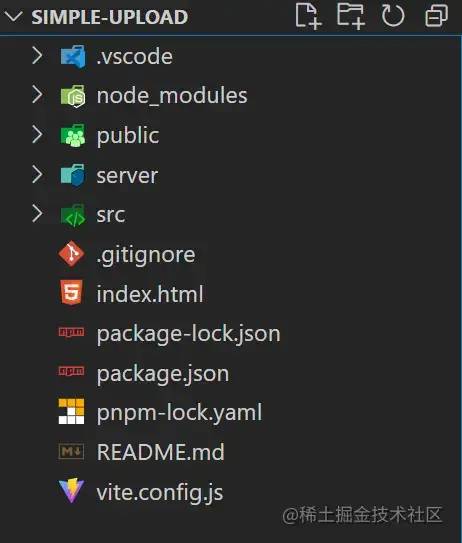
adopt pnpm create vite Create project , The corresponding file directory is as follows .
Request module
src/request.js
This document is for axios Simple encapsulation , as follows :
import axios from "axios";

const baseURL = 'http://localhost:3001';

export const uploadFile = (url, formData, onUploadProgress = () => { }) => {
  return axios({
    method: 'post',
    url,
    baseURL,
    headers: {
      'Content-Type': 'multipart/form-data'
    },
    data: formData,
    onUploadProgress
  });
}

export const mergeChunks = (url, data) => {
  return axios({
    method: 'post',
    url,
    baseURL,
    headers: {
      'Content-Type': 'application/json'
    },
    data
  });
}
 Copy code
File resource segmentation
according to DefualtChunkSize = 5 * 1024 * 1024 , namely 5 MB , To calculate the resource block of the file , adopt spark-md5[1] Calculate the of the file according to the content of the file hash value , Convenient for other optimization , such as : When hash When the value remains unchanged , The server does not need to read and write files repeatedly .
//  Get file chunks
const getFileChunk = (file, chunkSize = DefualtChunkSize) => {
  return new Promise((resovle) => {
    let blobSlice = File.prototype.slice || File.prototype.mozSlice || File.prototype.webkitSlice,
      chunks = Math.ceil(file.size / chunkSize),
      currentChunk = 0,
      spark = new SparkMD5.ArrayBuffer(),
      fileReader = new FileReader();

    fileReader.onload = function (e) {
      console.log('read chunk nr', currentChunk + 1, 'of');

      const chunk = e.target.result;
      spark.append(chunk);
      currentChunk++;

      if (currentChunk < chunks) {
        loadNext();
      } else {
        let fileHash = spark.end();
        console.info('finished computed hash', fileHash);
        resovle({ fileHash });
      }
    };

    fileReader.onerror = function () {
      console.warn('oops, something went wrong.');
    };

    function loadNext() {
      let start = currentChunk * chunkSize,
        end = ((start + chunkSize) >= file.size) ? file.size : start + chunkSize;
      let chunk = blobSlice.call(file, start, end);
      fileChunkList.value.push({ chunk, size: chunk.size, name: currFile.value.name });
      fileReader.readAsArrayBuffer(chunk);
    }

    loadNext();
  });
}
 Copy code
Send upload request and merge request
adopt Promise.all Method integration, so block upload requests , After uploading all block resources , stay then Send merge request in .
//  Upload request
const uploadChunks = (fileHash) => {
  const requests = fileChunkList.value.map((item, index) => {
    const formData = new FormData();
    formData.append(`${currFile.value.name}-${fileHash}-${index}`, item.chunk);
    formData.append("filename", currFile.value.name);
    formData.append("hash", `${fileHash}-${index}`);
    formData.append("fileHash", fileHash);
    return uploadFile('/upload', formData, onUploadProgress(item));
  });

  Promise.all(requests).then(() => {
    mergeChunks('/mergeChunks', { size: DefualtChunkSize, filename: currFile.value.name });
  });
}
 Copy code
Progress bar data
Block progress data utilization axios Medium onUploadProgress Get data from configuration item , By using computed Automatically calculate the total progress of the current file according to the change of block progress data .
//  General progress bar
const totalPercentage = computed(() => {
  if (!fileChunkList.value.length) return 0;
  const loaded = fileChunkList.value
    .map(item => item.size * item.percentage)
    .reduce((curr, next) => curr + next);
  return parseInt((loaded / currFile.value.size).toFixed(2));
})

//  Block progress bar
const onUploadProgress = (item) => (e) => {
  item.percentage = parseInt(String((e.loaded / e.total) * 100));
}
 Copy code
The service end
Build services
Use koa2 Build simple services , Port is 3001
Use koa-body Process and receive the front-end transmission
'Content-Type': 'multipart/form-data'Data of typeUse koa-router Register server-side routing
Use koa2-cors Dealing with cross domain issues
Catalog / File Division
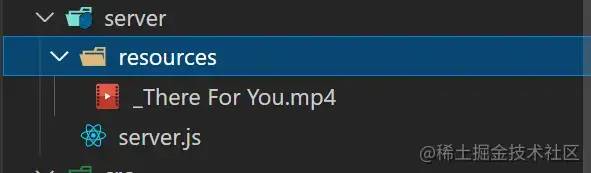
server/server.js
This file is the specific code implementation of the server , For processing, receiving and integrating block resources .
server/resources
This directory is used to store multiple blocks of a single file , And the resources after the final block integration :
When block resources are not merged , A directory will be created under this directory with the current file name , Used to store all blocks related to this file
When block resources need to be merged , All partitioned resources in the directory corresponding to this file will be read , Then integrate them into the original file
The merging of block resources is completed , The corresponding file directory will be deleted , Only the merged original files are retained , The generated file name is one more than the real file name
_Prefix , Such as the original file name" The test file .txt"Corresponding to the merged file name"_ The test file .txt"
Receive block
Use koa-body Medium formidable The configuration of the onFileBegin The function handles the... From the front end FormData File resources in , When processing the corresponding block name at the front end, the format is :filename-fileHash-index, Therefore, the corresponding information can be obtained by directly splitting the block name .
//  Upload request
router.post(
  '/upload',
  //  Processing documents  form-data  data
  koaBody({
    multipart: true,
    formidable: {
      uploadDir: outputPath,
      onFileBegin: (name, file) => {
        const [filename, fileHash, index] = name.split('-');
        const dir = path.join(outputPath, filename);
        //  Save the current  chunk  Information , Return when an error occurs
        currChunk = {
          filename,
          fileHash,
          index
        };

        //  Check if the folder exists, if not, create a new folder
        if (!fs.existsSync(dir)) {
          fs.mkdirSync(dir);
        }

        //  Overwrite the full path where the file is stored
        file.path = `${dir}/${fileHash}-${index}`;
      },
      onError: (error) => {
        app.status = 400;
        app.body = { code: 400, msg: " Upload failed ", data: currChunk };
        return;
      },
    },
  }),
  //  Process response
  async (ctx) => {
    ctx.set("Content-Type", "application/json");
    ctx.body = JSON.stringify({
      code: 2000,
      message: 'upload successfully!'
    });
  });
 Copy code
Integration and segmentation
Find the corresponding file partition directory through the file name , Use fs.readdirSync(chunkDir) Method to obtain the names of all blocks in the corresponding directory , Through fs.createWriteStream/fs.createReadStream Create writable / Read stream , Combine the pipes pipe Integrate streams into the same file , After the merger is completed, pass fs.rmdirSync(chunkDir) Delete the corresponding partition Directory .
//  Merge request
router.post('/mergeChunks', async (ctx) => {
  const { filename, size } = ctx.request.body;
  //  Merge  chunks
  await mergeFileChunk(path.join(outputPath, '_' + filename), filename, size);

  //  Process response
  ctx.set("Content-Type", "application/json");
  ctx.body = JSON.stringify({
    data: {
      code: 2000,
      filename,
      size
    },
    message: 'merge chunks successful!'
  });
});

//  Process the flow through a pipe
const pipeStream = (path, writeStream) => {
  return new Promise(resolve => {
    const readStream = fs.createReadStream(path);
    readStream.pipe(writeStream);
    readStream.on("end", () => {
      fs.unlinkSync(path);
      resolve();
    });
  });
}

//  Merge slices
const mergeFileChunk = async (filePath, filename, size) => {
  const chunkDir = path.join(outputPath, filename);
  const chunkPaths = fs.readdirSync(chunkDir);

  if (!chunkPaths.length) return;

  //  Sort by slice subscript , Otherwise, the order of direct reading of the directory may be disordered
  chunkPaths.sort((a, b) => a.split("-")[1] - b.split("-")[1]);
  console.log("chunkPaths = ", chunkPaths);

  await Promise.all(
    chunkPaths.map((chunkPath, index) =>
      pipeStream(
        path.resolve(chunkDir, chunkPath),
        //  Create a writable stream at the specified location
        fs.createWriteStream(filePath, {
          start: index * size,
          end: (index + 1) * size
        })
      )
    )
  );

  //  Delete the directory where the slices are saved after merging
  fs.rmdirSync(chunkDir);
};
 Copy code
front end & Server side Interaction
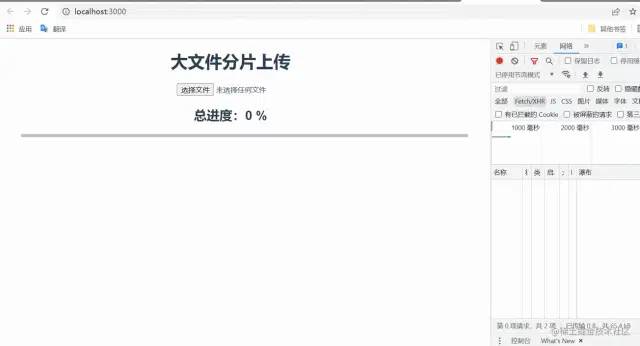
Front end block upload
Test file information :

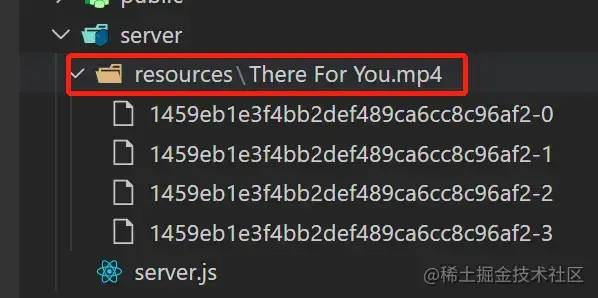
Select the file type as 19.8MB, And the default block size set above is 5MB , So it should be divided into 4 A block , namely 4 A request .
The server receives in blocks
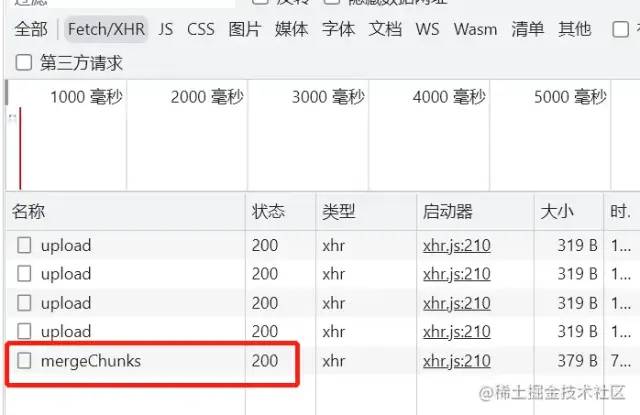
The front end sends a merge request
The server is merged and partitioned
Expand —— Breakpoint continuation & Second transmission
With the core logic above , To realize the functions of breakpoint continuous transmission and second transmission , You just need to get the extension in , The specific implementation will not be given here , Just list some ideas .
Breakpoint continuation
Breakpoint continuation is actually to make the request interruptible , Then continue sending at the location of the last interrupt , At this point, save the instance object of each request , In order to cancel the corresponding request later , And save the cancellation request or record the original block list, cancellation location information, etc , In order to reissue the request later .
Several ways to cancel a request
If you use native XHR You can use
(new XMLHttpRequest()).abort()Cancel the requestIf you use axios You can use
new CancelToken(function (cancel) {})Cancel the requestIf you use fetch You can use
(new AbortController()).abort()Cancel the request
Second transmission
Don't be misled by the name , In fact, the so-called second pass is not to pass , When the upload request is officially initiated , Start with an inspection request , This request will carry the corresponding file hash To the server , As like as two peas, the server is responsible for finding the exact same files. hash, If it exists, you can reuse this file resource directly at this time , There is no need for the front end to initiate additional upload requests .
Last
The content uploaded by the front-end fragment is easy to understand in theory , But in fact, I will step on some pits when I realize it myself , For example, the server receives and parses formData Format data , Unable to obtain binary data of the file, etc
Source code : https://github.com/hanwenma/simple-upload
About this article
author : Bear cat
https://juejin.cn/post/7074534222748188685
Last
Welcome to your attention 「 Front end talent 」
版权声明
本文为[Front end talent]所创,转载请带上原文链接,感谢
https://yzsam.com/2022/04/202204231449329390.html
边栏推荐
- do(Local scope)、初始化器、内存冲突、Swift指针、inout、unsafepointer、unsafeBitCast、successor、
- Model location setting in GIS data processing -cesium
- 【JZ46 把数字翻译成字符串】
- Achievements in science and Technology (21)
- 线程同步、生命周期
- Frame synchronization implementation
- 抑郁症治疗的进展
- Vous ne connaissez pas encore les scénarios d'utilisation du modèle de chaîne de responsabilité?
- 分布式事务Seata介绍
- 分享3个使用工具,在家剪辑5个作品挣了400多
猜你喜欢
Thread synchronization, life cycle
QT interface optimization: QT border removal and form rounding

中富金石财富班29800效果如何?与专业投资者同行让投资更简单

3、 Gradient descent solution θ
分布式事务Seata介绍
Explanation and example application of the principle of logistic regression in machine learning

【无标题】
eolink 如何助力遠程辦公

Introduction to Arduino for esp8266 serial port function
线程同步、生命周期
随机推荐
QT Detailed explanation of pro file
1 - first knowledge of go language
like和regexp差别
中富金石财富班29800效果如何?与专业投资者同行让投资更简单
Epolloneshot event of epoll -- instance program
面试官:说一下类加载的过程以及类加载的机制(双亲委派机制)
Achievements in science and Technology (21)
每日一题-LeetCode396-旋转函数-递推
QT actual combat: Yunxi chat room
Pnpm installation and use
L'externalisation a duré quatre ans.
I/O复用的高级应用:同时处理 TCP 和 UDP 服务
ASEMI超快恢复二极管与肖特基二极管可以互换吗
Unity_ Code mode add binding button click event
Provided by Chengdu control panel design_ It's detailed_ Introduction to the definition, compilation and quotation of single chip microcomputer program header file
Explain TCP's three handshakes in detail
Swift protocol Association object resource name management multithreading GCD delay once
MySQL error packet out of order
抑郁症治疗的进展
pnpm安装使用