当前位置:网站首页>使用easyexcel导出excel表格
使用easyexcel导出excel表格
2022-04-22 05:24:00 【NewBee.Mu】
想要将数据使用excel表格导出,可以使用easyexcel
pom.xml
		<dependency>
            <groupId>com.alibaba</groupId>
            <artifactId>easyexcel</artifactId>
            <version>3.0.5</version>
        </dependency>
ExcelUtil
@Component
public class ExcelUtil {


    public static Map<Integer,String> addTop(String str) {

        Map<Integer,String> topMap = new HashMap<Integer,String>();
        topMap.put(0,str);
        return topMap;
    }

    public static Map<Integer,String> addStatistic(List<ExampleInfo> list) {

        Map<Integer,String> statisticMap = new HashMap<Integer,String>();
        statisticMap.put(0,null);
        for (int i =0; i<list.size(); i++) {

            statisticMap.put( i+1 , list.get(i).getOrgName());
        }
        return statisticMap;
    }

    public static Map<Integer,String> addNum(List<ExampleInfo> list) {

        Map<Integer,String> numMap = new HashMap<Integer,String>();
        numMap.put(0,null);
        for (int i =0; i<list.size(); i++) {

            numMap.put( i+1 , list.get(i).getCount().toString());
        }
        return numMap;
    }
}
ExampleInfo
@Data
@AllArgsConstructor
@NoArgsConstructor
public class ExampleInfo {

    private Integer id;
    private String orgName;
    private Integer count = 0;
}
CustomCellWriteHandler
public class CustomCellWriteHandler implements CellWriteHandler {


    public void afterCellDispose(CellWriteHandlerContext context) {

        Cell cell = context.getCell();
        int rowIndex = cell.getRowIndex();
        int cellIndex = cell.getColumnIndex();

        // 自定义样式处理
        // 当前事件会在 数据设置到poi的cell里面才会回调
        // 判断不是头的情况 如果是fill 的情况 这里会==null 所以用not true
        if (BooleanUtils.isNotTrue(context.getHead())) {

            if (cell.getRowIndex() == 0 && StringUtils.isNotBlank(cell.getStringCellValue())) {

                // 拿到poi的workbook
                Workbook workbook = context.getWriteWorkbookHolder().getWorkbook();
                // 这里千万记住 想办法能复用的地方把他缓存起来 一个表格最多创建6W个样式
                // 不同单元格尽量传同一个 cellStyle
                CellStyle cellStyle = workbook.createCellStyle();
                Font font = workbook.createFont();
                font.setColor(Font.COLOR_RED);
                cellStyle.setFont(font);
                cellStyle.setAlignment(HorizontalAlignment.CENTER);
                cellStyle.setVerticalAlignment(VerticalAlignment.CENTER);
                cell.setCellStyle(cellStyle);
                // 由于这里没有指定dataformat 最后展示的数据 格式可能会不太正确
                // 这里要把 WriteCellData的样式清空, 不然后面还有一个拦截器 FillStyleCellWriteHandler 默认会将 WriteCellStyle 设置到
                // cell里面去 会导致自己设置的不一样(很关键)
                context.getFirstCellData().setWriteCellStyle(null);
            } else if (cell.getRowIndex() == 1 && StringUtils.isNotBlank(cell.getStringCellValue())) {

                Workbook workbook = context.getWriteWorkbookHolder().getWorkbook();
                CellStyle cellStyle = workbook.createCellStyle();
                //背景颜色
                cellStyle.setFillForegroundColor(IndexedColors.YELLOW.getIndex());
                // 这里需要指定 FillPatternType 为FillPatternType.SOLID_FOREGROUND
                cellStyle.setFillPattern(FillPatternType.SOLID_FOREGROUND);
                cellStyle.setWrapText(true);//设置自动换行
                cellStyle.setAlignment(HorizontalAlignment.CENTER);
                cellStyle.setVerticalAlignment(VerticalAlignment.CENTER);
                cellStyle.setBorderBottom(BorderStyle.THIN); //下边框
                cellStyle.setBorderLeft(BorderStyle.THIN);//左边框
                cellStyle.setBorderTop(BorderStyle.THIN);//上边框
                cellStyle.setBorderRight(BorderStyle.THIN);//右边框
                cell.setCellStyle(cellStyle);
                Sheet sheet = cell.getSheet();
                for (int i = 0; i < cellIndex; i++) {

                    sheet.setColumnWidth(i + 1,5000);
                }
                context.getFirstCellData().setWriteCellStyle(null);
            } else if (cell.getRowIndex() == 2 && StringUtils.isNotBlank(cell.getStringCellValue())) {

                Workbook workbook = context.getWriteWorkbookHolder().getWorkbook();
                CellStyle cellStyle = workbook.createCellStyle();
                Font font = workbook.createFont();
                font.setColor(Font.COLOR_RED);
                cellStyle.setFont(font);
                cellStyle.setWrapText(true);//设置自动换行
                cellStyle.setAlignment(HorizontalAlignment.CENTER);
                cellStyle.setVerticalAlignment(VerticalAlignment.CENTER);
                cellStyle.setBorderBottom(BorderStyle.THIN); //下边框
                cellStyle.setBorderLeft(BorderStyle.THIN);//左边框
                cellStyle.setBorderTop(BorderStyle.THIN);//上边框
                cellStyle.setBorderRight(BorderStyle.THIN);//右边框
                cell.setCellStyle(cellStyle);
                context.getFirstCellData().setWriteCellStyle(null);
            } else if (cell.getRowIndex() == 3 && StringUtils.isNotBlank(cell.getStringCellValue())) {

                Workbook workbook = context.getWriteWorkbookHolder().getWorkbook();
                CellStyle cellStyle = workbook.createCellStyle();
                Font font = workbook.createFont();
                font.setColor(Font.COLOR_RED);
                cellStyle.setFont(font);
                cellStyle.setWrapText(true);//设置自动换行
                cellStyle.setAlignment(HorizontalAlignment.LEFT);
                cellStyle.setVerticalAlignment(VerticalAlignment.CENTER);
                cell.setCellStyle(cellStyle);
                context.getFirstCellData().setWriteCellStyle(null);
            } else if (cell.getRowIndex() == 4 && StringUtils.isNotBlank(cell.getStringCellValue())) {

                Workbook workbook = context.getWriteWorkbookHolder().getWorkbook();
                CellStyle cellStyle = workbook.createCellStyle();
                cellStyle.setFillForegroundColor(IndexedColors.GREY_25_PERCENT.getIndex());
                cellStyle.setFillPattern(FillPatternType.SOLID_FOREGROUND);
                cellStyle.setWrapText(true);//设置自动换行
                cellStyle.setAlignment(HorizontalAlignment.CENTER);
                cellStyle.setVerticalAlignment(VerticalAlignment.CENTER);
                cellStyle.setBorderBottom(BorderStyle.THIN); //下边框
                cellStyle.setBorderLeft(BorderStyle.THIN);//左边框
                cellStyle.setBorderTop(BorderStyle.THIN);//上边框
                cellStyle.setBorderRight(BorderStyle.THIN);//右边框
                if (cell.getColumnIndex() == 1) {

                    Font font = workbook.createFont();
                    font.setColor(Font.COLOR_RED);
                    cellStyle.setFont(font);
                }
                cell.setCellStyle(cellStyle);
                context.getFirstCellData().setWriteCellStyle(null);
            } else if (cell.getRowIndex() > 4 && cell.getColumnIndex() <= 11) {

                Workbook workbook = context.getWriteWorkbookHolder().getWorkbook();
                CellStyle cellStyle = workbook.createCellStyle();
                cellStyle.setWrapText(true);//设置自动换行
                cellStyle.setAlignment(HorizontalAlignment.CENTER);
                cellStyle.setVerticalAlignment(VerticalAlignment.CENTER);
                cellStyle.setBorderBottom(BorderStyle.THIN); //下边框
                cellStyle.setBorderLeft(BorderStyle.THIN);//左边框
                cellStyle.setBorderTop(BorderStyle.THIN);//上边框
                cellStyle.setBorderRight(BorderStyle.THIN);//右边框
                if (cell.getColumnIndex() == 1) {

                    Font font = workbook.createFont();
                    font.setColor(Font.COLOR_RED);
                    cellStyle.setFont(font);
                }
                cell.setCellStyle(cellStyle);
                context.getFirstCellData().setWriteCellStyle(null);
            }
        }
    }

}
ExcelTestController
@RestController
@Api(tags = "测试excel表格导出")
@RequestMapping("/excel")
@Slf4j
public class ExcelTestController {

    @GetMapping("/export")
    public Object exportDataReport(HttpServletResponse response) {

        List<Map<Integer,String>> firstDataList = new ArrayList<Map<Integer,String>>();
        List<Map<Integer,String>> midDataList = new ArrayList<Map<Integer,String>>();
        List<Map<Integer,String>> finDataList = new ArrayList<Map<Integer,String>>();

        //日期转换格式
        SimpleDateFormat simpleDateFormat = new SimpleDateFormat("yyyy年MM月dd日");
        Calendar yesterday=Calendar.getInstance();
        Calendar tomorrow=Calendar.getInstance();
        Calendar theDayAfterTomorrow=Calendar.getInstance();
        //昨天
        yesterday.add(Calendar.DATE, -1);
        //明天
        tomorrow.add(Calendar.DATE, 1);
        //后天
        theDayAfterTomorrow.add(Calendar.DATE, 2);

        String firstTop = simpleDateFormat.format(new Date()) + "测试名单1";
        String midTop = simpleDateFormat.format(new Date()) + "测试名单2";
        String finTop = simpleDateFormat.format(theDayAfterTomorrow.getTime()) + "测试名单3";

        firstDataList.add(ExcelUtil.addTop(firstTop));
        midDataList.add(ExcelUtil.addTop(midTop));
        finDataList.add(ExcelUtil.addTop(finTop));

        List<ExampleInfo> firstResult = new ArrayList<ExampleInfo>();
        firstResult.add(0,new ExampleInfo(1,"测试1",1));
        firstResult.add(1,new ExampleInfo(2,"测试2",2));
        firstResult.add(2,new ExampleInfo(3,"测试3",3));
        firstResult.add(3,new ExampleInfo(4,"测试4",4));
        firstResult.add(4,new ExampleInfo(5,"测试5",5));
        List<ExampleInfo> midResult = new ArrayList<ExampleInfo>();
        midResult.add(0,new ExampleInfo(1,"测试1",1));
        midResult.add(1,new ExampleInfo(2,"测试2",2));
        midResult.add(2,new ExampleInfo(3,"测试3",3));
        midResult.add(3,new ExampleInfo(4,"测试4",4));
        midResult.add(4,new ExampleInfo(5,"测试5",5));
        List<ExampleInfo> finResult = new ArrayList<ExampleInfo>();
        finResult.add(0,new ExampleInfo(1,"测试1",1));
        finResult.add(1,new ExampleInfo(2,"测试2",2));
        finResult.add(2,new ExampleInfo(3,"测试3",3));
        finResult.add(3,new ExampleInfo(4,"测试4",4));
        finResult.add(4,new ExampleInfo(5,"测试5",5));

        firstDataList.add(ExcelUtil.addStatistic(firstResult));
        midDataList.add(ExcelUtil.addStatistic(midResult));
        finDataList.add(ExcelUtil.addStatistic(finResult));

        firstDataList.add(ExcelUtil.addNum(firstResult));
        midDataList.add(ExcelUtil.addNum(midResult));
        finDataList.add(ExcelUtil.addNum(finResult));

        Map<Integer,String> titleMap = new HashMap<Integer,String>();
        titleMap.put(0,"详细数据:");
        firstDataList.add(titleMap);
        midDataList.add(titleMap);
        finDataList.add(titleMap);

        Map<Integer,String> headMap = new HashMap<Integer,String>();
        headMap.put(0,"标题1");
        headMap.put(1,"标题2");
        headMap.put(2,"标题3");
        headMap.put(3,"标题4");
        headMap.put(4,"标题5");
        headMap.put(5,"标题6");
        headMap.put(6,"标题7");
        headMap.put(7,"标题8");
        headMap.put(8,"标题9");
        headMap.put(9,"标题10");
        firstDataList.add(headMap);
        midDataList.add(headMap);
        finDataList.add(headMap);

        firstDataList = this.addlist(firstDataList);
        midDataList = this.addlist(midDataList);
        finDataList = this.addlist(finDataList);

        String fileName = String.format("D:\\testexcel\\%s","测试表格导出.xlsx");
        ExcelWriter excelWriter = EasyExcel.write(fileName).build(); // 本地
        //前端下载
// ExcelWriter excelWriter = EasyWriteUtils.getExcelWriter(response,"excel表格.xlsx");
        OnceAbsoluteMergeStrategy firstOnceAbsoluteMergeStrategy = new OnceAbsoluteMergeStrategy(0, 0, 0, firstResult.size());
        OnceAbsoluteMergeStrategy midOnceAbsoluteMergeStrategy = new OnceAbsoluteMergeStrategy(0, 0, 0, midResult.size());
        OnceAbsoluteMergeStrategy finOnceAbsoluteMergeStrategy = new OnceAbsoluteMergeStrategy(0, 0, 0, finResult.size());
        OnceAbsoluteMergeStrategy onceAbsoluteMergeStrategy1 = new OnceAbsoluteMergeStrategy(3, 3, 0, 9);
        WriteCellStyle headWriteCellStyle = new WriteCellStyle();

        //内容策略
        WriteCellStyle contentWriteCellStyle = new WriteCellStyle();
        //设置 水平居中
        contentWriteCellStyle.setHorizontalAlignment(HorizontalAlignment.CENTER);

        //设置 自动换行
        contentWriteCellStyle.setWrapped(true);
        //设置 垂直居中
        contentWriteCellStyle.setVerticalAlignment(VerticalAlignment.CENTER);
        //设置 水平居中
        contentWriteCellStyle.setHorizontalAlignment(HorizontalAlignment.CENTER);

        HorizontalCellStyleStrategy horizontalCellStyleStrategy = new HorizontalCellStyleStrategy(headWriteCellStyle, contentWriteCellStyle);

        WriteSheet sheet1 = EasyExcel.writerSheet(1, "模板1").registerWriteHandler(firstOnceAbsoluteMergeStrategy).registerWriteHandler(onceAbsoluteMergeStrategy1).registerWriteHandler(horizontalCellStyleStrategy).registerWriteHandler(new CustomCellWriteHandler()).build();
        WriteSheet sheet2 = EasyExcel.writerSheet(2, "模板2").registerWriteHandler(midOnceAbsoluteMergeStrategy).registerWriteHandler(onceAbsoluteMergeStrategy1).registerWriteHandler(horizontalCellStyleStrategy).registerWriteHandler(new CustomCellWriteHandler()).build();
        WriteSheet sheet3 = EasyExcel.writerSheet(3, "模板3").registerWriteHandler(finOnceAbsoluteMergeStrategy).registerWriteHandler(onceAbsoluteMergeStrategy1).registerWriteHandler(horizontalCellStyleStrategy).registerWriteHandler(new CustomCellWriteHandler()).build();
        excelWriter.write(firstDataList,sheet1);
        excelWriter.write(midDataList,sheet2);
        excelWriter.write(finDataList,sheet3);
        excelWriter.finish();
        try {

            response.flushBuffer();
        } catch (Exception e) {

            e.printStackTrace();
        }
        return null;
    }

    public List<Map<Integer,String>> addlist(List<Map<Integer,String>> list) {

        for (int i = 0; i <= 10; i++) {

            Map<Integer,String> map = new HashMap<Integer,String>();
            map.put(0,"测试1");
            map.put(1,"测试2");
            map.put(2,"测试3");
            map.put(3,"测试4");
            map.put(4,"测试5");
            map.put(5,"测试6");
            map.put(6,"测试7");
            map.put(7,"测试8");
            map.put(8,"测试9");
            map.put(9,"测试10");
            list.add(map);
        }
        return list;
    }
}
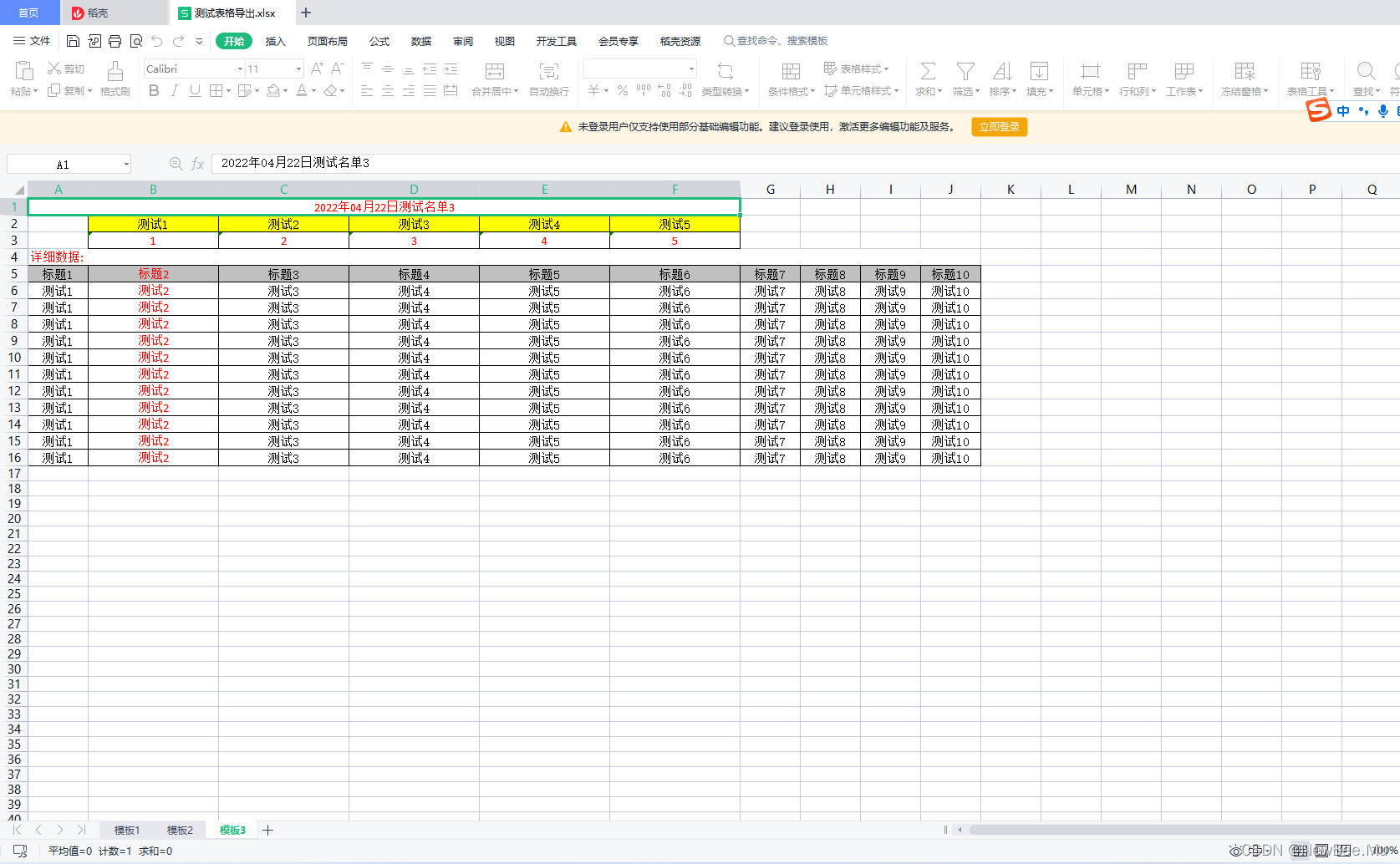
效果图


版权声明
本文为[NewBee.Mu]所创,转载请带上原文链接,感谢
https://blog.csdn.net/NewBeeMu/article/details/124289938
边栏推荐
- Detailed explanation of ten functional features of ETL's kettle tool
- Complexité temporelle et spatiale
- Sourcetree version backtracking and single change version backtracking
- [WPF] making navigation bar with RadioButton
- One way to disable Google cross domain
- Unity is limited to execute every few frames in update
- Stack (C language)
- Send a shutdown command to the LAN computer every 30 seconds
- Basic principle and numerical method of finite element method_ Basic principle of finite element method
- Codeforces Round #781 (Div. 2) ABCD
猜你喜欢

AssetBundle packaging based on unitygameframework framework

Query result processing

Strategy mode (2.28-3.6)

The eleventh job of MySQL database - Application of view
The signature of the update package is inconsistent with that of the installed app
物联网测试都有哪些挑战,软件检测机构如何保证质量
![[WPF] customize combobox](/img/99/21298293139f6acb9d0144236b825e.png)
[WPF] customize combobox

水处理控制系统采用信号隔离器解决因某些现场非电量安装条件的限制问题

Learning C language diary from scratch -- day27 minesweeping
Realization of mathematical function curve editor with minscript script language

随机推荐
Basic configuration of NP and OSPF
Pytorch builds a two-way LSTM to realize time series forecasting (load forecasting)
(2022.1.31-2022.2.14) template mode analysis
Input and output of scanf and printf (format controller)
Basic security settings of the server
Basic concepts of outh2
13.9.1-PointersOnC-20220421
IT配电及防火限流式保护器应用及选型
Aiming position of unity shooting game
2022-4-20 operation
Onzième emploi dans la base de données MySQL - application de la vue
Realization of mathematical function curve editor with minscript script language
Interpreter mode (3.7-3.13)
The eleventh job of MySQL database - Application of view
[WPF] use ellipse or rectangle to make circular progress bar
Meetup 02 review: Q & A highlights
萌新看过来 | WeDataSphere 开源社区志愿者招募
SQL learning record
How to modify the IP address of the rancher server
Talk about anti reverse connection circuit in combination with practice (summary of anti reverse connection circuit)