当前位置:网站首页>ESP32学习-GPIO的使用与配置
ESP32学习-GPIO的使用与配置
2022-04-23 06:19:00 【什么时候才能像大佬一样厉害】
1 参考资料
2 添加头文件
#include "drive/gpio.h"3 GPIO初始化的两种方法
3.1 单一函数设置方案
直接通过函数设置GPIO的模式:
// 设置gpio3为输出模式:
gpio_set_direction(GPIO_NUM_3, GPIO_MODE_OUTPUT);
// 设置gpio3输出低电平:
gpio_set_level(GPIO_NUM_3, 0);

// 设置gpio9为输入模式:
gpio_set_direction(GPIO_NUM_9,GPIO_MODE_INPUT);
// 获取gpio9的io状态:
ret = gpio_get_level(GPIO_NUM_9);
上面就是单一函数下gpio最简单的操作,其他单一设置函数还有:
// 设置gpio的上下拉模式:
gpio_set_pull_mode(gpio_num_t gpio_num, gpio_pull_mode_t pull);
// 使能上拉:
gpio_pullup_en(gpio_num_t gpio_num);
// 失能上拉:
gpio_pullup_dis(gpio_num_t gpio_num);
3.2 结构体形式初始化GPIO
// 定义一个gpio结构体变量:
#define LED_GPIO (1ULL << 3)

gpio_config_t led_conf;

led_conf.mode = GPIO_MODE_OUTPUT;		     // 配置gpio的模式
led_conf.intr_type = GPIO_PIN_INTR_DISABLE;  // 失能中断
led_conf.pin_bit_mask = LED_GPIO;            // 配置GPIO_IN寄存器,选择初始化的GPIO3口为led控制
led_conf.pull_down_en = 0;                   // 下拉失能
led_conf.pull_up_en = 0;                     // 上拉失能

gpio_config(&led_conf);                       // 配置gpio参数,并使能

// gpio的使用和单一模式一致
// 设置gpio3输出高电平:
gpio_set_level(LED_GPIO, 1);
4 示例教程
版权声明
本文为[什么时候才能像大佬一样厉害]所创,转载请带上原文链接,感谢
https://blog.csdn.net/qq_36016038/article/details/124332237
边栏推荐
- Take you to travel in space, and American photography technology provides comprehensive technical support for aerospace creative applet
- go语言切片操作
- 大型体育赛事无线通信系统
- Intelligent communication solution of Hainan Phoenix Airport
- HQL语句的调优
- 可视化常见绘图(五)散点图
- 如何将进程绑定到指定的CPU上
- Unable to determine the device handle for GPU 0000:02:00.0: GPU is lost.
- Statement of American photography technology suing Tianmu media for using volcanic engine infringement code
- By onnx checker. check_ Common errors detected by model
猜你喜欢
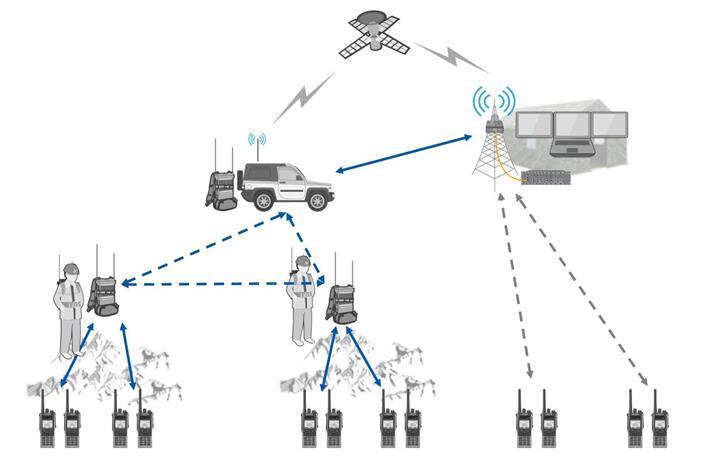
Flexible blind patch of ad hoc network | Beifeng oil and gas field survey solution

重大安保事件应急通信系统解决方案

Int8 quantification and inference of onnx model using TRT

Solution of self Networking Wireless Communication intercom system in Beifeng oil and gas field

Intuitive understanding of torch nn. Unfold

# 可视化常见绘图(二)折线图

Meishe helps Baidu "Duka editing" to make knowledge creation easier

PyTorch 10. Learning rate

枫桥学院开元名庭酒店DMR系统解决方案

广西电网|应急空天一体化通信系统方案
随机推荐
Solution of emergency communication system for major security incidents
免费开源充电桩物联网云平台
# 可视化常见绘图(二)折线图
remote: Support for password authentication was removed on August 13, 2021.
可视化之路(十一)matplotlib颜色详解
可视化常见问题解决方案(八)共享绘图区域问题解决方案
el-table 横向滚动条固定在可视窗口底部
Meishe technology launches professional video editing solution for desktop -- Meiying PC version
按需引入vant组件
Emergency air space integrated communication system scheme of Guangxi Power Grid
可视化常见问题解决方案(九)背景颜色问题
Lead the industry trend with intelligent production! American camera intelligent video production platform unveiled at 2021 world Ultra HD Video Industry Development Conference
什么是闭包?
自定义classloader并实现热部署-使用loadClass
不需要破解markdown编辑工具Typora
quill-editor图片缩放、在一个页面使用多个富文本框、quill-editor上传图片地址为服务器地址
Object.create()原理,Object.create()规范,手写Object.create(),Object.create()用法
How to improve the service efficiency of the hotel without blind spots and long endurance | public and Private Integrated walkie talkie?
null和undefined的区别
带您遨游太空,美摄科技为航天创意小程序提供全面技术支持