当前位置:网站首页>iptables初探
iptables初探
2022-04-23 18:29:00 【喝醉酒的小白】
一、概念
iptables是Linux下功能强大的防火墙工具,由于它集成于Linux内核,所以效率极高。
二、分类
按照对数据包的操作类别分类,iptables可以分为4个表,按照不同的Hook点可区分为5个链。
其中4个表分别是filter表(用于一般的过滤)、nat表(地址或端口映射)、mangle表(对特定数据包的修改)、raw表,这里面最常用的是filter表;
5个链分别是PREROUTING链(数据包进入路由决策之前)、INPUT(路由决策为本机的数据包)、FORWARD(路由决策不是本机的数据包)、OUTPUT(由本机产生的向外发送的数据包)、POSTROUTING(发送给网卡之前的数据包),最常用的是INPUT、OUTPUT链。
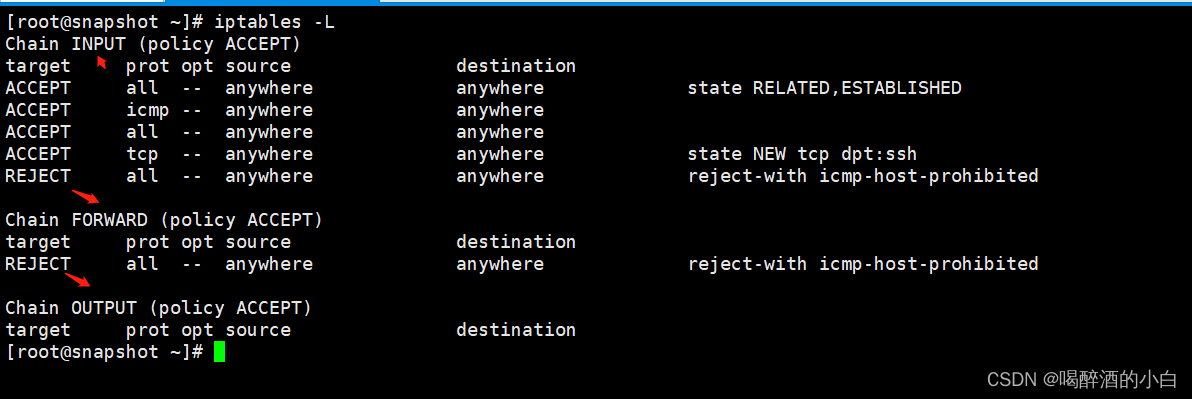
三、工作策略
第一种是仅接受允许的数据,这种策略一般是设置防火墙的默认策略为拒绝所有数据包(也就是拒绝网卡上出入的数据包),然后有针对性地放开特定的访问;第二种是只防止不允许的数据访问请求,这种策略一般是设置防火墙的默认策略为允许所有数据包,只拒绝已知的非法访问数据。从安全效果而言,前一种防火墙策略表现更为优秀/
四、配置规则
#cat /etc/sysconfig/iptables
# sample configuration for iptables service
# you can edit this manually or use system-config-firewall
# please do not ask us to add additional ports/services to this default configuration
*filter
:INPUT ACCEPT [0:0]
:FORWARD ACCEPT [0:0]
:OUTPUT ACCEPT [0:0]
-A INPUT -m state --state RELATED,ESTABLISHED -j ACCEPT #允许已经建立和相关的数据包进入 / 代表目前已经与本机建立连接的主机,依然保持连接状态
-A INPUT -p icmp -j ACCEPT #在INPUT规则链中添加允许ICMP流量进入
-A INPUT -i lo -j ACCEPT
-A INPUT -i bond0 -s x.x.x.x -m state --state NEW -m tcp -p tcp --dport 22 -j ACCEPT #允许固定的IP能SSH到该服务器上
-A INPUT -p tcp -m state --state NEW -m tcp --dport 8080 -j ACCEPT
-A INPUT -p tcp -m tcp --dport 80 -j ACCEPT #允许访问80端口

-A INPUT -s x.x.x.x -p tcp -m multiport --dports 80,10011,3000,6379,9307 -j ACCEPT #允许固定的IP能访问该服务器某些端口

-A INPUT -p tcp --dport 3000 -d 127.0.0.1 -j ACCEPT
-A INPUT -p tcp --dport 3000 -j DROP #DROP(丢弃)

-A OUTPUT -p tcp --sport 5900:5930 -j DROP

-A INPUT -j REJECT --reject-with icmp-host-prohibited #REJECT(拒绝)
-A FORWARD -j REJECT --reject-with icmp-host-prohibited
五、直接配置并保存规则
iptables -A INPUT -p tcp -m tcp --dport 80 -j ACCEPT #添加
iptables -D INPUT -p tcp -m tcp --dport 80 -j ACCEPT #清理
iptables -L #查看
保存
service iptables save
重启后永久生效
service iptables restart
六、参考链接
版权声明
本文为[喝醉酒的小白]所创,转载请带上原文链接,感谢
https://blog.csdn.net/hezuijiudexiaobai/article/details/124359382
边栏推荐
- Kettle paoding jieniu Chapter 17 text file output
- Test questions of daily safety network (February 2024)
- Ionic 从创建到打包指令集顺序
- Daily network security certification test questions (April 13, 2022)
- After CANopen starts PDO timing transmission, the heartbeat frame time is wrong, PDO is delayed, and CANopen time axis is disordered
- Can filter
- CANopen usage method and main parameters of object dictionary
- Pointers in rust: box, RC, cell, refcell
- Solution to Chinese garbled code after reg file is imported into the registry
- QT tablewidget insert qcombobox drop-down box
猜你喜欢
ESP32 LVGL8. 1 - label (style 14)

机器学习理论之(8):模型集成 Ensemble Learning
STM32 learning record 0008 - GPIO things 1
【ACM】455. Distribute Biscuits (1. Give priority to big biscuits to big appetite; 2. Traverse two arrays with only one for loop (use subscript index -- to traverse another array))

【数学建模】—— 层次分析法(AHP)
Qt读写XML文件(含源码+注释)

机器学习实战 -朴素贝叶斯
Notepad + + replaces tabs with spaces

PowerDesigner various font settings; Preview font setting; SQL font settings
How to restore MySQL database after win10 system is reinstalled (mysql-8.0.26-winx64. Zip)
随机推荐
CISSP certified daily knowledge points (April 12, 2022)
NVIDIA Jetson: GStreamer and openmax (GST OMX) plug-ins
ESP32 LVGL8. 1 - event (event 17)
Correct opening method of option
JD-FreeFuck 京东薅羊毛控制面板 后台命令执行漏洞
Robocode tutorial 3 - Robo machine analysis
C language simulates entering and leaving the stack, first in first out, first in first out, shared memory
Mode of interprocess communication
The difference between deep copy and shallow copy
Daily CISSP certification common mistakes (April 13, 2022)
多功能工具箱微信小程序源码
Resolve the error Max virtual memory areas VM max_ map_ count [65530] is too low, increase to at least [262144]
From source code to executable file
7-21 wrong questions involve knowledge points.
CISSP certified daily knowledge points (April 13, 2022)
线上怎么确定期货账户安全的?
Daily network security certification test questions (April 18, 2022)
MATLAB从入门到精通(二)
Daily CISSP certification common mistakes (April 14, 2022)
The vivado project corresponding to the board is generated by TCL script