当前位置:网站首页>QML进阶(五)-通过粒子模拟系统实现各种炫酷的特效
QML进阶(五)-通过粒子模拟系统实现各种炫酷的特效
2022-04-23 04:32:00 【码农飞飞】
粒子模拟是计算机图形技术的可视化图形效果。典型的效果有:落叶,火焰,爆炸,流星,云等等。它不同于其它图形渲染,粒子是基于模糊来渲染的。它的结果在基于像素下是不可预测的。粒子系统的参数描述了随机模拟的边界。传统的渲染技术实现粒子渲染效果很困难。
粒子模拟的核心是粒子系统(ParticleSystem),它控制了共享时间线.一个场景下可以有多个粒子系统,每个都有自己独特的时间线。一个粒子使用发射器元素(Emitter)发射,使用粒子画笔(ParticlePainter)实现可视化,它可以是一个图片,一个QML项或者一个着色项。一个发射器元素也提供向量来控制粒子的方向。一个粒子被发送后就再也无法控制。粒子模型提供粒子模拟器,它可以控制已发射粒子的参数。在一个系统中,粒子可以使用粒子群参数(ParticleGroup)来共享移动时间。
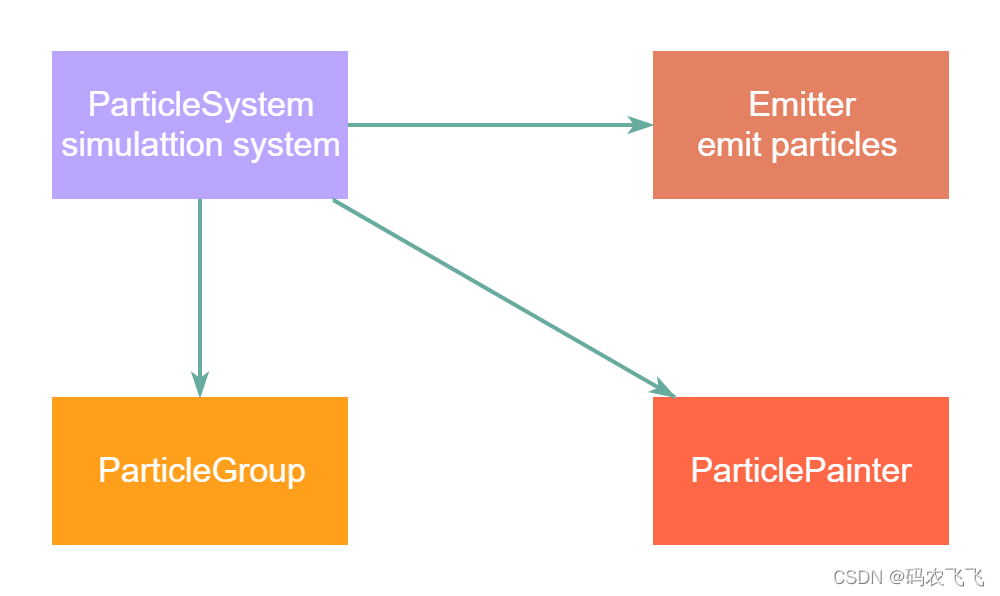
粒子系统(ParticleSystem)
负责管理发射器之间的共享时间线
发射器(Emitter)
负责向系统中发射逻辑粒子
粒子画笔(ParticlePainter)
负责实现粒子可视化
方向(Drection)
负责已发射粒子的向量空间
粒子组(ParticleGroup)
每个粒子是一个粒子组的成员
粒子控制器(Affector)
控制已发射的粒子
简单的粒子系统模拟效果
import QtQuick 2.8
import QtQuick.Window 2.2
import QtQuick.Particles 2.0
Window {
    visible: true
    width: 640
    height: 480
    title: qsTr("ParticleSystem")

    //背景图片
    Rectangle {
        id: root
        width: 640; height: 480
        color: "#EEEEEE"

        //粒子发射系统
        ParticleSystem {
            id: particleSystem
        }

        Emitter {
            id: emitter
            anchors.centerIn: parent
            //发射范围
            width: 640; height: 480
            system: particleSystem
            //粒子的发射频率,粒子存在的周期
            emitRate: 60
            lifeSpan: 1000
            //生命周期变化的速度
            lifeSpanVariation: 500
            //粒子的大小和结束的大小
            size: 16
            endSize: 64
        }
        //粒子的类型
        ImageParticle {
            source: "qrc:/images/flower.png"
            system: particleSystem
        }
    }
}
修改粒子的动画特效和对应的属性
import QtQuick 2.8
import QtQuick.Window 2.2
import QtQuick.Particles 2.0

Window {
    visible: true
    width: 640
    height: 480
    title: qsTr("ParticleSystem")

    //背景图片
    Rectangle {
        id: root
        width: 640; height: 480
        color: "#EEEEEE"

        //粒子发射系统
        ParticleSystem {
            id: particleSystem
        }

        Emitter {
            id: emitter
            anchors.centerIn: parent
            //发射范围
            width: 640; height: 480
            system: particleSystem
            //粒子的发射频率,粒子存在的周期
            emitRate: 60
            lifeSpan: 2000
            //生命周期变化的速度
            lifeSpanVariation: 200
            //粒子的大小和结束的大小
            size: 16
            endSize: 64
        }

        //粒子的类型
        ImageParticle {
            source: "qrc:/images/heart.png"
            system: particleSystem
            //初始颜色和颜色变化范围
            color: '#FFD700'
            colorVariation: 0.2
            //首先顺时针旋转15度
            rotation: 15
            //不同粒子在+/-5度之间变化
            rotationVariation: 5
            //每个粒子会以45度旋转
            rotationVelocity: 45
            //每个粒子的旋转速度在+/-15度之间变化
            rotationVelocityVariation: 15
            //入场效果
            entryEffect: ImageParticle.scale

        }
    }
}
指定粒子发射方向
粒子已经可以旋转,但是如何让粒子有一个轨迹.轨迹由速度或者粒子随机方向的加速度来指定,也可以叫做矢量空间.
有多种可用矢量空间用来定义粒子的速度或者加速度:
1.角度方向(AngleDirection)-使用角度的方向变化
2.点方向(PointDirection)-使用x,y组件组成的方向变化
3.目标方向(TargetDirection)-朝着目标点的方向变化
 import QtQuick 2.8
import QtQuick.Window 2.2
import QtQuick.Particles 2.0

Window {
    visible: true
    width: 640
    height: 480
    title: qsTr("ParticleSystem")

    //背景图片
    Rectangle {
        id: root
        width: 640; height: 480
        color: "#EEEEEE"

        //粒子发射系统
        ParticleSystem {
            id: particleSystem
        }

        Emitter {
            id: emitter
            //从相同的位置发射出去
            width: 1; height: 1
            x:0; y:240
            system: particleSystem


            lifeSpan: 6400
            //生命周期变化的速度
            lifeSpanVariation: 500
            //粒子的大小和结束的大小
            size: 64

            velocity: AngleDirection{
                //发射的角度
                angle: 0
                angleVariation: 15
                //发射的梯度值变化
                magnitude: 100
                magnitudeVariation: 50
            }
        }

        //粒子的类型
        ImageParticle {
            source: "qrc:/images/heart.png"
            system: particleSystem
            //初始颜色和颜色变化范围
            color: '#FFD700'
            colorVariation: 0.2
            //首先顺时针旋转15度
            rotation: 15
            //不同粒子在+/-5度之间变化
            rotationVariation: 5
            //每个粒子会以45度旋转
            rotationVelocity: 45
            //每个粒子的旋转速度在+/-15度之间变化
            rotationVelocityVariation: 15
            //入场效果
            entryEffect: ImageParticle.scale

        }
    }
}
显示效果如下图所示:

带有发射角度的粒子发射系统
import QtQuick 2.8
import QtQuick.Window 2.2
import QtQuick.Particles 2.0

Window {
    visible: true
    width: 640
    height: 480
    title: qsTr("ParticleSystem")

    //背景图片
    Rectangle {
        id: root
        width: 640; height: 480
        color: "#EEEEEE"

        //粒子发射系统
        ParticleSystem {
            id: particleSystem
        }

        Emitter {
            id: emitter
            //发射范围
            width: 1; height: 1
            x:0; y:240
            system: particleSystem
            emitRate: 3
            lifeSpan: 6400
            //生命周期变化的速度
            lifeSpanVariation: 500
            size: 32

            velocity: AngleDirection{
                //发射的角度
                angle: -45
                angleVariation: 0
                magnitude: 120
            }
            //加速度对应的变化
            acceleration: AngleDirection{
                angle: 90
                magnitude: 25
            }
        }

        //粒子的类型
        ImageParticle {
            source: "qrc:/images/bomb.png"
            system: particleSystem
            rotation: 15
            //不同粒子在+/-5度之间变化
            rotationVariation: 5
            //每个粒子会以45度旋转
            rotationVelocity: 10
            //每个粒子的旋转速度在+/-15度之间变化
            rotationVelocityVariation: 15
            entryEffect: ImageParticle.scale

        }
    }
}
粒子发射的方向可以是一个点,通过指定一个发射点,以及在x和y方向的变化速度,我们就可以控制粒子的变化方向了。
velocity: PointDirection{
			x: 100
			y: 0
			xVariation: 0
			yVariation: 100/6
       }
我们还可以将某个QML中的Item对象设定为粒子的发射目标,从而让粒子发送到某个UI控件处。
velocity: TargetDirection{
               targetItem:rootItem
            }
通过自定义画笔来指定粒子类型
在QML中我们还可以将自己绘制的UI元素作为粒子进行发射,这时候我们就需要用到
ItemParticle和CustomParticle元素了。
ItemParticle:基于粒⼦画笔的代理
CustomParticle:基于粒子画笔的着色器
import QtQuick 2.8
import QtQuick.Window 2.2
import QtQuick.Particles 2.0

Window {
    visible: true
    width: 640
    height: 480
    title: qsTr("ParticleSystem")

    //背景图片
    Rectangle {
        id: root
        width: 640; height: 480
        color: "#EEEEEE"

        //粒子发射系统
        ParticleSystem {
            id: particleSystem
        }

        Emitter {
            id: emitter
            //发射范围
            width: 1; height: 1
            x:0; y:100
            system: particleSystem
            emitRate: 3
            lifeSpan: 6400
            //生命周期变化的速度
            lifeSpanVariation: 500
            size: 32

            velocity: PointDirection{
                x: 100
                y: 0
                xVariation: 5
                yVariation: 0
            }
            //加速度对应的变化
            acceleration: AngleDirection{
                angle: 90
                magnitude: 25
            }
        }

        ItemParticle{
            id: particle
            system: particleSystem
            delegate: itemDelegate
        }
        Component{
            id: itemDelegate
            Rectangle{
                id: container
                width: 20*Math.ceil(Math.random()*3);height: width
                color: 'white'
                Image {
                    anchors.fill:parent
                    anchors.margins: 4
                    source: "qrc:/images/heart.png"
                }
            }
        }
    }
}
运行效果如下图所示:

粒子控制参数
粒子由粒子发射器发出。在粒子发射出后,发射器无法再改变粒子。但是粒子控制器允许你控制发射后的粒子参数,通过修改对应的参数我们可以控制粒子的状态。
控制器影响粒子的参数包含如下:
1.生命周期(Age)-修改粒子的生命周期
2.吸引(Attrator)-吸引粒子朝向指定点
3.摩擦(Friction)-按照粒子速度成正比减慢速度
4.重力(Gravity)-设置一个角度的加速度
5.紊流(Turbulence)-强制基于噪声图像方向的流动
7.漂流(Wander)-随机变化的轨迹
8.组目标(GroupGoal)-改变一个粒子组的状态
9.子粒子(SpriteGoal)-改变一个子粒子的状态
粒子组合发射
我们可以在一个系统里面添加多个粒子发射器,同时发射多种粒子,这样就可以实现各种各样的炫酷的特效了。这里以一个例子来进行说明:
import QtQuick 2.8
import QtQuick.Window 2.2
import QtQuick.Particles 2.0


Window {
    visible: true
    width: 640
    height: 480
    title: qsTr("Particles")

    Rectangle {
        id: root
        width: 480; height: 240
        color: "#000000"
        property bool tracer: false

        ParticleSystem {
            id: particleSystem
        }

        ImageParticle {
            id: smokePainter
            system: particleSystem
            groups: ['smoke']
            source: "qrc:/images/bomb.png"
            alpha: 0.3
        }

        ImageParticle {
            id: rocketPainter
            system: particleSystem
            groups: ['rocket']
            source: "qrc:/images/heart.png"
            entryEffect: ImageParticle.Fade
        }

        Emitter {
            id: rocketEmitter
            anchors.bottom: parent.bottom
            width: parent.width; height: 40
            system: particleSystem
            group: 'rocket'
            emitRate: 2
            maximumEmitted: 8
            lifeSpan: 4800
            lifeSpanVariation: 400
            size: 128
            velocity: AngleDirection { angle: 270; magnitude: 150; magnitudeVariation: 10 }
            acceleration: AngleDirection { angle: 90; magnitude: 50 }
        }

        TrailEmitter {
            id: smokeEmitter
            system: particleSystem
            group: 'smoke'
            follow: 'rocket'
            size: 16
            sizeVariation: 8
            emitRatePerParticle: 16
            velocity: AngleDirection { angle: 90; magnitude: 100; angleVariation: 15 }
            lifeSpan: 200
        }

        Friction {
            groups: ['rocket']
            anchors.top: parent.top
            width: parent.width; height: 80
            system: particleSystem
            threshold: 5
            factor: 0.9

        }

        Turbulence {
            groups: ['rocket']
            anchors.bottom: parent.bottom
            width: parent.width; height: 160
            system: particleSystem
            strength:25
        }


        ImageParticle {
            id: sparklePainter
            system: particleSystem
            groups: ['sparkle']
            color: 'red'
            colorVariation: 0.6
            source: "qrc:/images/flower.png"
            alpha: 0.3
        }

        GroupGoal {
            id: rocketChanger
            anchors.top: parent.top
            width: parent.width; height: 80
            system: particleSystem
            groups: ['rocket']
            goalState: 'explosion'
            jump: true
        }

        ParticleGroup {
            name: 'explosion'
            system: particleSystem

            TrailEmitter {
                id: explosionEmitter
                anchors.fill: parent
                group: 'sparkle'
                follow: 'rocket'
                lifeSpan: 750
                emitRatePerParticle: 200
                size: 32
                velocity: AngleDirection { angle: -90; angleVariation: 180; magnitude: 50 }
            }

            TrailEmitter {
                id: explosion2Emitter
                anchors.fill: parent
                group: 'sparkle'
                follow: 'rocket'
                lifeSpan: 250
                emitRatePerParticle: 100
                size: 32
                velocity: AngleDirection { angle: 90; angleVariation: 15; magnitude: 400 }
            }
        }
    }
}
运行效果如下图所示:

版权声明
本文为[码农飞飞]所创,转载请带上原文链接,感谢
https://blog.csdn.net/yang1fei2/article/details/124343478
边栏推荐
- A function second kill 2sum 3sum 4sum problem
- Effects of antibiotics on microbiome and human health
- C语言:恶搞小游戏
- 【测绘程序设计】坐标方位角推算神器(C#版)
- 【BIM入门实战】Revit中的墙体层次以及常见问题解答
- The latest price trend chart and trading points of London Silver
- Mysql出现2013 Lost connection to MySQL server during query
- Bacterial infection and antibiotic use
- UDP protocol and TCP protocol
- HMS Core Discovery第14期回顾长文|纵享丝滑剪辑,释放视频创作力
猜你喜欢

Bacterial infection and antibiotic use

The perfect combination of collaborative process and multi process

MYSQL查询至少连续n天登录的用户

【论文阅读】【3d目标检测】point transformer

LabVIEW 小端序和大端序区别

MATLAB lit plusieurs diagrammes fig et les combine en un seul diagramme (sous forme de sous - Diagramme)

IDE Idea 自动编译 与 On Upate Action 、 On Frame Deactivation 的配置

C语言:恶搞小游戏
![[mapping program design] coordinate azimuth calculation artifact (version C)](/img/2b/e640f3e2702f80d003fa3dd5c4158d.png)
[mapping program design] coordinate azimuth calculation artifact (version C)

【时序】基于 TCN 的用于序列建模的通用卷积和循环网络的经验评估
随机推荐
Bacterial infection and antibiotic use
Brushless motor drive scheme based on Infineon MCU GTM module
减治思想——二分查找详细总结
The perfect combination of collaborative process and multi process
2020 is coming to an end, special and unforgettable.
UDP protocol and TCP protocol
[AI vision · quick review of NLP natural language processing papers today, No. 32] wed, 20 APR 2022
OpenCV----YOLACT实例分割模型推理
Nel ASA: her ø Ya facility in Norway officially opened
A new method for evaluating the quality of metagenome assembly - magista
[mapping program design] coordinate azimuth calculation artifact (version C)
Apache Bench(ab 压力测试工具)的安装与使用
[AI vision · quick review of today's sound acoustic papers, issue 2] Fri, 15 APR 2022
Set classic topics
TreeSet after class exercises
STM32 MCU ADC rule group multi-channel conversion DMA mode
【论文阅读】【3d目标检测】point transformer
PHP export excel table
三十六计是什么
洛谷P1858 【多人背包】 (背包求前k优解)