TLDR: Twin Learning for Dimensionality Reduction
TLDR (Twin Learning for Dimensionality Reduction) is an unsupervised dimensionality reduction method that combines neighborhood embedding learning with the simplicity and effectiveness of recent self-supervised learning losses.
Inspired by manifold learning, TLDR uses nearest neighbors as a way to build pairs from a training set and a redundancy reduction loss to learn an encoder that produces representations invariant across such pairs. Similar to other neighborhood embeddings, TLDR effectively and unsupervisedly learns low-dimensional spaces where local neighborhoods of the input space are preserved; unlike other manifold learning methods, it simply consists of an offline nearest neighbor computation step and a straightforward learning process that does not require mining negative samples to contrast, eigendecompositions, or cumbersome optimization solvers.
More details and evaluation can be found in our paper.
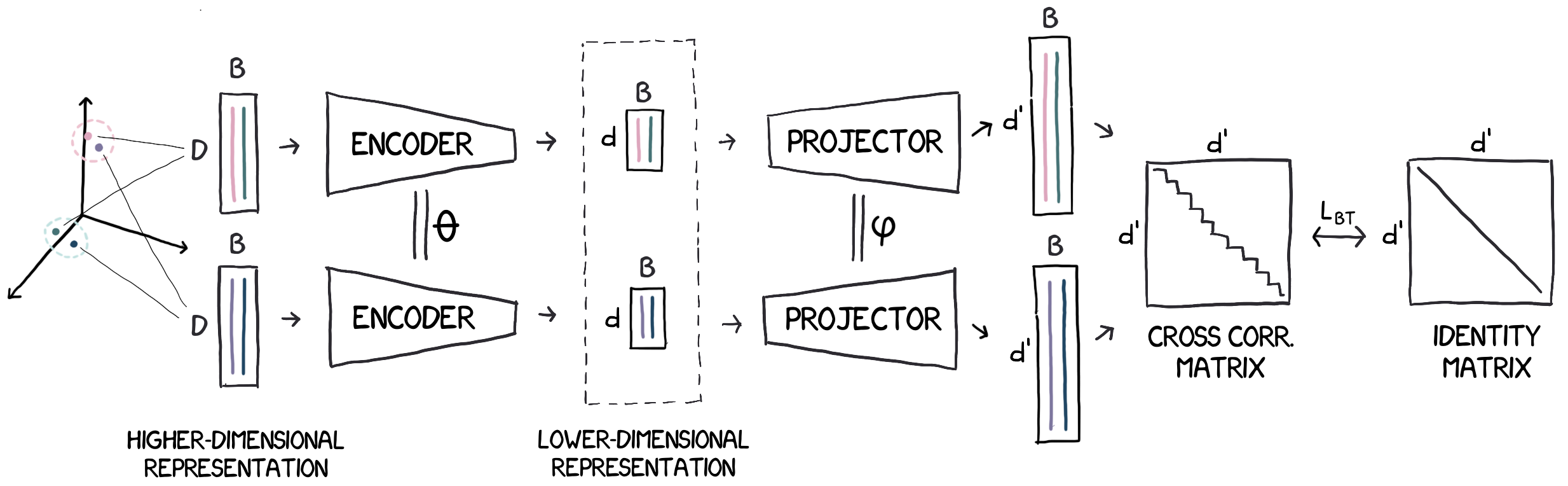
Overview of TLDR: Given a set of feature vectors in a generic input space, we use nearest neighbors to define a set of feature pairs whose proximity we want to preserve. We then learn a dimensionality-reduction function (theencoder) by encouraging neighbors in the input space to havesimilar representations. We learn it jointly with an auxiliary projector that produces high dimensional representations, where we compute the Barlow Twins loss over the (d′ × d′) cross-correlation matrix averaged over the batch.
Contents:
Installing the TLDR library
Requirements:
In order to install the TLDR library, one should first make sure that FAISS and Pytorch are installed. We recommend using a new conda environment:
conda create --name ENV_NAME python=3.6.8
conda activate ENV_NAME
conda install -c pytorch faiss-gpu cudatoolkit=10.2
conda install pytorch torchvision torchaudio cudatoolkit=10.2 -c pytorch
After ensuring that you have installed both FAISS and numpy, you can install TLDR by using the two commands below:
git clone [email protected]:naver/tldr.git
python3 -m pip install -e tldr
Using the TLDR library
The TLDR library can be used to learn dimensionality reduction models using an API and functionality that mimics similar methods in the scikit-learn library, i.e. you can learn a dimensionality reduction on your training data using fit() and you can project new data using transform().
To illustrate the different functionalities we present a dummy example on randomly generated data. Let's import the library and generate some random training data (we will use 100K training examples with a dimensionality of 2048), i.e.:
import numpy as np
from tldr import TLDR

# Generate random data
X = np.random.rand(100000, 2048)  # replace with training (N x D) array
Instantiating a TLDR model
When instantiating a TLDR model one has to specify the output dimension (n_components), the number of nearest neighbors to use (n_neighbors) as well as the encoder and projector architectures that are specified as strings.
For this example we will learn a dimensionality reduction to 32 components, we will use the 10 nearest neighbors to sample positive pairs, and we will use a linear encoder and a multi-layer perceptron with one hidden layer of 2048 dimensions as a projector:
tldr = TLDR(n_components=32, n_neighbors=10, encoder='linear', projector='mlp-1-2048', device='cuda', verbose=2)
For a more detailed list of optional arguments please refer to the function documentation below; architecture specification string formatting guide is described in this section below.
Learning and applying the TLDR model
We learn the parameters of the dimensionality reduction model by using the fit() method:
tldr.fit(X, epochs=100, batch_size=1024, output_folder='data/', print_every=50)
By default, fit() first collects the k nearest neighbors for each training data point using FAISS and then optimizes the Barlow Twin loss using the batch size and number of epochs provided. Note that, apart from the dimensionality reduction function (the encoder), a projector function that is part of the training process is also learned (see also the Figure above); the projector is by default discarded after training.
Once the model has been trained we can use transform() to project the training data to the new learned space:
Z = tldr.transform(X, l2_norm=True) # Returns (N x n_components) matrix
The optional l2_norm=True argument of transform() further applies L2 normalization to all features after projection.
Again, we refer the user to the functions' documentation below for argument details.
Saving/loading the model
The TLDR model and the array of nearest neighbors per training datapoint can be saved using the save() and save_knn() functions, repsectively:
tldr.save("data/inference_model.pth")
tldr.save_knn("data/knn.npy")
Note that by default the projector weights will not be saved. To also save the projector (e.g. for subsequent fine-tuning of the model) one must set the retain_projector=True argument when calling fit().
One can use the load() method to load a pre-trained model from disk. Using the init=True argument when loading also loads the hyper-parameters of the model:
X = np.random.rand(5000, 2048)
tldr = TLDR()
tldr.load("data/inference_model.pth", init=True)  # Loads both model parameters and weights
Z = tldr.transform(X, l2_norm=True)  # Returns (N x n_components) matrix
You can find this full example in scripts/dummy_example.py.
Documentation
TLDR(n_components, encoder, projector, n_neighbors=5, device='cpu', pin_memory=False)
Description of selected arguments (see code for full list):
n_components: output dimensionencoder: encoder network architecture specification string--see formatting guide (Default:'linear').projector: projector network architecture specification string--see formatting guide (Default:'mlp-1-2048').n_neighbors: number of nearest neighbors used to sample training pairs (Default:5).device: selects the device ['cpu', 'cuda'] (Default:cpu).pin_memory: pin all data to the memory of the device (Default:False).random_state: sets the random seed (Default:None).knn_approximation: Amount of approximation to use during the knn computation; accepted values are [None, "low", "medium" and "high"] (Default:None). No approximation will calculate exact neighbors while setting the approximation to either low, medium or high will use product quantization and create the FAISS index using the index_factory with an"IVF1,PQ[X]"string, where X={32,16,8} for {"low","med","high"}. The PQ parameters are learned using 10% of the training data.
from tldr import TLDR

tlrd = TLDR(n_components=128, encoder='linear', projector='mlp-2-2048', n_neighbors=3, device='cuda')
fit(X, epochs=100, batch_size=1024, knn_graph=None, output_folder=None, snapshot_freq=None)
Parameters:
X: NxD training data array containing N training samples of dimension D.epochs: number of training epochs (Default:100).batch_size: size of the training mini batch (Default:1024).knn_graph:Nxn_neighborsarray containing the indices of nearest neighbors of each sample; if None it will be computed (Default:None).output_folder: folder where the final model (and also the snapshots if snapshot_freq > 1) will be saved (Default:None).snapshot_freq: number of epochs to save a new snapshot (Default:None).print_every: prints useful training information every given number of steps (Default:0).retain_projector: flag so that the projector parameters are retained after training (Default:False).
from tldr import TLDR
import numpy as np

tldr = TLDR(n_components=32, encoder='linear', projector='mlp-2-2048')
X = np.random.rand(10000, 2048)
tldr.fit(X, epochs=50, batch_size=512, output_folder='data/', snapshot_freq=5, print_every=50)
transform(X, l2_norm=False)
Parameters:
X: NxD array containing N samples of dimension D.l2_norm: l2 normalizes the features after projection. Default False.
Output:
- Z: Nxn_components array
tldr.fit(X, epochs=100)
Z = tldr.transform(X, l2_norm=True)
save(path) and load(path)
save()saves to disk both model parameters and weights.load()loads the weights of the model. Ifinit=Trueit initializes the model with the hyper-parameters found in the file.
tldr = TLDR(n_components=32, encoder='linear', projector='mlp-2-2048')
tldr.fit(X, epochs=50, batch_size=512)
tldr.save("data/model.pth")  # Saves weights and params

tldr = TLDR()
tldr.load("data/model.pth", init=True)  # Initialize model with params in file and loads the weights
remove_projector()
Removes the projector head from the model. Useful for reducing the size of the model before saving it to disk. Note that you'll need the projection head if you want to resume training.
compute_knn(), save_knn() and load_knn()
tldr = TLDR(n_components=128, encoder='linear', projector='mlp-2-2048')
tldr.compute_knn(X)
tldr.fit(X, epochs=100)
tldr.save_knn("knn.npy")
tldr = TLDR(n_components=128, encoder='linear', projector='mlp-2-2048')
tldr.load_knn("knn.npy")
tldr.fit(X, epochs=100)
Architecture Specification Strings
You can specify the network configuration using a string with the following format:
'[NETWORK_TYPE]-[NUM_HIDDEN_LAYERS]-[NUM_DIMENSIONS_PER_LAYER]'
NETWORK_TYPE: three network types currently available:linear: a linear function parametrized by a weight matrix W of sizeinput_dim X num_components.flinear: a factorized linear model in a sequence of linear layers, each composed of a linear layer followed by a batch normalization layer.mlp: a multi-layer perceptron (MLP) with batch normalization and rectified linear units (ReLUs) as non-linearities.
NUM_HIDDEN_LAYERS: selects the number of hidden (ie. intermediate) layers for the factorized linear model and the MLPNUM_DIMENSIONS_PER_LAYER: selects the dimensionality of the hidden layers.
For example, linear will use a single linear layer; flinear-1-512 will use a factorized linear layer with one hidden layer of 512 dimensions; and mlp-2-4096 will select a MLP composed of two hidden layers of 4096 dimensions each.
Citation
Please consider citing the following paper in your publications if this helps your research.
@article{KLAL21,
 title = {TLDR: Twin Learning for Dimensionality Reduction},
 author = {Kalantidis, Y. and Lassance, C. and Almaz\'an, J. and Larlus, D.}
 journal = {arXiv:2110.09455},
 year = {2021}
}
Contributors
This code has been developed by Jon Almazan, Carlos Lassance, Yannis Kalantidis and Diane Larlus at NAVER Labs Europe.

 5 Jul 18, 2022
 16 Oct 26, 2022
 2 May 12, 2022
 1.4k Jan 01, 2023
 533 Dec 30, 2022
 20 May 27, 2022
 260 Nov 16, 2022
 383 Dec 27, 2022
 71 Dec 22, 2022
 39 Dec 17, 2022
 1 Nov 05, 2021
 155 Jan 04, 2023
 115 Dec 23, 2022
 370 Dec 21, 2022
 10 Sep 30, 2022
 186 Dec 29, 2022
 2 Jun 17, 2022
 149 Dec 22, 2022
 15 Nov 26, 2022
 2 Mar 14, 2022