当前位置:网站首页>Authorization server (simple construction of authorization server)
Authorization server (simple construction of authorization server)
2022-04-23 07:41:00 【cqwoniu】
1. stay pom Add dependency... To the file
<!--   Service discovery -->
        <dependency>
            <groupId>com.alibaba.cloud</groupId>
            <artifactId>spring-cloud-starter-alibaba-nacos-discovery</artifactId>
        </dependency>

        <dependency>
            <groupId>org.springframework.cloud</groupId>
              <artifactId>spring-cloud-starter-oauth2</artifactId>
        </dependency>
2. Add a profile
spring:
  application:
    name: authorization-server
  cloud:
    nacos:
      discovery:
        server-addr: nacos-server:8848
server:
  port: 9999
3. Create startup class
@SpringBootApplication
public class AuthorizationApplication {


    public static void main(String[] args) {

        SpringApplication.run(AuthorizationApplication.class, args);
    }
}
4. Add configuration class
4.1 Configuration of authorization server
package com.bjsxt.config;
@EnableAuthorizationServer// Enable the authorization service function
@Configuration
public class AuthorizationServerConfig extends AuthorizationServerConfigurerAdapter {

    @Autowired
    private PasswordEncoder passwordEncoder;
    @Autowired
    private AuthenticationManager authenticationManager;
    @Autowired
    private UserDetailsService userDetailsService;
/** *  Add a third-party client  * */
    @Override
    // Input config Will pop up automatically configure Methods , Note that the parameter to be selected here is client Of
    public void configure(ClientDetailsServiceConfigurer clients) throws Exception {

        clients.inMemory()
                .withClient("coin-api")// The name of the third party client
                .secret(passwordEncoder.encode("coin-secret"))// The key of the third party client
                .scopes("all")// Scope of authorization for third party clients
                .accessTokenValiditySeconds(3600)//token The validity of the
                .refreshTokenValiditySeconds(7*3600);//redresh_token The validity of the
        super.configure(clients);
    }
/** *  Configure the Validation Manager ,UserdetailService */
    @Override
    // Also here configure Methods should also pay attention to the choice of endpoint
    public void configure(AuthorizationServerEndpointsConfigurer endpoints) throws Exception {

        endpoints.authenticationManager(authenticationManager)
                .userDetailsService(userDetailsService);
        super.configure(endpoints);
    }
}
4.2 web Secure configuration
@Configuration
public class WebSecurityConfig extends WebSecurityConfigurerAdapter {


    /** *  Inject an authentication manager  * * @return * @throws Exception */
    @Bean
    public AuthenticationManager authenticationManagerBean() throws Exception {

        return super.authenticationManagerBean();
    }

    /** *  Release of resources  */
    @Override
    protected void configure(HttpSecurity http) throws Exception {

        http.csrf().disable(); //  close scrf
        http.authorizeRequests().anyRequest().authenticated();
        // Notice that... Is deleted here super class , Prevent conflict and error reporting when the service is started ,
    }


    /** *  Create a test of UserDetail * @return */
    @Bean
    public UserDetailsService userDetailsService() {

        //InMemoryUserDetailsManager yes Spring Security Config Provide a security configurator
        // The security builder provides a user account details management object that stores user account details based on memory
        // It is mainly used in the development and debugging environment , Its design purpose is mainly to test and function demonstration , Generally not used in production environment .
        InMemoryUserDetailsManager inMemoryUserDetailsManager = new InMemoryUserDetailsManager();
        // Note the imported user My bag is org.springframework.security.core.userdetails.User;
        User user = new User("admin", "123456", Arrays.asList(new SimpleGrantedAuthority("ROLE_ADMIN"))) ;
        inMemoryUserDetailsManager.createUser(user);
        return inMemoryUserDetailsManager;
    }

    /** *  The authentication manager that injects the password  * @return */
    @Bean
    public PasswordEncoder passwordEncoder() {

    // Note that this unencrypted method has been abandoned , We're just here to test
        return NoOpPasswordEncoder.getInstance();
    }
}
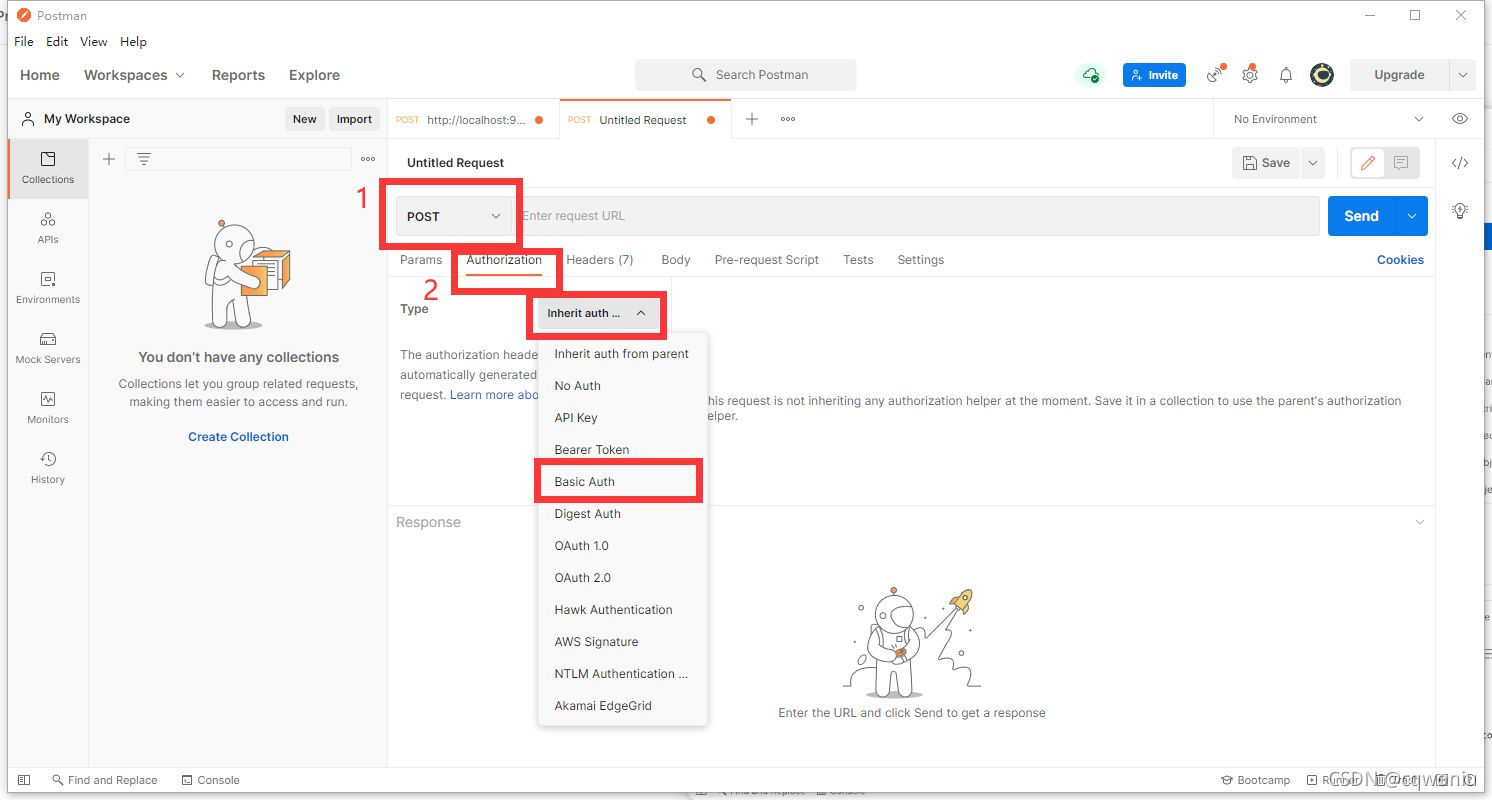
5. utilize postman Tools to test
5.1 postman Download and install
If this machine has been installed postman, Then this step ignores
Download address postman
Fool installation
5.2


版权声明
本文为[cqwoniu]所创,转载请带上原文链接,感谢
https://yzsam.com/2022/04/202204230622032374.html
边栏推荐
猜你喜欢






随机推荐
理解补码的要点
3.排序语句
LATEX公式注意事项
11.表和库的管理
Failed to install Tui editor, quick solution
VIM使用
王者荣耀-unity学习之旅
数据分析入门 | kaggle泰坦尼克任务(三)—>探索数据分析
菜菜的并发编程笔记 |(五)线程安全问题以及Lock解决方案
Applet newline character \ nfailure problem resolution - Daily pit stepping
Mysql 索引
通用型冒泡、选择、插入、希尔、快速排序的代码实现
Background management system framework, there is always what you want
10.更新操作
7. sub query
6. Aggregation function and grouping statistics
技术小白的第一篇(表达自己)
kaggle-房价预测实战
Methods of database query optimization
npm 安装踩坑