当前位置:网站首页>SAP ECC connecting SAP pi system configuration
SAP ECC connecting SAP pi system configuration
2022-04-23 09:33:00 【rogerix4】
Reference=> Reference documents
- Reference documents :Process Integration (PI)
1. establish SAP and PI Of RFC Connect
- Transaction code :SM59-> establish SAP To SAPSLDAPI Of TCP/IP Connect
-
Fill in the connection properties

project value remarks RFC The goal is SAPSLDAPI The default value is :SAPSLDAPI Connection type T TCP/IP Connect Activation type Registered server program Program identification SAPSLDAPI_PID by PI System registered program ID ID,PI The configuration of JCo RFC service Gateway host name xxx.com PI Systematic Hostname/IP Address Gateway service sapgw01 PI Service name of the system -
Test connection


-
- Transaction code :SM59-> establish SAP To LCRSAPRFC Of TCP/IP Connect
-
Fill in the connection properties
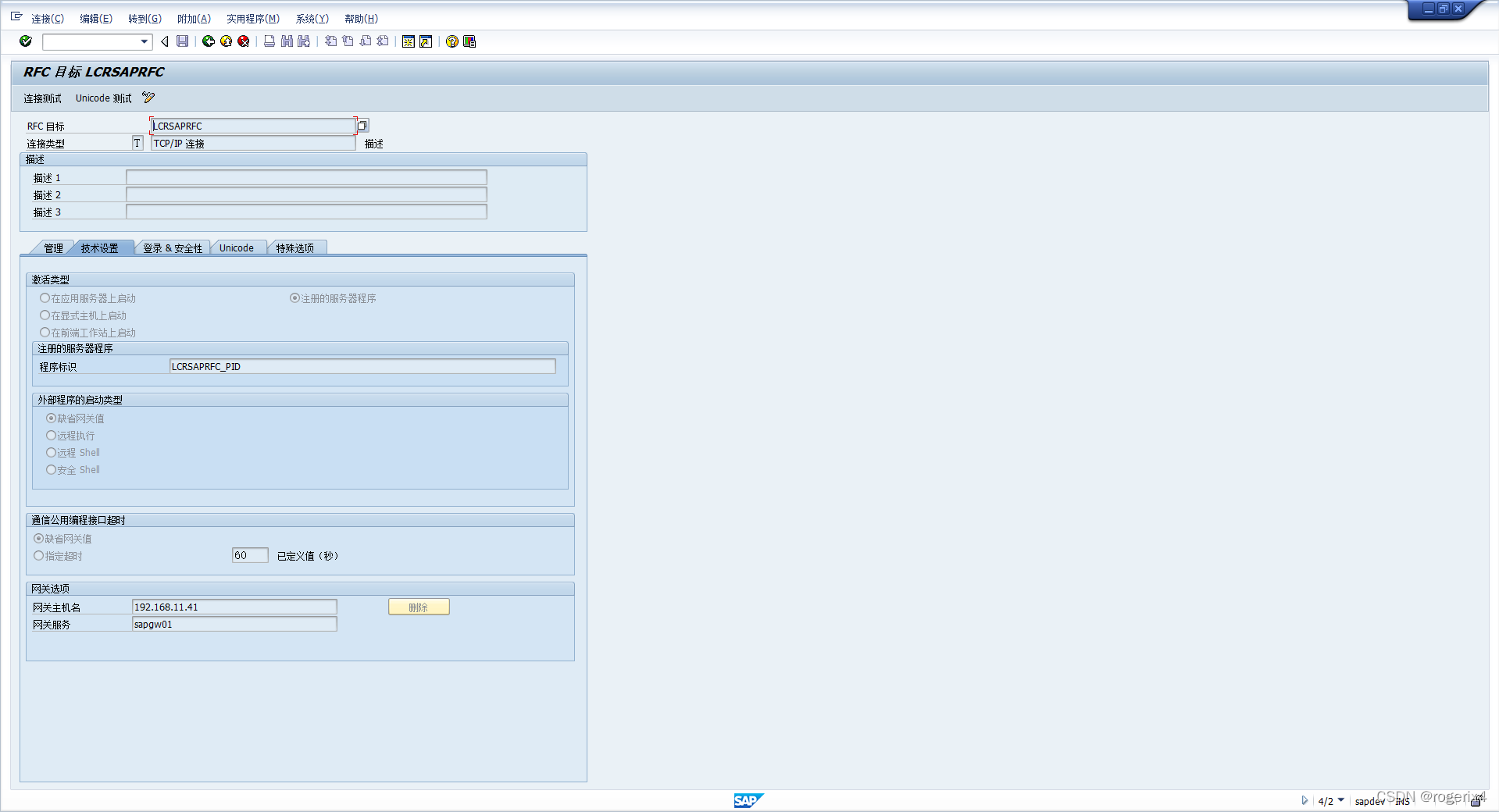
project value remarks RFC The goal is LCRSAPRFC The default value is :LCRSAPRFC Connection type T TCP/IP Connect Activation type Registered server program Program identification SAPSLDAPI_PID by PI System registered program ID ID,PI The configuration of JCo RFC service Gateway host name xxx.com PI Systematic Hostname/IP Address Gateway service sapgw01 PI Service name of the system -
Test connection


-
2. stay PI The configuration of JCo RFC service
- Configure address :http://<host>:5< instance>00/nwa( Such as :http://192.168.11.41:50000/nwa)

- Jco Server configuration

- Jco Server configuration
3. establish ABAP To PI SLD The connection of
-
Transaction code :SLDAPICUST
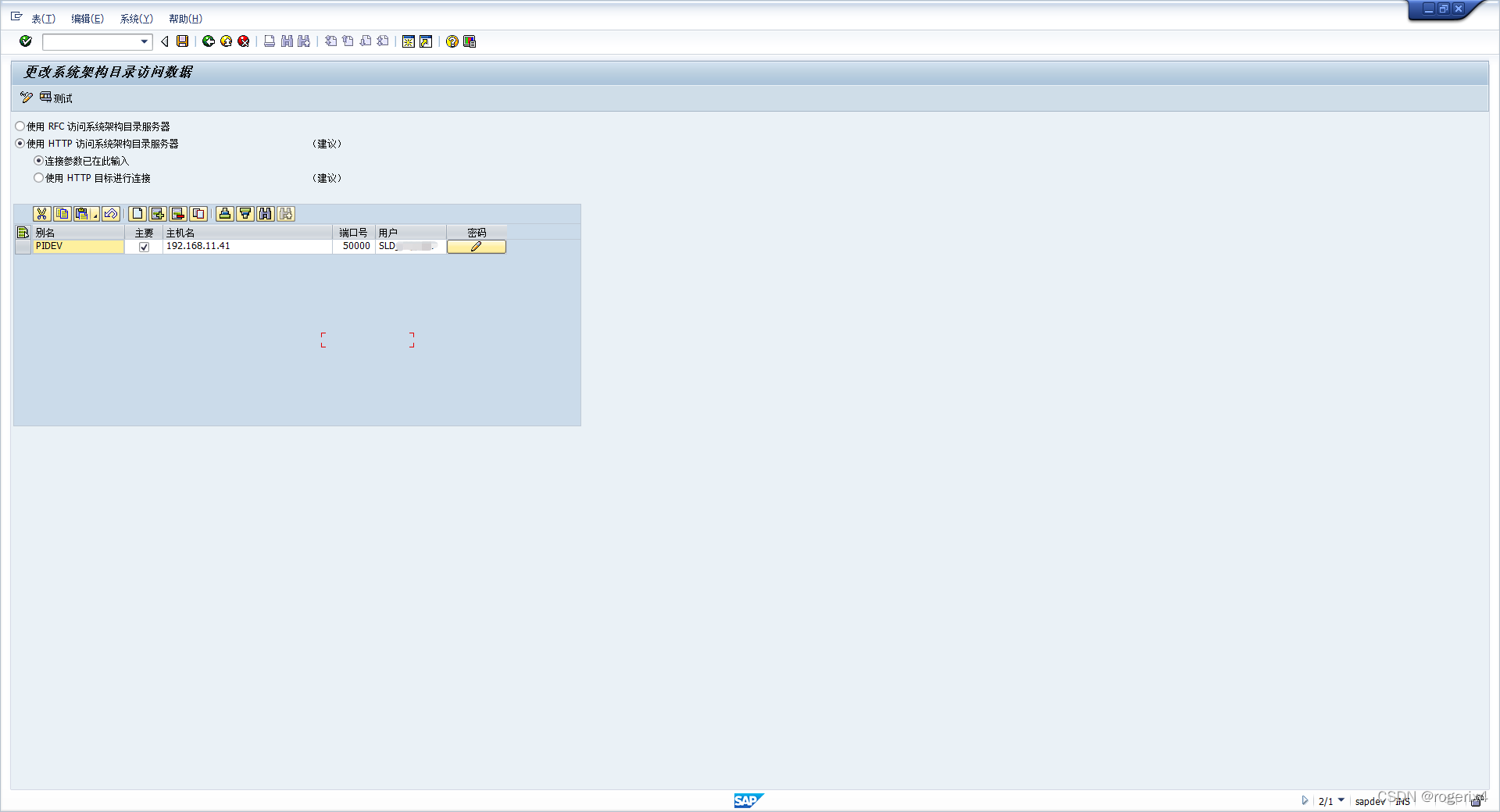
project value describe Alias PIDEV System Aliases , Customizable The main X Single connection is checked by default , Only one default connection can be checked for multiple connections Host name 192.168.11.41 PI System Hostname/IP Address Port number 50000 PI System service port number , Service port number :5<instance>00 user xxxx PI Connect account password xxxx PI Connection account password -
Connect the test

4. establish ABAP PROXY To PI ES Repository Of HTTP Connect
-
Transaction code :SM59-> make new connection

project value describe RFC The goal is SAP_PROXY_ESR Connection type G To an external server HTTP Connect The target host 192.168.1.41 PI System Hostname/IP Address Service number 50000 PI System service port number , Service port number :5<instance>00 Path prefix /rep Fixed value -
Sign in & Security

project value describe user xxxx PI Connect account password xxxx PI Connection account password -
Connect the test ( Transaction code :SPROXY Can also PI The resource server of )


4. establish SAP To PI Adapter engine HTTP Connect
-
Transaction code :SM59-> make new connection

project value describe RFC The goal is POD_AEX Connection type G To an external server HTTP Connect The target host 192.168.1.41 PI System Hostname/IP Address Service number 50000 PI System service port number , Service port number :5<instance>00 Path prefix /XISOAPAdapter/MessageServlet?ximessage=true Fixed value -
Sign in & Security

project value describe user xxxx PI Connect account password xxxx PI Connection account password -
Connect the test

-
Transaction code :SXMB_ADM-> Configure integration engine


project value describe Business system role Application System SAP Select in system Application System;PI System selection Integration Server Corresponding integration server dest://POD_AEX SM59 Created HTTP2ABAP Connect
5. take SAP The system is registered to PI In the system
- Transaction code :RZ70

project value describe Gateway host 192.168.1.41 PI System Hostname/IP Address Gateway service sapgw01 PI System service port name Scheduled background job X Check... By default minute 720 Every time 720 Schedule jobs once a minute
6. Log in to PI Portal
- The login address :http://<host>:5< instance>00/dir/start/index.jsp( Such as :http://192.168.11.41:50000/dir/start/index.jsp)
- SAP PI There are four main pages Java link :
- Enterprise service repository (ESR)
- Integration directory (ID)
- System architecture (SL)
- Configure and monitor (CM)

版权声明
本文为[rogerix4]所创,转载请带上原文链接,感谢
https://yzsam.com/2022/04/202204230623503766.html
边栏推荐
- Flink 流批一体在小米的实践
- Pre parsing of JS
- [in-depth good article] detailed explanation of Flink SQL streaming batch integration technology (I)
- ABAP CDs view with association example
- Colorui solves the problem of blocking content in bottom navigation
- High paid programmer & interview question series 91 limit 20000 loading is very slow. How to solve it? How to locate slow SQL?
- 108. 将有序数组转换为二叉搜索树
- Practice of Flink streaming batch integration in Xiaomi
- 1 + X cloud computing intermediate -- script construction, read-write separation
- 重载、重写、隐藏的对比
猜你喜欢

Go language learning notes - language interface | go language from scratch

Simple understanding of arguments in JS

Enter "net start MySQL" and "system error 5. Access denied" appears. Detailed explanation of the problem

【读书笔记】《Verilog数字系统设计教程》 第5章 条件语句、循环语句和块语句(附思考题答案)

653. Sum of two IV - input BST

EmuElec 编译总结

个人主页软件Fenrus

#yyds干货盘点#ubuntu18.0.4安装mysql并解决ERROR 1698: Access denied for user ''root''@''localhost''

Flink SQL realizes the integration of stream and batch

node安装
随机推荐
Two methods of building Yum source warehouse locally
GUI, CLI and UNIX Philosophy
EmuElec 编译总结
Image processing in opencv -- Introduction to contour + contour features
Simply understand = = and equals, why can string not use new
PHP笔记(一):开发环境配置
653. Sum of two IV - input BST
Program, process, thread; Memory structure diagram; Thread creation and startup; Common methods of thread
npm ERR! network
个人主页软件Fenrus
JS case to find the maximum value, reverse the array, bubble sort
《數字電子技術基礎》3.1 門電路概述、3.2 半導體二極管門電路
Kernel PWN learning (4) -- double fetch & 0ctf2018 baby
Distributed message oriented middleware framework selection - Digital Architecture Design (7)
Number of islands
[Luke V0] verification environment 2 - Verification Environment components
Installation of data cleaning ETL tool kettle
JS scope, scope chain, global variables and local variables
JS prototype chain
ABAP 7.4 SQL Window Expression