当前位置:网站首页>蓝桥杯线上模拟赛——Flex 经典骰子布局
蓝桥杯线上模拟赛——Flex 经典骰子布局
2022-08-09 12:53:00 【算法与编程之美】
1 引言
目前 CSS3 中新增的 Flex 弹性布局已经成为前端页面布局的首选方式,这次试题将利用 Flex 实现经典布局效果。
进入模拟赛:https://www.lanqiao.cn/problems/1523/learning/
2 问题描述
本次试题主要是补全Flex 经典骰子布局项目的index.html 文件空缺的 css 代码,并按照提示或要求完成效果图。
需要注意的是要严格按照考试步骤操作,要根据考试需求所要求的进行文件的添加、代码的添加修改等以及不要修改项目文件名、文件夹路径等。
CSS3(Flex Box)弹性盒子部分知识点:
(具体可看:https://www.runoob.com/css3/css3-flexbox.html)
1.弹性容器通过设置 display 属性的值为 flex 或 inline-flex将其定义为弹性容器。弹性容器内包含了一个或多个弹性子元素。(注意:弹性子元素通常在弹性盒子内一行显示。默认情况每个容器只有一行。)
2.flex-direction(位置方向):row(从左到右排列) | row-reverse| column(纵向排列)|column-reverse
3.flex-wrap(换行): nowrap(默认)|wrap(多行、溢出的部分会被放置到新行,子项内部会发生断行)|wrap-reverse|initial|inherit
4.align-items(在纵轴方向上的对齐): flex-start | flex-end | center | baseline | stretch
5.align-content(各个行纵轴方向的对齐): flex-start | flex-end | center | space-between | space-around | stretch
6.justify-content(沿着弹性容器的主轴线对齐): flex-start | flex-end | center | space-between | space-around
7.flex-basis(设置或检索弹性盒伸缩基准):number | auto | initial | inherit
3 算法描述
前期准备。
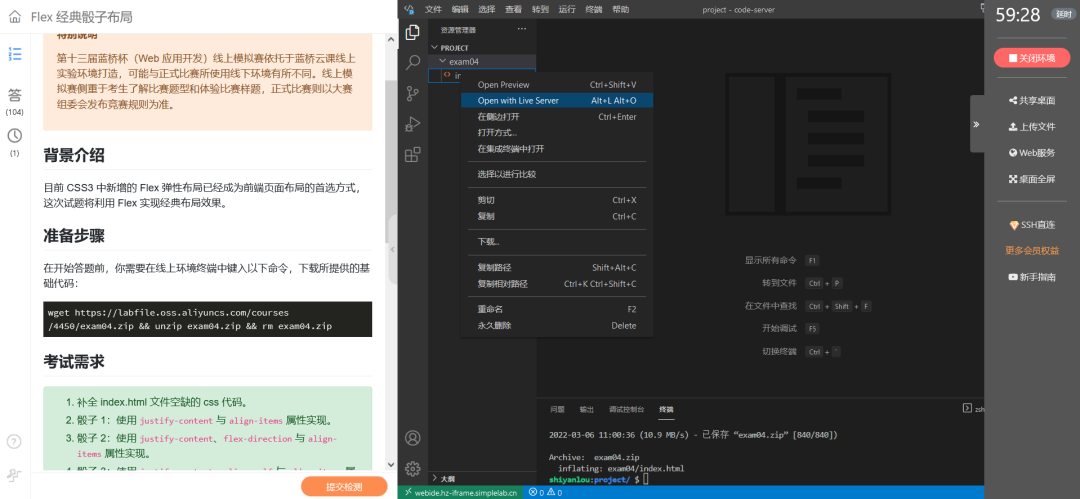
1.1在终端输入命令打开项目并进行运行。
1.2仔细阅读考试需求中的文字,重点要清楚试题要我们做什么。同时还要注意题目所给的小细节。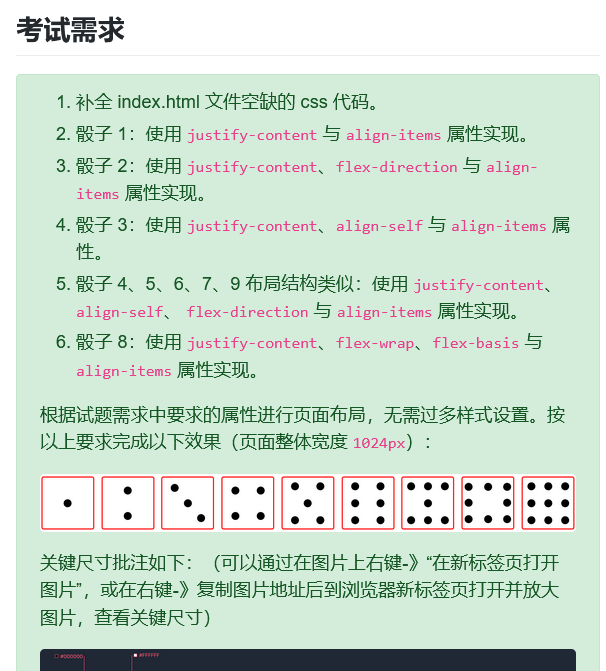
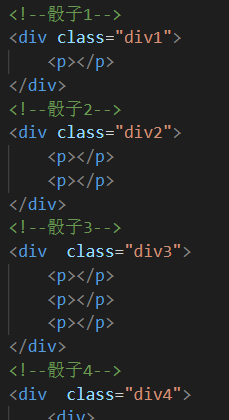
跟据要求进行代码书写。
2.1将每个骰子的外层div进行命名,分别为div2、div3、div4……。
2.2根据要求及样式进行CSS书写。
| /*todo:请补全剩余骰子布局代码*/ .div2 { justify-content: space-around; align-items: center; flex-direction: column; } .div3 { justify-content: space-around; } .div3 p:nth-child(1) { align-self: flex-start; } .div3 p:nth-child(2) { align-self: center; } .div3 p:nth-child(3) { align-self: flex-end; } .div4,.div5,.div6,.div7,.div8,.div9 { flex-direction: column; justify-content: space-around; } .div4 div,.div5 div,.div6 div,.div7 div,.div8 div,.div9 div { display: flex; justify-content: space-around; } .div8 div { justify-content: space-between; } |
4 结语
总的来说,主要要对CSS3弹性盒子的属性意义要有一定的了解。在本次练习中主要难点在于对部分属性的不了解。同时在此次练习中,还学到了:nth-child(n)、:nth-of-type(n)选择器的使用。通过第一次的练习以及练习中所获的,希望在后续练习中更进一步。
边栏推荐
- OOM排查和处理
- uni-app - uview Swiper 轮播图组件点击跳转链接(点击后拿到 item 行数据, 取出数据做操作)
- Redis源码剖析之跳表(skiplist)
- 农村区县域农业电商如何做?数字化转型如何进行?
- Flutter entry and advanced tour (6) Layout Widget
- 正则表达式-re模块
- Jenkins API groovy calling practice: Jenkins Core Api & Job DSL to create a project
- 为什么文字不贴合边
- How to solve the 0x80070005 error when the computer is reinstalled and the system is restored
- 30行代码实现微信朋友圈自动点赞
猜你喜欢
5G China unicom AP:B SMS ASCII 转码要求
How to save Simulink simulation model as image or PDF
GIN初探,环境安装
RTSP协议讲解
2022年非一线IT行业就业前景?

我的2020年终总结
阿里大淘系模型治理阶段性分享
![[HCIP Continuous Update] Principle and Configuration of IS-IS Protocol](/img/4f/035432ac84644c4bd46573aa0ab7cd.png)
[HCIP Continuous Update] Principle and Configuration of IS-IS Protocol
Do you know the difference between comments, keywords, and identifiers?
Final assignment of R language data analysis in a university
随机推荐
GET POST PUT DELETE request in GIN
GIN file upload and return
Dry+Bean+Dataset R语言数据分析,报告英文
Ledong Fire Rescue Brigade was invited to carry out fire safety training for cadres
剑指offer,剪绳子2
glibc memory management model freeing C library memory cache
NFS 特别注意权限的问题
FFmpeg multimedia file processing (FFMPEG logging system)
电脑重装系统还原0x80070005错误如何解决
陈强教授《机器学习及R应用》课程 第十三章作业
Map mixed density function and quantile added line
The FPGA - work summary recently
read stream 特别注意
Rust 入门指南(使用JSON)
GIN Bind模式获取参数和表单验证
telnet+ftp 对设备进行 操控 和 升级
5G China unicom 直放站 网管协议 实时性要求
How to solve the 0x80070005 error when the computer is reinstalled and the system is restored
一维数组&指针
[MRCTF2020]套娃-1