当前位置:网站首页>2022-08-08 The fifth group Gu Xiangquan study notes day31-collection-IO stream-File class
2022-08-08 The fifth group Gu Xiangquan study notes day31-collection-IO stream-File class
2022-08-09 03:06:00 【aggressive leeks】
File类
file是什么? —> 文件和目录路径名的抽象表示形式.
- 包路径:java.io.File
- 继承关系:File —> Object
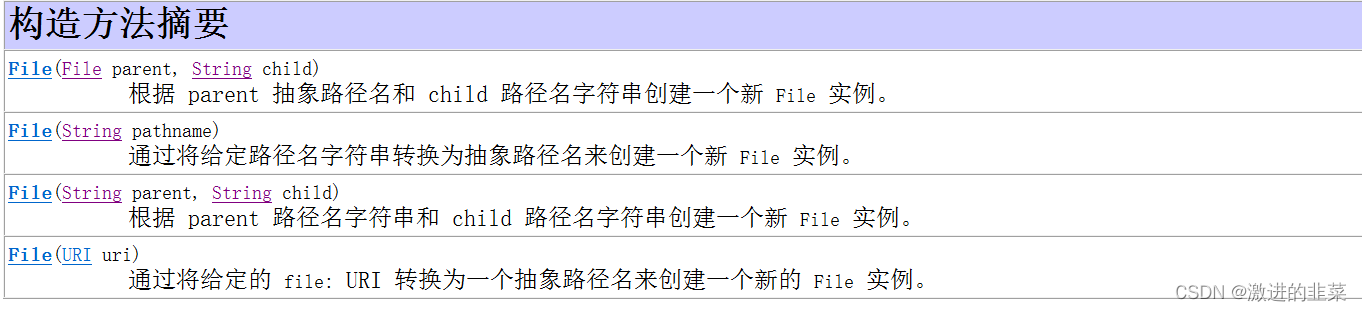
- 构造方法
4.方法

常用方法
| 方法 | 功能 |
|---|---|
| String getPath() String getAbsolutePath() String getCanonicalPath() | 将此抽象路径名转换为一个路径名字符串(获取构建路径) 返回此抽象路径名的绝对路径名字符串(获取 当前路径1 + 构建路径) 返回此抽象路径名的规范路径名字符串.(If the build directory include".“或”.."时,Will standardize processing) |
| boolean isFile() boolean isDirtory() | 在不知道file是否存在时,Don't use these two methods to determinefile是否是文件/目录 ,因为When a file does not exist when the file is not a file or directory is not;在不知道fileWhether there is suggested to write their own a method to judge. |
| boolean delete() | You can delete files and empty directory,Cannot be deleted with the contents of the directory(With a directory or a file directory) |
| boolean createNewFile() | 如果文件存在,Is not does not create won't cover;如果文件不存在则创建文件 |
| boolean mkdir() boolean mkdirs() | 如果目录存在,Do not create won't cover,如果目录不存在则创建目录 如果fileIs a multi-level directory usingmkdir()会创建失败,返回false |
Not empty directory delete
With the creation of a file directory
编写一个简易的cmd
package com.jsoft.io.file;

import org.junit.Test;

import java.io.File;
import java.io.IOException;
import java.text.SimpleDateFormat;
import java.util.Date;
import java.util.Scanner;

public class CMD {

    private static String currentDir;  // 当前目录路径
    private static String userIn;       // 用户输入内容
    private static Scanner sc;

    static {

        currentDir = System.getProperty("user.dir");
        sc = new Scanner(System.in);
    }

    // 切换路径
    private static boolean cd(String dirName) throws IOException {


        // 当前路径(currentDir)+相对路径
        File file = new File(currentDir + "\\" + dirName);
        // 如果是绝对路径
        if(dirName.contains(":")) {

            file = new File(dirName);
        }

        // 切换当前目录
        if(".".equals(dirName)) {

            return true;
        }
        // 切换到上级目录
        if("..".equals(dirName)) {


            File fatherFile = new File(currentDir).getParentFile();
            if(fatherFile == null) {

                return false;
            }
            currentDir = fatherFile.getCanonicalPath();
            return true;
        }

        // 如果不是目录
        if(isFile(file)) {

            System.out.println("目录名称无效");
            return false;
        }

        // 如果文件不存在
        if(!file.exists()) {

            System.out.println("系统找不到指定的路径.");
            return false;
        }

        // 文件存在
        currentDir = file.getCanonicalPath();
        return true;

    }

    // 创建文件或目录
    private static boolean md(String cdContent) throws IOException {

        File file = new File(currentDir + "\\" + cdContent);

        // 如果是绝对路径
        if(cdContent.contains(":")) {

            file = new File(cdContent);
        }

        // 如果是文件(Now can't handle with directory file)
        if(isFile(file)) {

            file.createNewFile();
        } else {

            file.mkdirs();
        }
        return true;

    }


    // Print the current path all the files in the directory information
    private static void dir() {

        File[] files = new File(currentDir).listFiles();
        SimpleDateFormat sdf = new SimpleDateFormat("yyyy/MM/dd HH:mm");
        long byteNum = 0;

        if(files.length == 0) {

            System.out.println("当前目录为空");
            return;
        }
        // Here is a statistical folder - accessor to size of
        for(File file : files) {

            byteNum += file.length();
            StringBuilder sb = new StringBuilder();
            sb.append(sdf.format(new Date(file.lastModified())));
            sb.append("\t");
            sb.append(file.isDirectory() ? "<DIR>" : "\t");
            sb.append("\t");
            sb.append(file.length());
            sb.append("\t");
            sb.append(file.getName());
            System.out.println(sb);
        }
        System.out.println(files.length + " 个文件");
        System.out.println(byteNum + " 字节");

    }

    private static boolean rd(String rdContent) throws IOException {

        File file = new File(currentDir + "\\" + rdContent);

        // 如果是绝对路径
        if(rdContent.contains(":")) {

           file = new File(rdContent);
        }

        // 如果是文件
        if (isFile(file)) {

            file.delete();
            return true;
        } else {

            // No support for multistage folder is not empty folders and delete
            file.delete();
            return true;
        }
    }


    // Get the user to type
    private static String commindLine() {

        System.out.print(currentDir + ">");
        userIn = sc.nextLine();
        return userIn;
    }

    // 显示帮助信息
    private static void help() {

        // cd
        StringBuilder sb = new StringBuilder();
        sb.append("cd命令");
        sb.append("\n");
        sb.append("语法格式:cd 文件路径");
        sb.append("\t");
        sb.append("改变当前目录(支持相对路径和绝对路径)");
        System.out.println(sb);
        System.out.println("---------------------------------------");
        // dir
        sb = new StringBuilder();
        sb.append("dir命令");
        sb.append("\t");
        sb.append("未实现功能:Query list of byte size,Statistics of the number of files and directories,对./..显示");
        sb.append("\n");
        sb.append("语法格式:dir");
        sb.append("\t");
        sb.append("列出当前目录的所有文件");
        System.out.println(sb);
        System.out.println("---------------------------------------");

        // md
        sb = new StringBuilder();

        sb.append("md命令");
        sb.append("\t");
        sb.append("未实现功能:创建带目录的文件");
        sb.append("\n");
        sb.append("语法格式:md 文件路径");
        sb.append("\t");
        sb.append("创建文件(支持相对路径和绝对路径)");
        System.out.println(sb);
        System.out.println("---------------------------------------");

        // rd
        sb = new StringBuilder();
        sb.append("rd命令");
        sb.append("\t");
        sb.append("未实现功能:To not empty directory delete");
        sb.append("\n");
        sb.append("语法格式:rd 文件路径");
        sb.append("\t");
        sb.append("删除文件(支持相对路径和绝对路径)");
        System.out.println(sb);
        System.out.println("---------------------------------------");
        sb = new StringBuilder();
        sb.append("exit");

        sb.append("\t");
        sb.append("退出cmd");
        System.out.println(sb);
        System.out.println("---------------------------------------");


    }

    // 判断File是否是文件,当路径中包含“.”时,我们认为这个file是一个文件
    private static boolean isFile(File file) throws IOException {

        // 当路径中存在.时,我们认为这个File是一个文件
        if(file.getCanonicalPath().contains(".")) {

            return true;
        }
        return false;
    }

    public static void main(String[] args) throws IOException {


        System.out.println("Microsoft Windows [版本 10.0.18363.1556]\n" +
                "(c) 2019 Microsoft Corporation.保留所有权利.\n");
        System.out.println("输入help查看帮助信息\n\n");

        while(true) {

           // Get the user to type
           String userIn = commindLine();

           if(userIn.startsWith("cd")) {

               String[] split = userIn.split(" ");
               if(split.length != 2) {

                   System.out.println("格式错误");
                   continue;
               }
               String dirName = split[1];
               cd(dirName);

           } else if(userIn.startsWith("dir")) {

               dir();
           } else if(userIn.startsWith("md")) {

               String[] split = userIn.split(" ");
               String cdContent = split[1];
               md(cdContent);
           } else if(userIn.startsWith("rd")) {

               String[] split = userIn.split(" ");
               String rdContent = split[1];
               rd(rdContent);

           }else if("help".equals(userIn)) {

               help();
           }else if("exit".equals(userIn)) {

               break;
           } else {

               System.out.println(userIn + "不是内部或外部命令,也不是可运行的程序或批处理文件.");
           }
       }

    }

}
在java中,The current path is the defaultproject(项目)的根 ︎
边栏推荐
- jsx定义与规则
- 【图像去噪】基于边缘增强扩散 (cEED) 和 Coherence Enhancing Diffusion (cCED) 滤波器实现图像去噪附matlab代码
- DSPE-PEG-OH,DSPE-PEG-Hydroxyl,磷脂-聚乙二醇-羟基仅供科研实验使用
- Exchange VLAN experiment
- 20220524搜索和排序:搜索二维矩阵II
- 数据库工具DataGrip V2022.2正式发布——支持导入多个 CSV 文件的选项
- 【洛谷】P1082 同余方程
- 高并发+海量数据下如何实现系统解耦?【中】
- 数学基础(三)PCA原理与推导
- 1.02亿美元从数字资产基金撤出!BTC价格已经触底!预示下跌趋势即将逆转?
猜你喜欢

The building had been registry cluster, load balancing

多线程 (进阶+初阶)

作为常用的荧光标记试剂Cy5 亚磷酰胺(CAS号:182873-67-2)有哪些特点了?

【CAS:41994-02-9 |Biotinyl Tyramide|】生物素基酪氨酰胺

【元胞自动机】基于元胞自动机模拟社会力因素下的灾害人员疏散应急仿真附matlab代码

【es6】教程 Symbol数据以及迭代器和生成器
Zabbix 5.0 监控教程(五)

如何实现有状态转化操作

新型双功能螯合剂NOTA及其衍生物CAS号:147597-66-8p-SCN-Bn-NOTA

2027年加密市场将会发生什么?思维的跨越?长期预测无法脱离形势变化
随机推荐
2022微服务面试题 最新50道题(含答案解析)
OpenLORIS-Object Datasets
【洛谷】P1456 Monkey King
Promoting practice with competitions-Like the 84th biweekly game reflection and the 305th weekly game supplementary questions
C18-PEG- ALD批发_C18-PEG-CHO_C18-PEG-醛基
一款免费的强大办公工具。
20220528动态规划:最长递增子序列
20220524搜索和排序:搜索二维矩阵II
数组与切片
权限系统就该这么设计(万能通用),稳的一批!
多商户商城系统功能拆解23讲-平台端分销等级
【CAS:41994-02-9 |Biotinyl Tyramide|】生物素基酪氨酰胺
Second data CEO CAI data warming invited to jointly organize the acceleration data elements online salon
DSP28379学习笔记 (一)——GPIO基本操作
Chapter2多元函数
C专家编程 第9章 再论数组 9.1 什么时候数组与指针相同
Postman interface test [official website] latest version installation and use tutorial
SQL注入(4)
【洛谷】P5091 【模板】扩展欧拉定理
Introduction to the JSP