当前位置:网站首页>Jetpack 之 LifeCycle 组件使用详解
Jetpack 之 LifeCycle 组件使用详解
2022-04-23 04:24:00 【程序员-吴彦祖】
一、LifeCycle 简介
LifeCycle 是一个可以感知宿主生命周期变化的组件。常见的宿主包括 Activity/Fragment、Service 和 Application。LifeCycle 会持有宿主的生命周期状态的信息,当宿主生命周期发生变化时,会通知监听宿主的观察者。
LifeCycle 的出现主要是为了解决: 系统组件的生命周期与普通组件之间的耦合性。
- 系统组件指:Activity/Fragment、Service 和 Application。
- 普通组件指:将代码按照功能或者作用封装成的组件。
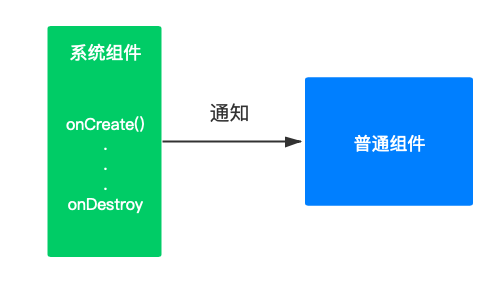
哪些情况下,系统组件的生命周期会和普通组件的生命周期耦合在一起呢?
举个栗子:
在 58 部落业务中有视频播放的业务需求。我们需要在 Activity 中对视频播放组件进行初始化,在 onPause() 方法中停止视频的播放,在 onDestroy() 方法中对视频播放组件以及一些资源进行回收。这样的做法非常繁琐,会让页面与组件之间的耦合度变高。
对于这类问题,完全可以使用 LifeCycle 来解决。它不仅降低了模块之间的耦合度,还降低了内存泄露发生的可能性。
二、LifeCycle 的使用
Jetpack 为我们提供了两个接口:
被观察者:LifecycleOwner
观察者:LifecycleObserver
被监听的系统组件需要去实现 LifecycleOwner 接口,观察者需要实现 LifecycleObserver 接口。
(一)使用场景1:使用 LifeCycle 解耦页面与组件
(1)解耦 Activity
第一步:添加依赖
implementation 'androidx.appcompat:appcompat:1.2.0'
在 AndroidX 里面 ComponentActivity 已经默认实现了 LifecycleOwner 接口。如果项目没有迁移到 AndroidX,还是用的 Support 库,新版本的 SDK 也通过 SupportActivity 实现了 LifecycleOwner 接口。

在 LifecycleOwner 接口中,只有一个 getLifecycle 方法。
第二步:实现观察者
如果是想监听某个 Activity 的生命周期,需要我们做的就是自定义组件,实现 LifecycleObserver 接口即可,该接口没有接口方法,不需要任何具体的实现。
比如以刚刚的视频播放为例:
- 创建一个 MyVideoPlayListener 类,实现 LifecycleObserver 接口,与视频播放相关的逻辑全在这个类里面完成。对于组件里面需要在 Activity 生命周期变化时得到通知的方法,用 @OnLifecycleEvent(Lifecycle.Event.ON_XXX) 注解进行标记,这样当 Activity 生命周期发生变化时,被标记过的方法便会被自动调用。
public class MyVideoPlayListener implements LifecycleObserver {
    private static String TAG = "MyVideoPlayListener";

    @OnLifecycleEvent(Lifecycle.Event.ON\_CREATE)
    private void initVideo(){
        Log.d(TAG,"initVideo");
    }

    @OnLifecycleEvent(Lifecycle.Event.ON\_RESUME)
    private void startPlay(){
        Log.d(TAG,"startPlay");
    }

    @OnLifecycleEvent(Lifecycle.Event.ON\_PAUSE)
    private void pausePlay(){
        Log.d(TAG,"pausePlay");
    }
}
2.在 MainActivity 中对 MyVideoPlayListener 进行引用即可。
public class MainActivity extends AppCompatActivity {

    @Override
    protected void onCreate(Bundle savedInstanceState) {
        super.onCreate(savedInstanceState);
        setContentView(R.layout.activity\_main);

        MyVideoPlayListener listener = new MyVideoPlayListener();
        getLifecycle().addObserver(listener);
    }
}
#####(2)解耦 Fragment
在新版的 SDK 中,Fragment 同样也默认实现了 LifecycleOwner 接口,因此,以上的例子同样适合于 Fragment。
####(二)使用场景2:使用 LifecycleService 解耦 Service 与组件
(1)LifecycleService 基本介绍
Android 中拥有生命周期的组件除了 Activity/Fragment ,还有一个非常重要的组件就是 Service。LifecycleService 就是用来监听和解耦 Service 组件的。
public class LifecycleService extends Service implements LifecycleOwner {

    private final ServiceLifecycleDispatcher mDispatcher = new ServiceLifecycleDispatcher(this);

    ......

    @Override
    @NonNull
    public Lifecycle getLifecycle() {
        return mDispatcher.getLifecycle();
    }
}
(2)具体使用方法
第一步:添加相关依赖
implementation "androidx.lifecycle:lifecycle-service:2.2.0"
第二步:创建 MyServiceObserver 类,实现 LifecycleObserver 接口。使用 @OnLifecycleEvent 标记希望在 Server 生命周期发生变化时得到同步调用的方法。
public class MyServiceObserver implements LifecycleObserver {
    private static String TAG = "MyServiceObserver";

    @OnLifecycleEvent(Lifecycle.Event.ON\_CREATE)
    private void initVideo(){
        Log.d(TAG,"initVideo");
    }

    @OnLifecycleEvent(Lifecycle.Event.ON\_DESTROY)
    private void pausePlay(){
        Log.d(TAG,"stopPlay");
    }
}
第三步:创建一个 MyService 的类,继承 LifecycleService。由于 LifecycleService 是 Service 的直接子类,所以使用起来与普通的 Service 没有差别。
public class MyService extends LifecycleService {
    private MyServiceObserver myServiceObserver;

    public MyService(){
        myServiceObserver = new MyServiceObserver();
        getLifecycle().addObserver(myServiceObserver);
    }
}
#####(三)使用场景3:使用 ProcessLifecycleOwner 监听应用程序的生命周期
具有生命周期的组件除了 Activity、Fragment 和 Service 外,还有 Application。ProcessLifecycleOwner 就是用来监听整个应用程序的生命周期情况。
具体使用方法:
第一步:添加依赖项
implementation "androidx.lifecycle:lifecycle-process:2.2.0"
第二步:定义一个 ApplicationObserver,实现 LifecycleObserver 接口。
public class ApplicationObserver implements LifecycleObserver {
    private String TAG = this.getClass().getName();

    /\*\*
     \* 在应用程序的整个生命周期中只会被调用一次
     \*/
    @OnLifecycleEvent(Lifecycle.Event.ON\_CREATE)
    public void onCreate() {
        Log.d(TAG,"Lifecycle.Event.ON\_CREATE");
    }

    @OnLifecycleEvent(Lifecycle.Event.ON\_START)
    public void onStart() {
        Log.d(TAG,"Lifecycle.Event.ON\_START");
    }

    @OnLifecycleEvent(Lifecycle.Event.ON\_RESUME)
    public void onResume() {
        Log.d(TAG,"Lifecycle.Event.ON\_RESUME");
    }

    @OnLifecycleEvent(Lifecycle.Event.ON\_PAUSE)
    public void onPause() {
        Log.d(TAG,"Lifecycle.Event.ON\_PAUSE");
    }

    @OnLifecycleEvent(Lifecycle.Event.ON\_STOP)
    public void onStop() {
        Log.d(TAG,"Lifecycle.Event.ON\_STOP");
    }

    /\*\*
     \* 永远不会被调用,系统不会分发调用 ON\_DESTROY 事件
     \*/
    @OnLifecycleEvent(Lifecycle.Event.ON\_DESTROY)
    public void onDestroy() {
        Log.d(TAG,"Lifecycle.Event.ON\_DESTROY");
    }
}
第三步:在 Application 中关联 ApplicationObserver。
public class App extends Application {
    @Override
    public void onCreate() {
        super.onCreate();
        ProcessLifecycleOwner.get().getLifecycle().addObserver(new ApplicationObserver());
    }
}
注意事项:
- ProcessLifecycleOwner 是针对整个应用程序的监听,与 Activity 的数量无关。
- Lifecycle.Event.ON_CREATE 只会被调用一次,而 Lifecycle.Event.ON_DESTROY 永远不会被调用。
- Lifecycle.Event.ON_PAUSE 和 Lifecycle.Event.ON_STOP 的调用会有一定的延后,因为系统需要为“屏幕旋转,由于配置发生变化而导致的 Activity 重新创建” 的情况预留一些时间。
三、Lifecycle 的另外两种写法
Lifecycle 有三种实现方法:
- LifecycleObserver 配合注解
- FullLifecyclerObserver 拥有宿主所有生命周期事件
- LifecycleEventObserver宿主生命周期事件封装成 Lifecycle.Event
在上一节使用介绍中,我们用的是第一种方式:LifecycleObserver 配合注解。
这种方式使用比较简单,但是注意最好添加 lifecycle-compiler 这个注解处理器,否者在运行时会使用反射的形式回调到对应的方法上:
annotationProcessor "androidx.lifecycle:lifecycle-compiler:2.2.0"
加上这个注解处理器后,用 @OnLifecycleEvent 标记的方法就不能再声明成 private ,否者会报如下的错误:
method marked with OnLifecycleEvent annotation can not be private
下面介绍一下另外两种实现方式:
(一)FullLifecyclerObserver 拥有宿主所有生命周期事件
//该接口中定义好了生命周期方法,我们只需要实现 FullLifecycleObserver 接口,重写对应的
//生命周期方法即可。不过目前 FullLifecycleObserver 这个接口未开放给开发者使用。
interface FullLifecycleObserver extends LifecycleObserver {

    void onCreate(LifecycleOwner owner);

    void onStart(LifecycleOwner owner);

    void onResume(LifecycleOwner owner);

    void onPause(LifecycleOwner owner);

    void onStop(LifecycleOwner owner);

    void onDestroy(LifecycleOwner owner);
}
(二)LifecycleEventObserver 宿主生命周期事件封装成 Lifecycle.Event
//通过实现 LifecycleEventObserver 接口,重写 onStateChanged 方法,在该方法内部
//通过判断 Lifecycle.Event 来实现具体的业务逻辑
public class MyVideoPlayObserver implements LifecycleEventObserver {
    private static String TAG = "MyVideoPlayObserver";

    @Override
    public void onStateChanged(@NonNull LifecycleOwner source, @NonNull Lifecycle.Event event) {
        switch (event){
            case ON\_CREATE:
                Log.d(TAG,"initVideo");
                break;
            case ON\_START:
                Log.d(TAG,"startPlay");
                break;
            case ON\_RESUME:
                Log.d(TAG,"resumePlay");
                break;
            default:
                 break;
        }
    }
}
四、总结
LifeCycle 组件存在的主要意义是帮助我们解耦,让自己定义的组件也能够感受到生命周期的变化。
五、补充
截止本文发布时,lifecycle_version 最新版本是 2.2.0,如需获取最新版本请查看官网:
注:lifecycle-extensions 中的 API 已弃用,需要使用到 Lifecycle 下的某个工具时,添加对应的依赖即可:
    dependencies {
        def lifecycle\_version = "2.2.0"
        def arch\_version = "2.1.0"

        // ViewModel
        implementation "androidx.lifecycle:lifecycle-viewmodel:$lifecycle\_version"
        // LiveData
        implementation "androidx.lifecycle:lifecycle-livedata:$lifecycle\_version"
        // Lifecycles only (without ViewModel or LiveData)
        implementation "androidx.lifecycle:lifecycle-runtime:$lifecycle\_version"

        // Saved state module for ViewModel
        implementation "androidx.lifecycle:lifecycle-viewmodel-savedstate:$lifecycle\_version"

        // Annotation processor
        annotationProcessor "androidx.lifecycle:lifecycle-compiler:$lifecycle\_version"
        // alternately - if using Java8, use the following instead of lifecycle-compiler
        implementation "androidx.lifecycle:lifecycle-common-java8:$lifecycle\_version"

        // optional - helpers for implementing LifecycleOwner in a Service
        implementation "androidx.lifecycle:lifecycle-service:$lifecycle\_version"

        // optional - ProcessLifecycleOwner provides a lifecycle for the whole application process
        implementation "androidx.lifecycle:lifecycle-process:$lifecycle\_version"

        // optional - ReactiveStreams support for LiveData
        implementation "androidx.lifecycle:lifecycle-reactivestreams:$lifecycle\_version"

        // optional - Test helpers for LiveData
        testImplementation "androidx.arch.core:core-testing:$arch\_version"
    }
版权声明
本文为[程序员-吴彦祖]所创,转载请带上原文链接,感谢
https://blog.csdn.net/hugo233/article/details/124351558
边栏推荐
- Stm32f4 MCU ADC sampling and FFT of ARM-DSP Library
- [AI vision · quick review of robot papers today, issue 32] wed, 20 APR 2022
- C语言常用字符串处理函数
- 国外LEAD,联盟经理常见问答
- QT program integration easyplayer RTSP streaming media player screen flicker what is the reason?
- Single chip microcomputer serial port data processing (1) -- serial port interrupt sending data
- Express middleware ① (use of Middleware)
- MySQL 2013 lost connection to MySQL server during query
- C语言:恶搞小游戏
- [AI vision · quick review of robot papers today, issue 30] Thu, 14 APR 2022
猜你喜欢
![[AI vision · quick review of robot papers today, issue 32] wed, 20 APR 2022](/img/eb/916a3fc1a89356fd8e74b943172ac3.png)
[AI vision · quick review of robot papers today, issue 32] wed, 20 APR 2022
![[latex] differences in the way scores are written](/img/77/3aebc8812f3e2d239187b95d3bd49f.png)
[latex] differences in the way scores are written

Why recommend you to study embedded
【NeurIPS 2019】Self-Supervised Deep Learning on Point Clouds by Reconstructing Space

Set经典小题目
229. 求众数 II

Does China Mobile earn 285 million a day? In fact, 5g is difficult to bring more profits, so where is the money?
C语言: 指针的进阶
Go反射法则
Nature medicine reveals individual risk factors of coronary artery disease
随机推荐
MySQL 2013 lost connection to MySQL server during query
mysql ,binlog 日志查询
[AI vision · quick review of today's sound acoustic papers, issue 2] Fri, 15 APR 2022
Opencv -- yoact case segmentation model reasoning
[mapping program design] coordinate inverse artifact v1 0 (with C / C / VB source program)
KVM error: Failed to connect socket to ‘/var/run/libvirt/libvirt-sock‘
[AI vision · quick review of robot papers today, issue 28] wed, 1 Dec 2021
STM32单片机ADC规则组多通道转换-DMA模式
顺序表的基本操作
记录一下盲注脚本
UDP协议与TCP协议
Effects of antibiotics on microbiome and human health
STM32上μC/Shell移植与应用
网络原理 | TCP/IP中的连接管理机制 重要协议与核心机制
Qt程序集成EasyPlayer-RTSP流媒体播放器出现画面闪烁是什么原因?
Kotlin. The binary version of its metadata is 1.6.0, expected version is 1.1.15.
Network principle | connection management mechanism in TCP / IP important protocol and core mechanism
RuntimeError: output with shape [4, 1, 512, 512] doesn‘t match the broadcast shape[4, 4, 512, 512]
【测绘程序设计】坐标反算神器V1.0(附C/C#/VB源程序)
秒杀所有区间相关问题