当前位置:网站首页>Export of data
Export of data
2022-04-23 06:24:00 【Wood acridine】
Data export
Define the export method in the page
Get query criteria , Pass the query conditions to the controller , Query the data to be exported according to the criteria
Serialize the search criteria section
Derived data
window . open(url+ Serialize some of the search criteria );
You can export the data to be exported according to the filter criteria
First query out the data to be exported
Define a method in the controller first , Method to receive some parameters to query
Associated table query data , Then filter the conditions
Write the data to be exported to Excel in
structure Excel
- Create Workbook
IWorkbook workbook = new HSSFWorkbook();
- Create sheet
ISheet sheet = workbook.CreateSheet(" Worksheet name ");
- Title Line
- Create a title line CreateRow( The index value of the row )
IRow rowTitle = sheet.CreateRow(0);
- Create cells
ICell cell0 = rowTitle.CreateCell(0);
- Set cell contents
cell0.SetCellValue(" Content ");
- Set the header row to display across columns ( Coordinates )
sheet.AddMergedRegion(new NPOI.SS.Util.CellRangeAddress(, , ,));
example :(0, 0, 0, 9) Says from the first 1 Xing di 1 The columns begin to merge into the 1 Xing di 10 End of column
- Set the style ( It can be set but not set )
After setting the style, you need to assign the style to the cell
Cell name . CellStyle= Style name
example :cell0.CellStyle = cellStyle_Title;
- Header row
- Create header row
NPOI.SS.UserModel.IRow rowHeader = sheet.CreateRow( The index value of the row );
Set fields
CreateCell Create cells SetCellValue Set the value
example :rowHeader.CreateCell(0).SetCellValue(" Serial number ");
rowHeader.CreateCell(1).SetCellValue(" Student number ");
rowHeader.CreateCell(2).SetCellValue(" full name ");
- Set header row style
Set the style for the header row cells Loop to each cell
example :
- data row
- style
- Traversal data Put the queried data one by one into Excel In the table
example :for (int i = 0; i < listStudent.Count; i++){
explain :i < listStudent.Count You can traverse as many data as you query
Create a row every time you traverse
IRow row = sheet.CreateRow(2 + i); because The title and header already occupy two lines , therefore 2+i
row.HeightInPoints = 22; HeightInPoints Set row height
Create column And set the values
example :row.CreateCell(0).SetCellValue(i + 1);// Serial number
row.CreateCell(1).SetCellValue(listStudent[i].StudentNumber)
row.CreateCell(2).SetCellValue(listStudent[i].StudentName);
explain :listStudent[i] The first i From the data StudentNumber
Add a style to each cell
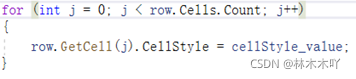
}
- Set the column width to auto fit

Create a good Excel Output to browser
1、 Define the name of the output file
string fileName = " Candidates information " + DateTime.Now.ToString("yyyy-MM-dd-HH-mm-ss-ffff") + ".xls";
- hold Excel Convert to stream output
- Define the flow
MemoryStream BookStream = new MemoryStream();
- Write workbook to stream
workbook.Write(BookStream);
- The output is called before Seek( Offset , Cursor position ) Sets the position in the current stream to the specified value
BookStream.Seek(0, SeekOrigin.Begin);
- Finally, the data is returned
example :return File(BookStream, "application/vnd.ms-excel", fileName);
explain : For returning files File( file , file type , File name )
Finally, call the exported method for the Export button
Click the Export button to generate a Excel surface

Click on Excel The table can be opened to see the exported data

Style settings
Create cell styles , Style a cell first , Recycle to each cell
You need to declare a style first
example :ICellStyle cellStyle_header = workbook.CreateCellStyle();
Horizontal center
example :cellStyle_header.Alignment = HorizontalAlignment.CENTER;
Vertical center
example :cellStyle_header.VerticalAlignment = VerticalAlignment.CENTER;
Set the background fill effect
example :cellStyle_header.FillPattern = FillPatternType.SOLID_FOREGROUND;
Set the background fill color
example :cellStyle_header.FillForegroundColor = NPOI.HSSF.Util.HSSFColor.AQUA.index;
Set border lines
example :cellStyle_header.BorderLeft = CellBorderType.THIN; The left margin
cellStyle_header.BorderTop = CellBorderType.THIN; On the border
cellStyle_header.BorderRight = CellBorderType.THIN; Right margin
cellStyle_header.BorderBottom = CellBorderType.THIN; Under the frame
Set the font
First declare the font
IFont font_header = workbook.CreateFont();
font size
example :font_header.FontHeightInPoints = 10;
In bold
example :font_Title.Boldweight = (short)FontBoldWeight.BOLD;
Add font color
example :font_title.Color = NPOI.HSSF.Util.HSSFColor.SkyBlue.Index;
版权声明
本文为[Wood acridine]所创,转载请带上原文链接,感谢
https://yzsam.com/2022/04/202204210616405432.html
边栏推荐
- LDCT图像重建论文——Eformer: Edge Enhancement based Transformer for Medical Image Denoising
- MySQL advanced query
- 8. Integer Decomposition
- MySQL table constraints and table design
- 线性代数第三章-矩阵的初等变换与线性方程组
- Common programming records - parser = argparse ArgumentParser()
- Optional best practices
- Reading of denoising paper - [ridnet, iccv19] real image denoising with feature attention
- Graphic numpy array matrix
- [leetcode217] there are duplicate elements
猜你喜欢
![[leetcode 202] happy number](/img/b2/a4e65688aef3a0cec8088bcaba048f.jpg)
[leetcode 202] happy number

LDCT图像重建论文——Eformer: Edge Enhancement based Transformer for Medical Image Denoising

In depth understanding of the relationship between dncblevel and noise denoising in the paper

Fundamentals of digital image processing (Gonzalez) II: gray transformation and spatial filtering
檢測技術與原理

MySQL advanced query

Gaussian processes of sklearn
![Denoising paper - [noise2void, cvpr19] noise2void learning denoising from single noise images](/img/9d/487c77b5d25d3e37fb629164c804e2.png)
Denoising paper - [noise2void, cvpr19] noise2void learning denoising from single noise images

SQL injection
Generate excel template (drop-down selection, multi-level linkage)
随机推荐
[transfer] MySQL: how many rows of data can InnoDB store in a B + tree?
自動控制(韓敏版)
線性代數第二章-矩陣及其運算
Pyqy5 learning (2): qmainwindow + QWidget + qlabel
Common sense of thread pool
In depth source code analysis servlet first program
1. Calculate a + B
Exception handling: grab and throw model
编程记录——图片旋转函数scipy.ndimage.rotate()的简单使用和效果观察
3. Continuous integer
MySQL occasional Caton
Three ways to create threads
Fundamentals of in-depth learning -- a simple understanding of meta learning (from Li Hongyi's course notes)
2. Devops sonar installation
Guaba and Computational Geometry
Preparedstatement prevents SQL injection
SQL optimization best practices
Installation and usage skills of idea
Pytorch learning record (V): back propagation + gradient based optimizer (SGD, adagrad, rmsporp, Adam)
C language file operation