当前位置:网站首页>Paddleocr image text extraction
Paddleocr image text extraction
2022-04-23 07:22:00 【Lin Jinpeng】
PaddleOCR Image text extraction
demand
A need at work , You need to extract the license plate number in the picture . Pictured , The license plate is in the fixed position of the picture . Start using pytesseract, Especially unfriendly to Chinese recognition , After all, it's a foreigner's thing . Colleagues recommend PaddleOCR, The things developed by Chinese people are different , The recognition accuracy can reach 90% above . But both have common problems , White characters on black background cannot be recognized / The range is too small, the identification is not allowed to wait .

One . Cut the license plate number area
# np.fromfil  Construct an array from data in a text or binary file
# cv2.imdecode() Convert the read data ( decode ) In image format ; It is mainly used to recover images from network transmission data
# cv2.IMREAD_UNCHANGED: Read the full picture , Include alpha passageway , You can write directly -1
img = cv2.imdecode(np.fromfile(imgSrc, dtype=np.uint8), cv2.IMREAD_UNCHANGED)
cropImg = img[y1:y2, x1:x2] # The order is up and down   about

So Baidu found Zhang Tu , It happens to be black on a white background Writing in the middle , The results magically identify the results 100% The identification is correct . After comparison , I concluded that the white font was unrecognizable , Then invert the small graph .
Two . Process the small picture of the license plate
height, width, deep = cropImg.shape
 gray = cv2.cvtColor(cropImg, cv2.COLOR_BGR2GRAY) # cv2.COLOR_BGR2GRAY  take BGR Convert format to grayscale image
 dst = np.zeros((height, width, 1), np.uint8) # Generate a pure black picture

 for i in range(0, height):  #  Reverse phase   Turn to black on white
     for j in range(0, width):
         grayPixel = gray[i, j]
         dst[i, j] = 255 - grayPixel
  # After this step , It's done   Turn to black on white , But the white low background is not the brightest
  # Reuse cv2.threshold To binarize , Make the black part darker , White is whiter
ret, img = cv2.threshold(dst, 0, 255, cv2.THRESH_BINARY + cv2.THRESH_OTSU)
The result of inverting the small graph is as follows , Look carefully and find that the white background is not very white , Reuse cv.threshold To binarize ( Neither black nor white ), By comparing binary images , The sense of hierarchy comes out .


Identify again , The recognition result finally came out , But I found the last one 7 Identified as 2, In principle, such simple words should not be recognized wrong . So I thought that the boundary of the picture used to test and identify is very wide , Writing in the middle , Then the small graph is filled with white background boundary 150 Pixel .
3、 ... and . Fill in the boundary
# cv2.BORDER_CONSTANT  Fixed value filling method
imgsrc = cv2.copyMakeBorder(img, 150, 150, 150, 150, cv2.BORDER_CONSTANT, value=[255, 255, 255])
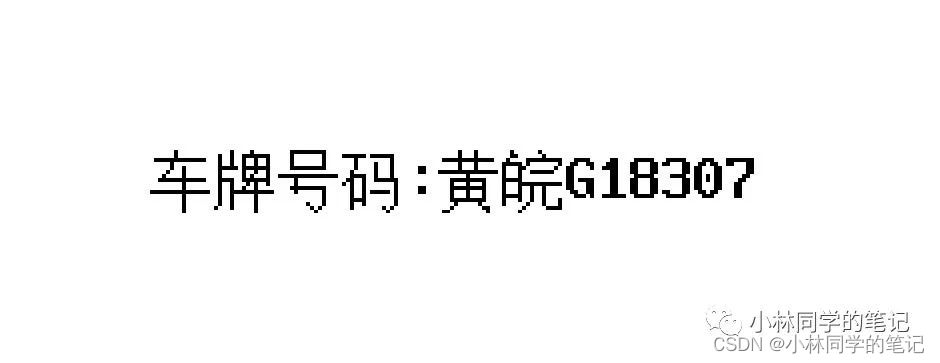
Four . Identification steps
ocr = PaddleOCR(use_angle_cls=True, use_gpu=False)  #  Use CPU Preloading , no need GPU
text = ocr.ocr(img, cls=True)
result = str(text[0][1][0]).replace(' license plate :', '').upper()


版权声明
本文为[Lin Jinpeng]所创,转载请带上原文链接,感谢
https://yzsam.com/2022/04/202204230609472920.html
边栏推荐
- PyTorch中的一些常见数据类型转换方法,与list和np.ndarray的转换方法
- 【点云系列】点云隐式表达相关论文概要
- Pytorch best practices and coding style guide
- 【动态规划】不同路径2
- ThreadLocal, just look at me!
- Chapter 8 generative deep learning
- C connection of new world Internet of things cloud platform (simple understanding version)
- WebView displays a blank due to a certificate problem
- [2021 book recommendation] practical node red programming
- 如何对多维矩阵进行标准化(基于numpy)
猜你喜欢

Use originpro express for free

Chapter 8 generative deep learning
红外传感器控制开关

【指标】Precision、Recall

Easyui combobox 判断输入项是否存在于下拉列表中

Gephi教程【1】安装
Pymysql connection database

【2021年新书推荐】Enterprise Application Development with C# 9 and .NET 5
Chapter 2 pytoch foundation 2

Write a wechat double open gadget to your girlfriend
随机推荐
素数求解的n种境界
Thanos.sh灭霸脚本,轻松随机删除系统一半的文件
树莓派:双色LED灯实验
Binder mechanism principle
Pytorch trains the basic process of a network in five steps
Gee configuring local development environment
Data class of kotlin journey
【指标】Precision、Recall
1.1 pytorch and neural network
[point cloud series] sg-gan: advantageous self attention GCN for point cloud topological parts generation
Face_ Recognition face detection
利用官方torch版GCN训练并测试cora数据集
face_recognition人脸检测
Pytorch model pruning example tutorial III. multi parameter and global pruning
Miscellaneous learning
机器学习——朴素贝叶斯
Record WebView shows another empty pit
MySQL notes 3_ Restraint_ Primary key constraint
【动态规划】杨辉三角
Gephi tutorial [1] installation