当前位置:网站首页>【目标检测】YOLOv5:标签中文显示/自定义颜色
【目标检测】YOLOv5:标签中文显示/自定义颜色
2022-08-08 17:33:00 【zstar-_】
前言
本篇主要用来实现将YOLOv5输出的标签转成中文,并且自定义标签颜色的需求。
我所使用的是YOLOv5-5.0版本。
源码逻辑分析
在detect.py中,这两行代码设置标签名字和颜色。
# Get names and colors
names = model.module.names if hasattr(model, 'module') else model.names
colors = [[random.randint(0, 255) for _ in range(3)] for _ in names]
可以发现,类别名字并不是在运行检测时导入的,而是内嵌在保存的模型参数文件中。
新建一个load_model.py文件,加载训练好的模型:
import torch
ckpt1 = torch.load('runs/train/exp21/weights/best.pt')
print("Done")
启动断点调试:

可以看到,类别名称包含在了模型内部:

而至于颜色,每次运行,程序会随机生成RGB三个数值,并不稳定。
思路分析
了解了上面的加载逻辑之后,为了实现中文显示的需求,主要有两种思路。
思路一
思路一:直接在data.yaml中,将names改成中文。
这种思路需要注意,文件默认打开并不是UTF-8编码,需要对文件读取编码进行修改。
在train.py中,将
with open(opt.data) as f:
改为
with open(opt.data, encoding='UTF-8') as f:
在test.py中,将
with open(data) as f:
改为
with open(data, encoding='UTF-8') as f:
这种思路意味着模型需要重新训练,并且后面还是会存在一些小问题。
思路二
思路二:直接在渲染标签的时候进行文字转换。
但是opencv默认不支持中文,因此需要下列步骤:
- 将opencv图片格式转换成PIL的图片格式;
- 使用PIL绘制文字;
- PIL图片格式转换成oepncv的图片格式;
思路实现
采用思路二进行操作。
下载字体
首先是下载支持中文的字体,我所采用的是SimHei这款字体,下载链接:
http://www.font5.com.cn/ziti_xiazai.php?id=151&part=1237887120&address=0
混淆矩阵字体修改
在utils/metrics.py文件中,开头添加代码:
plt.rcParams['font.sans-serif'] = ['SimHei']
plt.rcParams['axes.unicode_minus'] = False
之后,将这段代码
sn.set(font_scale=1.0 if self.nc < 50 else 0.8) # for label size
改为
sn.set(font='SimHei', font_scale=1.0 if self.nc < 50 else 0.8) # for label size
中文标签/颜色修改
在detect.py的Write results中,添加这部分
 # Write results
for *xyxy, conf, cls in reversed(det):
    if save_txt:  # Write to file
        xywh = (xyxy2xywh(torch.tensor(xyxy).view(1, 4)) / gn).view(-1).tolist()  # normalized xywh
        line = (cls, *xywh, conf) if opt.save_conf else (cls, *xywh)  # label format
        with open(txt_path + '.txt', 'a') as f:
            f.write(('%g ' * len(line)).rstrip() % line + '\n')

    if save_img or view_img:  # Add bbox to image
        # label = f'{names[int(cls)]} {conf:.2f}'
        # label = None # 修改隐藏标签
        # plot_one_box(xyxy, im0, label=label, color=colors[int(cls)], line_thickness=3)

        # 增加中文标签
        label = '%s %.2f' % (names[int(cls)], conf)
        # 设置固定颜色
        color_dict = {
    '1': [0, 131, 252], '2': [190, 90, 92], '3': [142, 154, 78], '4': [2, 76, 82], '5': [119, 80, 5], '6': [189, 163, 234]}
        # 中文输出
        if names[int(cls)] == 'truck':
            ch_text = '%s %.2f' % ('类别1', conf)
            color_single = color_dict['1']
        elif names[int(cls)] == 'panzer':
            ch_text = '%s %.2f' % ('类别2', conf)
            color_single = color_dict['2']
        elif names[int(cls)] == 'tank':
            ch_text = '%s %.2f' % ('类别3', conf)
            color_single = color_dict['3']
        elif names[int(cls)] == 'SUV':
            ch_text = '%s %.2f' % ('类别4', conf)
            color_single = color_dict['4']
        elif names[int(cls)] == 'cam_net':
            ch_text = '%s %.2f' % ('类别5', conf)
            color_single = color_dict['5']
        elif names[int(cls)] == 'cam_tar':
            ch_text = '%s %.2f' % ('类别6', conf)
            color_single = color_dict['6']

        im0 = plot_one_box(xyxy, im0, label=label, ch_text=ch_text, color=color_single, line_thickness=3)
其中,颜色我根据自己整理的调色盘进行吸取筛选。

之后,在utils/plots.py中导入库
from PIL import Image, ImageDraw, ImageFont
修改plot_one_box这个函数:
def cv2ImgAddText(img, text, left, top, textColor=(0, 255, 0), textSize=25):
    # 图像从OpenCV格式转换成PIL格式
    if (isinstance(img, np.ndarray)):  # 判断是否OpenCV图片类型
        img = Image.fromarray(cv2.cvtColor(img, cv2.COLOR_BGR2RGB))
    draw = ImageDraw.Draw(img)
    fontText = ImageFont.truetype("Font/simhei.ttf", textSize, encoding="utf-8")
    draw.text((left, top - 2), text, textColor, font=fontText)
    return cv2.cvtColor(np.asarray(img), cv2.COLOR_RGB2BGR)


def plot_one_box(x, img, color=None, label=None, ch_text=None, line_thickness=None):
    # Plots one bounding box on image img
    tl = line_thickness or round(0.002 * (img.shape[0] + img.shape[1]) / 2) + 1  # line/font thickness
    color = color or [random.randint(0, 255) for _ in range(3)]
    c1, c2 = (int(x[0]), int(x[1])), (int(x[2]), int(x[3]))
    cv2.rectangle(img, c1, c2, color, thickness=tl, lineType=cv2.LINE_AA)
    if label:
        tf = max(tl - 1, 1)  # font thickness
        t_size = cv2.getTextSize(label, 0, fontScale=tl / 3, thickness=tf)[0]
        c2 = c1[0] + t_size[0], c1[1] - t_size[1]
        cv2.rectangle(img, c1, c2, color, -1, cv2.LINE_AA)  # filled
        # cv2.putText(img, label, (c1[0], c1[1] - 2), 0, tl / 3, [225, 255, 255], thickness=tf, lineType=cv2.LINE_AA)
        img_text = cv2ImgAddText(img, ch_text, c1[0], c2[1], (255, 255, 255), 25)
    return img_text
查看效果
修改之前:
修改之后: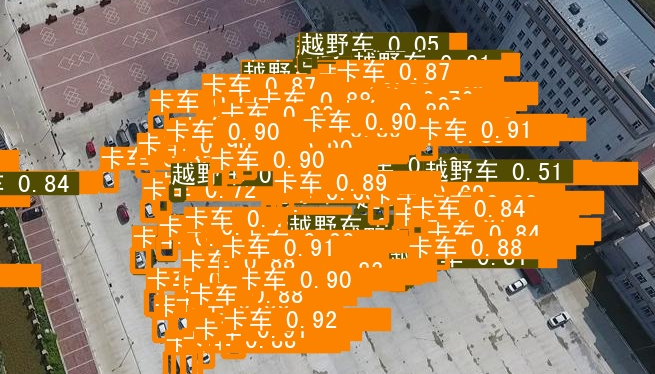
结果能够成功显示,不过存在标签宽度过长的小问题,后续有空再进行优化。
References
[1]https://blog.csdn.net/bu_fo/article/details/114668184
[2]https://blog.csdn.net/oJiWuXuan/article/details/109337713
边栏推荐
猜你喜欢

Vscode LeetCode 教程

【20210923】Choose the research direction you are interested in?
The difference between a uri (url urn)

信号生成和可视化
dp,dpi,px知识补充
Fluorescein-PEG-CLS,胆固醇-聚乙二醇-荧光素用于缩短包封周期
leetcode:296.最佳的碰头地点
2 prerequisites for the success of "digital transformation" of enterprises!
无需精子卵子子宫体外培育胚胎,Cell论文作者这番话让网友们炸了
The latest research from PNAS: 81% problem solving rate, neural network Codex opens the door to the world of advanced mathematics
随机推荐
盘点检索任务中的损失函数
对于端口的粗浅理解
章节小测一
钱放在股票账户安全吧?
爬百度图片
Detailed explanation of JVM memory model and structure (five model diagrams)
LeaRun模型驱动开发框架 重塑企业生产力
leetcode:294.翻转游戏
slam测评工具evo的安装与使用
KITTI数据集简介(一)—— 传感器介绍
L2-010 排座位 (25 分) (DFS)
无需精子卵子子宫体外培育胚胎,Cell论文作者这番话让网友们炸了
openGauss社区七月运作报告
用皮肤“听”音乐,网友戴上这款装备听音乐会:仿佛住在钢琴里
Cyanine5 tetrazine,Cy5 tetrazineCY5四嗪,1427705-31-4
基于simulink的风力机房温度控制系统仿真
Cy5反式环辛烯,TCO-Cy5,Cy5 trans-cyclooctene标记生物分子
【NodeJs篇】fs文件系统模块
DSPE-PEG-NH2,DSPE-PEG-amine,474922-26-4,磷脂-聚乙二醇-氨基科研试剂
数据库分析与优化