当前位置:网站首页>浅谈BFC(块格式化上下文)
浅谈BFC(块格式化上下文)
2022-04-23 06:18:00 【flym_】
在我们的开发中常听到BFC这个词,当要让我说出BFC 是什么,却不能很好的却解释,似懂非懂。反正就是没有清晰的理解,是这两天仔细阅读了相关资料加深自己对BFC理解。(BFC是Web页面中盒模型布局的CSS渲染模式,指一个独立的渲染区域或者说是一个隔离的独立容器。 )
什么是BFC
BFC:块格式化上下文(Block Formatting Context,BFC) 是Web页面的可视化CSS渲染的一部分,是块盒子的布局过程发生的区域,也是浮动元素与其他元素交互的区域。
1 BFC是一个独立的布局环境,其中的元素布局是不受外界的影响。
2.如果一个元素符合触发 BFC 的条件,则 BFC 中的元素布局不受外部影响。
3.浮动不会影响其它BFC中元素的布局,而清除浮动只能清除同一BFC中在它前面的元素的浮动。
4.块格式化上下文包含创建它的元素内部的所有内容.
5.在一个 BFC 中,块盒与行盒(行盒由一行中所有的内联元素所组成)都会垂直的沿着其父元素的边框排列。
怎样才能形成BFC
- 浮动元素 float的值不为none。
- 绝对定位元素(元素的 position 为 absolute 或 fixed)
- overflow值不为 visible 的块元素
- display值为 flow-root的元素
- display的值为table-cell, table-caption, inline-block中的任何一个。
- position的值不为relative和static。
BFC应用
- 防止字体环绕
- 自适应两(多)栏布局
- 清除内部浮动
- 防止margin重叠
实际代码中理解BFC
1.让浮动内容和周围的内容等高
在实际开发中我们会遇到浮动元素超出了父元素的高度。
<style>
.outer {
  border: 5px dotted rgb(214,129,137);
  width: 450px;
}
.aside {
        width: 100px;
        height: 150px;
        float: left;
        background: #f66;
    }

    .main {
        /* height: 200px; */
        background: #fcc;
    }
</style>
<body>
  <div class="outer">
    <div class="aside"></div>
    <div class="main">I am a floated element.</div>
  </div>
</body>

创建一个会包含这个浮动的BFC,通常的做法是设置父元素 overflow: auto 或者设置其他的非默认的 overflow: visible 的值。
.outer {
  border: 5px dotted rgb(214,129,137);
  width: 450px;
  overflow: hidden;
}

2.不和浮动元素重叠
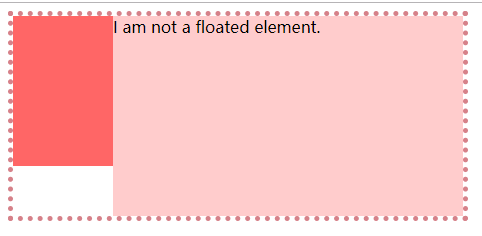
如果一个浮动元素后面跟着一个非浮动的元素,那么就会产生一个覆盖的现象,很多自适应的两栏布局就是这么做的。比如下图的效果,参考例子
<style>
.outer {
  border: 5px dotted rgb(214,129,137);
  width: 450px;
  position:  relative;
}
.aside {
        width: 100px;
        height: 150px;
        float: left;
        background: #f66;
    }

    .main {
        height: 200px;
        background: #fcc;
    }
</style>
<body>
  <div class="outer">
    <div class="aside"></div>
    <div class="main">I am a floated element.</div>
  </div>
</body>

由于两个box都处在同一个BFC中,都是以BFC边界为起点,如果两个box本身都具备BFC的话,会按顺序一个一个排列布局,我们这时可以触发main生成BFC。
    .main {
        height: 200px;
        background: #fcc;
        overflow: hidden;
    }
版权声明
本文为[flym_]所创,转载请带上原文链接,感谢
https://blog.csdn.net/u014689760/article/details/103467361
边栏推荐
猜你喜欢






随机推荐
x86架构初探之8086
连接orcale
《Attention in Natural Language Processing》翻译
golang实现MD5,SHA256,bcrypt加密
Urban emergency management - urban emergency communication command and dispatching system
应急医疗通讯解决方案|MESH无线自组网系统
Detailed explanation of unwind stack backtracking
go iris框架实现多服务Demo:通过(监听8083端口的)服务1中的接口启动(监听8084端口的)服务2
AMBA协议学习小记
电力行业巡检对讲通信系统
Intuitive understanding of torch nn. Unfold
SQL练习第一题
可视化常见绘图(一)堆叠图
带您遨游太空,美摄科技为航天创意小程序提供全面技术支持
SDC intelligent communication patrol management system of Nanfang investment building
unhandled system error, NCCL version 2.7.8
Are realrange and einsum really elegant
可视化之路(十一)matplotlib颜色详解
美摄助力百度“度咔剪辑”,让知识创作更容易
Warning "force fallback to CPU execution for node: gather_191" in onnxruntime GPU 1.7