当前位置:网站首页>C# 利用iTextSharp画PDF
C# 利用iTextSharp画PDF
2022-08-09 06:20:00 【喜欢看剧的小菇凉】
利用iTextSharp画PDF
友情提示:以下画PDF的代码是先创建PDF文件,然后往PDF里填充数据,如果不符合业务需求的,可以滑过
1、首先,添加iTextSharp包
2、添加PDF基类,供添加页脚、页眉、水印等
 /// <summary>
    /// Pdf处理基类
    /// </summary>
    public class PDFBase : PdfPageEventHelper
    {

        #region 属性
        private String _fontFilePathForHeaderFooter = Path.Combine(Environment.GetFolderPath(Environment.SpecialFolder.Fonts), "SIMHEI.TTF");
        /// <summary>
        /// 页眉/页脚所用的字体
        /// </summary>
        public String FontFilePathForHeaderFooter
        {

            get
            {

                return _fontFilePathForHeaderFooter;
            }

            set
            {

                _fontFilePathForHeaderFooter = value;
            }
        }

        private String _fontFilePathForBody = Path.Combine(Environment.GetFolderPath(Environment.SpecialFolder.Fonts), "SIMSUN.TTC,1");
        /// <summary>
        /// 正文内容所用的字体
        /// </summary>
        public String FontFilePathForBody
        {

            get {
     return _fontFilePathForBody; }
            set {
     _fontFilePathForBody = value; }
        }


        private PdfPTable _header;
        /// <summary>
        /// 页眉
        /// </summary>
        public PdfPTable Header
        {

            get {
     return _header; }
            private set {
     _header = value; }
        }

        private PdfPTable _footer;
        /// <summary>
        /// 页脚
        /// </summary>
        public PdfPTable Footer
        {

            get {
     return _footer; }
            private set {
     _footer = value; }
        }


        private BaseFont _baseFontForHeaderFooter;
        /// <summary>
        /// 页眉页脚所用的字体
        /// </summary>
        public BaseFont BaseFontForHeaderFooter
        {

            get {
     return _baseFontForHeaderFooter; }
            set {
     _baseFontForHeaderFooter = value; }
        }

        private BaseFont _baseFontForBody;
        /// <summary>
        /// 正文所用的字体
        /// </summary>
        public BaseFont BaseFontForBody
        {

            get {
     return _baseFontForBody; }
            set {
     _baseFontForBody = value; }
        }

        private Document _document;
        /// <summary>
        /// PDF的Document
        /// </summary>
        public Document Document
        {

            get {
     return _document; }
            private set {
     _document = value; }
        }

        #endregion


        public override void OnOpenDocument(PdfWriter writer, Document document)
        {

            try
            {

                BaseFontForHeaderFooter = BaseFont.CreateFont(FontFilePathForHeaderFooter, BaseFont.IDENTITY_H, BaseFont.NOT_EMBEDDED);
                BaseFontForBody = BaseFont.CreateFont(FontFilePathForBody, BaseFont.IDENTITY_H, BaseFont.NOT_EMBEDDED);
                Document = document;
            }
            catch (DocumentException de)
            {


            }
            catch (System.IO.IOException ioe)
            {


            }
        }

        #region GenerateHeader
        /// <summary>
        /// 生成页眉
        /// </summary>
        /// <param name="writer"></param>
        /// <returns></returns>
        public virtual PdfPTable GenerateHeader(iTextSharp.text.pdf.PdfWriter writer)
        {

            return null;
        }
        #endregion

        #region GenerateFooter
        /// <summary>
        /// 生成页脚
        /// </summary>
        /// <param name="writer"></param>
        /// <returns></returns>
        public virtual PdfPTable GenerateFooter(iTextSharp.text.pdf.PdfWriter writer)
        {

            BaseFont baseFont = BaseFontForHeaderFooter;
            iTextSharp.text.Font font = new iTextSharp.text.Font(baseFont, 10, iTextSharp.text.Font.NORMAL);

            PdfPTable footer = new PdfPTable(3);
            AddFooterCell(footer, "甲方项目经理:", font);
            AddFooterCell(footer, "乙方代表::", font);
            AddFooterCell(footer, "日期:", font);
            return footer;
        }

        private void AddFooterCell(PdfPTable foot, String text, iTextSharp.text.Font font)
        {

            PdfPCell cell = new PdfPCell();
            cell.BorderWidthTop = 2;
            cell.BorderWidthRight = 0;
            cell.BorderWidthBottom = 0;
            cell.BorderWidthLeft = 0;
            cell.Phrase = new Phrase(text, font);
            cell.HorizontalAlignment = iTextSharp.text.Element.ALIGN_CENTER;
            foot.AddCell(cell);
        }
        #endregion

        public override void OnEndPage(iTextSharp.text.pdf.PdfWriter writer, iTextSharp.text.Document document)
        {

            base.OnEndPage(writer, document);

            输出页眉
            //Header = GenerateHeader(writer);
            //Header.TotalWidth = document.PageSize.Width - 20f;
            /调用PdfTable的WriteSelectedRows方法。该方法以第一个参数作为开始行写入。
            /第二个参数-1表示没有结束行,并且包含所写的所有行。
            /第三个参数和第四个参数是开始写入的坐标x和y.
            //Header.WriteSelectedRows(0, -1, 10, document.PageSize.Height - 20, writer.DirectContent);

            //输出页脚
            Footer = GenerateFooter(writer);
            Footer.TotalWidth = document.PageSize.Width - 20f;
            Footer.WriteSelectedRows(0, -1, 10, document.PageSize.GetBottom(60), writer.DirectContent);
        }
    }
3、根据后台查出的数据画出PDF
///友情提示:在代码画PDF之前,最好自己先手动做一个范本(Excel),然后根据对应的行和列,代码画出
[AllowAnonymous]
public string BuildPdf(int srqrID)
{
//获取数据
var srqr = SRQR.getInfoByID(srqrID);
var errMSG = "";
try
{
if (srqr != null && srqr.ID > 0)
{
//文件保存路径为当前程序的路径+日期+文件名称
var urlHelper = new UrlHelper(this.Request.RequestContext);
string hostPath = urlHelper.Content("~/");
var dt = DateTime.Now;
string fileHost = Server.MapPath("/") + "doc\\SRQRAttachments\\" + dt.ToString("yyyyMMdd") + "\\";
if (!Directory.Exists(fileHost))
{
Directory.CreateDirectory(fileHost);
}
string fileName = string.Format("{0}-{1}.pdf", "收入确认单审批表", srqr.DJBH);//文件名称
string filePath = fileHost + fileName;//文件路径
string title = string.Format("收入确认单审批表");
BaseFont bf = BaseFont.CreateFont(@"C:\Windows\Fonts\SIMHEI.TTF", BaseFont.IDENTITY_H, BaseFont.NOT_EMBEDDED);
BaseFont fs = BaseFont.CreateFont(@"C:\Windows\Fonts\SIMFANG.TTF", BaseFont.IDENTITY_H, BaseFont.NOT_EMBEDDED);
Font fonta = new Font(bf, 20, Font.BOLD, BaseColor.BLACK);
Font fontb = new Font(bf, 12, Font.NORMAL, BaseColor.BLACK);
Font fontc = new Font(fs, 20, Font.BOLD, BaseColor.BLACK);
Rectangle pageSize = new Rectangle(1600, 1000);
Document document = new Document(pageSize, 20, 20, 50, 80);
PdfWriter writer = PdfWriter.GetInstance(document, new FileStream(filePath, FileMode.Create));
writer.PageEvent = new PDFBase();
document.Open();
Paragraph p1 = new Paragraph(title, fontc);
p1.Alignment = Element.ALIGN_CENTER;
document.Add(p1);
Paragraph p2 = new Paragraph(" ", fontc);
p2.Alignment = Element.ALIGN_CENTER;
document.Add(p2);
document.AddTitle(title);
//设置列的宽度,要画的PDF有多少列,就写多少个
PdfPTable table = new PdfPTable(new float[] {
20, 10, 10, 10, 10, 10, 10, 20, 10, 10, 10, 20, 10, 10, 10, 10 });
table.TotalWidth = 1200;
table.LockedWidth = true;
#region 第一行
PdfPCell row1_Cell1 = new PdfPCell(new Paragraph("单据内码", fontc));
row1_Cell1.HorizontalAlignment = Element.ALIGN_CENTER;
row1_Cell1.VerticalAlignment = Element.ALIGN_MIDDLE;
table.AddCell(row1_Cell1);
PdfPCell row1_Cell1_value = new PdfPCell(new Paragraph(srqr.DJNM, fontb));
row1_Cell1_value.HorizontalAlignment = Element.ALIGN_CENTER;
row1_Cell1_value.VerticalAlignment = Element.ALIGN_MIDDLE;
row1_Cell1_value.Colspan = 6;
table.AddCell(row1_Cell1_value);
PdfPCell row1_Cell2 = new PdfPCell(new Paragraph("单据编号", fontc));
row1_Cell2.HorizontalAlignment = Element.ALIGN_CENTER;
row1_Cell2.VerticalAlignment = Element.ALIGN_MIDDLE;
table.AddCell(row1_Cell2);
PdfPCell row1_Cell2_value = new PdfPCell(new Paragraph(srqr.DJBH, fontb));
row1_Cell2_value.HorizontalAlignment = Element.ALIGN_CENTER;
row1_Cell2_value.VerticalAlignment = Element.ALIGN_MIDDLE;
row1_Cell2_value.Colspan = 3;
table.AddCell(row1_Cell2_value);
PdfPCell row1_Cell3 = new PdfPCell(new Paragraph("行政组织", fontc));
row1_Cell3.HorizontalAlignment = Element.ALIGN_CENTER;
row1_Cell3.VerticalAlignment = Element.ALIGN_MIDDLE;
table.AddCell(row1_Cell3);
PdfPCell row1_Cell3_value = new PdfPCell(new Paragraph(srqr.XZZZName, fontb));
row1_Cell3_value.HorizontalAlignment = Element.ALIGN_CENTER;
row1_Cell3_value.VerticalAlignment = Element.ALIGN_MIDDLE;
row1_Cell3_value.Colspan = 4;
table.AddCell(row1_Cell3_value);
#endregion
#region 第二行
PdfPCell row2_Cell1 = new PdfPCell(new Paragraph("行政部门", fontc));
row2_Cell1.HorizontalAlignment = Element.ALIGN_CENTER;
row2_Cell1.VerticalAlignment = Element.ALIGN_MIDDLE;
table.AddCell(row2_Cell1);
PdfPCell row2_Cell1_value = new PdfPCell(new Paragraph(srqr.XZBMName, fontb));
row2_Cell1_value.HorizontalAlignment = Element.ALIGN_CENTER;
row2_Cell1_value.VerticalAlignment = Element.ALIGN_MIDDLE;
row2_Cell1_value.Colspan = 6;
table.AddCell(row2_Cell1_value);
PdfPCell row2_Cell2 = new PdfPCell(new Paragraph("所属单位", fontc));
row2_Cell2.HorizontalAlignment = Element.ALIGN_CENTER;
row2_Cell2.VerticalAlignment = Element.ALIGN_MIDDLE;
table.AddCell(row2_Cell2);
PdfPCell row2_Cell2_value = new PdfPCell(new Paragraph(srqr.OwnerDeptName, fontb));
row2_Cell2_value.HorizontalAlignment = Element.ALIGN_CENTER;
row2_Cell2_value.VerticalAlignment = Element.ALIGN_MIDDLE;
row2_Cell2_value.Colspan = 3;
table.AddCell(row2_Cell2_value);
PdfPCell row2_Cell3 = new PdfPCell(new Paragraph("所属部门", fontc));
row2_Cell3.HorizontalAlignment = Element.ALIGN_CENTER;
row2_Cell3.VerticalAlignment = Element.ALIGN_MIDDLE;
table.AddCell(row2_Cell3);
PdfPCell row2_Cell3_value = new PdfPCell(new Paragraph(srqr.OwnerProName, fontb));
row2_Cell3_value.HorizontalAlignment = Element.ALIGN_CENTER;
row2_Cell3_value.VerticalAlignment = Element.ALIGN_MIDDLE;
row2_Cell3_value.Colspan = 4;
table.AddCell(row2_Cell3_value);
#endregion
#region 第三行
PdfPCell row3_Cell1 = new PdfPCell(new Paragraph("收入类型", fontc));
row3_Cell1.HorizontalAlignment = Element.ALIGN_CENTER;
row3_Cell1.VerticalAlignment = Element.ALIGN_MIDDLE;
table.AddCell(row3_Cell1);
PdfPCell row3_Cell1_value = new PdfPCell(new Paragraph(srqr.SRLXName, fontb));
row3_Cell1_value.HorizontalAlignment = Element.ALIGN_CENTER;
row3_Cell1_value.VerticalAlignment = Element.ALIGN_MIDDLE;
row3_Cell1_value.Colspan = 6;
table.AddCell(row3_Cell1_value);
PdfPCell row3_Cell2 = new PdfPCell(new Paragraph("纳税人类型", fontc));
row3_Cell2.HorizontalAlignment = Element.ALIGN_CENTER;
row3_Cell2.VerticalAlignment = Element.ALIGN_MIDDLE;
table.AddCell(row3_Cell2);
PdfPCell row3_Cell2_value = new PdfPCell(new Paragraph(srqr.NSRLXName, fontb));
row3_Cell2_value.HorizontalAlignment = Element.ALIGN_CENTER;
row3_Cell2_value.VerticalAlignment = Element.ALIGN_MIDDLE;
row3_Cell2_value.Colspan = 3;
table.AddCell(row3_Cell2_value);
PdfPCell row3_Cell3 = new PdfPCell(new Paragraph("是否主营", fontc));
row3_Cell3.HorizontalAlignment = Element.ALIGN_CENTER;
row3_Cell3.VerticalAlignment = Element.ALIGN_MIDDLE;
table.AddCell(row3_Cell3);
PdfPCell row3_Cell3_value = new PdfPCell(new Paragraph(srqr.SFZYName, fontb));
row3_Cell3_value.HorizontalAlignment = Element.ALIGN_CENTER;
row3_Cell3_value.VerticalAlignment = Element.ALIGN_MIDDLE;
row3_Cell3_value.Colspan = 4;
table.AddCell(row3_Cell3_value);
#endregion
#region 第四行
PdfPCell row4_Cell1 = new PdfPCell(new Paragraph("制单人", fontc));
row4_Cell1.HorizontalAlignment = Element.ALIGN_CENTER;
row4_Cell1.VerticalAlignment = Element.ALIGN_MIDDLE;
table.AddCell(row4_Cell1);
PdfPCell row4_Cell1_value = new PdfPCell(new Paragraph(srqr.ZDRName, fontb));
row4_Cell1_value.HorizontalAlignment = Element.ALIGN_CENTER;
row4_Cell1_value.VerticalAlignment = Element.ALIGN_MIDDLE;
row4_Cell1_value.Colspan = 6;
table.AddCell(row4_Cell1_value);
PdfPCell row4_Cell2 = new PdfPCell(new Paragraph("单据日期", fontc));
row4_Cell2.HorizontalAlignment = Element.ALIGN_CENTER;
row4_Cell2.VerticalAlignment = Element.ALIGN_MIDDLE;
table.AddCell(row4_Cell2);
PdfPCell row4_Cell2_value = new PdfPCell(new Paragraph((srqr.DJRQ != null ? srqr.DJRQ.Value.ToString("yyyy-MM-dd") : ""), fontb));
row4_Cell2_value.HorizontalAlignment = Element.ALIGN_CENTER;
row4_Cell2_value.VerticalAlignment = Element.ALIGN_MIDDLE;
row4_Cell2_value.Colspan = 3;
table.AddCell(row4_Cell2_value);
PdfPCell row4_Cell3 = new PdfPCell(new Paragraph("单据状态", fontc));
row4_Cell3.HorizontalAlignment = Element.ALIGN_CENTER;
row4_Cell3.VerticalAlignment = Element.ALIGN_MIDDLE;
table.AddCell(row4_Cell3);
PdfPCell row4_Cell3_value = new PdfPCell(new Paragraph(srqr.DJZTName, fontb));
row4_Cell3_value.HorizontalAlignment = Element.ALIGN_CENTER;
row4_Cell3_value.VerticalAlignment = Element.ALIGN_MIDDLE;
row4_Cell3_value.Colspan = 4;
table.AddCell(row4_Cell3_value);
#endregion
#region 第五行
PdfPCell row5_Cell1 = new PdfPCell(new Paragraph("本位币币种", fontc));
row5_Cell1.HorizontalAlignment = Element.ALIGN_CENTER;
row5_Cell1.VerticalAlignment = Element.ALIGN_MIDDLE;
table.AddCell(row5_Cell1);
PdfPCell row5_Cell1_value = new PdfPCell(new Paragraph(srqr.BWBName, fontb));
row5_Cell1_value.HorizontalAlignment = Element.ALIGN_CENTER;
row5_Cell1_value.VerticalAlignment = Element.ALIGN_MIDDLE;
row5_Cell1_value.Colspan = 6;
table.AddCell(row5_Cell1_value);
PdfPCell row5_Cell2 = new PdfPCell(new Paragraph("计税方式", fontc));
row5_Cell2.HorizontalAlignment = Element.ALIGN_CENTER;
row5_Cell2.VerticalAlignment = Element.ALIGN_MIDDLE;
table.AddCell(row5_Cell2);
PdfPCell row5_Cell2_value = new PdfPCell(new Paragraph(srqr.JSFSName, fontb));
row5_Cell2_value.HorizontalAlignment = Element.ALIGN_CENTER;
row5_Cell2_value.VerticalAlignment = Element.ALIGN_MIDDLE;
row5_Cell2_value.Colspan = 3;
table.AddCell(row5_Cell2_value);
PdfPCell row5_Cell3 = new PdfPCell(new Paragraph("收入确认金额", fontc));
row5_Cell3.HorizontalAlignment = Element.ALIGN_CENTER;
row5_Cell3.VerticalAlignment = Element.ALIGN_MIDDLE;
table.AddCell(row5_Cell3);
PdfPCell row5_Cell3_value = new PdfPCell(new Paragraph((srqr.SRQRJEBB ?? 0) == 0 ? "" : srqr.SRQRJEBB.Value.ToString("F2"), fontb));
row5_Cell3_value.HorizontalAlignment = Element.ALIGN_CENTER;
row5_Cell3_value.VerticalAlignment = Element.ALIGN_MIDDLE;
row5_Cell3_value.Colspan = 4;
table.AddCell(row5_Cell3_value);
#endregion
#region 第六行
PdfPCell row6_Cell1 = new PdfPCell(new Paragraph("附件张数", fontc));
row6_Cell1.HorizontalAlignment = Element.ALIGN_CENTER;
row6_Cell1.VerticalAlignment = Element.ALIGN_MIDDLE;
table.AddCell(row6_Cell1);
PdfPCell row6_Cell1_value = new PdfPCell(new Paragraph((srqr.DJFJZS ?? 0).ToString(), fontb));
row6_Cell1_value.HorizontalAlignment = Element.ALIGN_CENTER;
row6_Cell1_value.VerticalAlignment = Element.ALIGN_MIDDLE;
row6_Cell1_value.Colspan = 6;
table.AddCell(row6_Cell1_value);
#endregion
#region 第七行
PdfPCell row7_Cell1 = new PdfPCell(new Paragraph("单据摘要", fontc));
row7_Cell1.HorizontalAlignment = Element.ALIGN_CENTER;
row7_Cell1.VerticalAlignment = Element.ALIGN_MIDDLE;
row7_Cell1.Rowspan = 2;
table.AddCell(row7_Cell1);
PdfPCell row7_Cell1_value = new PdfPCell(new Paragraph(srqr.DJZY, fontb));
row7_Cell1_value.HorizontalAlignment = Element.ALIGN_LEFT;
row7_Cell1_value.VerticalAlignment = Element.ALIGN_MIDDLE;
row7_Cell1_value.Colspan = 15;
row7_Cell1_value.Rowspan = 2;
table.AddCell(row7_Cell1_value);
#endregion
#region 第八行
PdfPCell row8_Cell1 = new PdfPCell(new Paragraph("报账事由", fontc));
row8_Cell1.HorizontalAlignment = Element.ALIGN_CENTER;
row8_Cell1.VerticalAlignment = Element.ALIGN_MIDDLE;
row8_Cell1.Rowspan = 2;
table.AddCell(row8_Cell1);
PdfPCell row8_Cell1_value = new PdfPCell(new Paragraph(srqr.BZSY, fontb));
row8_Cell1_value.HorizontalAlignment = Element.ALIGN_LEFT;
row8_Cell1_value.VerticalAlignment = Element.ALIGN_MIDDLE;
row8_Cell1_value.Colspan = 15;
row8_Cell1_value.Rowspan = 2;
table.AddCell(row8_Cell1_value);
#endregion
var workerList = Wf_QueryDAL.Wf_GetEffectiveTrackList(srqr.WorkID ?? 0);
if (workerList != null && workerList.Count > 0)
{
#region 第九行
PdfPCell row9_Cell1 = new PdfPCell(new Paragraph("审批记录", fontc));
row9_Cell1.HorizontalAlignment = Element.ALIGN_CENTER;
row9_Cell1.VerticalAlignment = Element.ALIGN_MIDDLE;
row9_Cell1.Colspan = 16;
table.AddCell(row9_Cell1);
#endregion
foreach (var item in workerList)
{
#region 审批处理人相关
PdfPCell spRow_Cell1 = new PdfPCell(new Paragraph(item.NDFromT, fontc));
spRow_Cell1.HorizontalAlignment = Element.ALIGN_CENTER;
spRow_Cell1.VerticalAlignment = Element.ALIGN_MIDDLE;
table.AddCell(spRow_Cell1);
PdfPCell spRow_Cell2 = new PdfPCell(new Paragraph(item.EmpFromT, fontb));
spRow_Cell2.HorizontalAlignment = Element.ALIGN_CENTER;
spRow_Cell2.VerticalAlignment = Element.ALIGN_MIDDLE;
spRow_Cell2.Colspan = 6;
table.AddCell(spRow_Cell2);
PdfPCell spRow_Cell3 = new PdfPCell(new Paragraph(item.NodeData, fontb));
spRow_Cell3.HorizontalAlignment = Element.ALIGN_CENTER;
spRow_Cell3.VerticalAlignment = Element.ALIGN_MIDDLE;
spRow_Cell3.Colspan = 4;
table.AddCell(spRow_Cell3);
PdfPCell spRow_Cell4 = new PdfPCell(new Paragraph(item.RDT.Substring(0, 10), fontb));
spRow_Cell4.HorizontalAlignment = Element.ALIGN_CENTER;
spRow_Cell4.VerticalAlignment = Element.ALIGN_MIDDLE;
spRow_Cell4.Colspan = 5;
table.AddCell(spRow_Cell4);
#endregion
}
}
document.Add(table);
document.Close();
writer.Close();
//给PDF加水印
// SetWatermark(filePath, "这是水印");
//如果需要单独保存附件的一些信息,比如大小等,可利用FileInfo
//FileInfo fileInfo = new FileInfo(filePath);
}
}
catch (Exception ex)
{
//对异常进行处理
}
return errMSG;
}
4、加水印
 /// <summary>
        /// 给PDF加水印
        /// </summary>
        /// <param name="outputfilepath">PDF路径</param>
        /// <param name="waterMarkName">需要加的水印</param>
        /// <returns></returns>
private void SetWatermark(string outputfilepath, string waterMarkName)
        {

            PdfReader pdfReader = null;
            PdfStamper pdfStamper = null;

            try
            {

                pdfReader = new PdfReader(outputfilepath);
                pdfStamper = new PdfStamper(pdfReader, new FileStream(outputfilepath, FileMode.Create));
                // 设置密码
                //pdfStamper.SetEncryption(false,userPassWord, ownerPassWord, permission);

                int total = pdfReader.NumberOfPages + 1;
                PdfContentByte content;
                BaseFont font = BaseFont.CreateFont(@"C:\WINDOWS\Fonts\SIMFANG.TTF", BaseFont.IDENTITY_H, BaseFont.EMBEDDED);
                PdfGState gs = new PdfGState();
                gs.FillOpacity = 0.3f;//透明度

                int waterMarkNameLenth = waterMarkName.Length;
                char c;
                int rise = 0;
                int span = 15;
                int fontSize = 20;
                int height = 500;
                int width = 1800;
                string spanString = " ";//水平位移
                for (int i = 1; i < total; i++)
                {

                    rise = waterMarkNameLenth * span;
                    //content = pdfStamper.GetOverContent(i);//在内容上方加水印
                    content = pdfStamper.GetUnderContent(i);//在内容下方加水印
                    content.SetGState(gs);
                    content.BeginText();
                    content.SetColorFill(BaseColor.DARK_GRAY);
                    content.SetFontAndSize(font, fontSize);
                    int heightNumbert = (int)Math.Ceiling((decimal)height / (decimal)rise);//垂直重复的次数,进一发
                    int panleWith = (fontSize + span) * waterMarkNameLenth;
                    int widthNumber = (int)Math.Ceiling((decimal)width / (decimal)panleWith);//水平重复次数

                    // 设置水印文字字体倾斜 开始
                    for (int w = 0; w < widthNumber; w++)
                    {

                        for (int h = 1; h <= heightNumbert; h++)
                        {

                            int yleng = rise * h;
                            content.SetTextMatrix(w * panleWith, yleng);//x,y设置水印开始的绝对左边,以左下角为x,y轴的起点
                            for (int k = 0; k < waterMarkNameLenth; k++)
                            {

                                content.SetTextRise(yleng);//指定的y轴值处添加
                                c = waterMarkName[k];
                                content.ShowText(c + spanString);
                                yleng -= span;
                            }
                        }
                    }
                    content.EndText();
                }
            }
            catch (Exception ex)
            {

                throw ex;
            }
            finally
            {

                if (pdfStamper != null)
                    pdfStamper.Close();

                if (pdfReader != null)
                    pdfReader.Close();
            }
        }
5、效果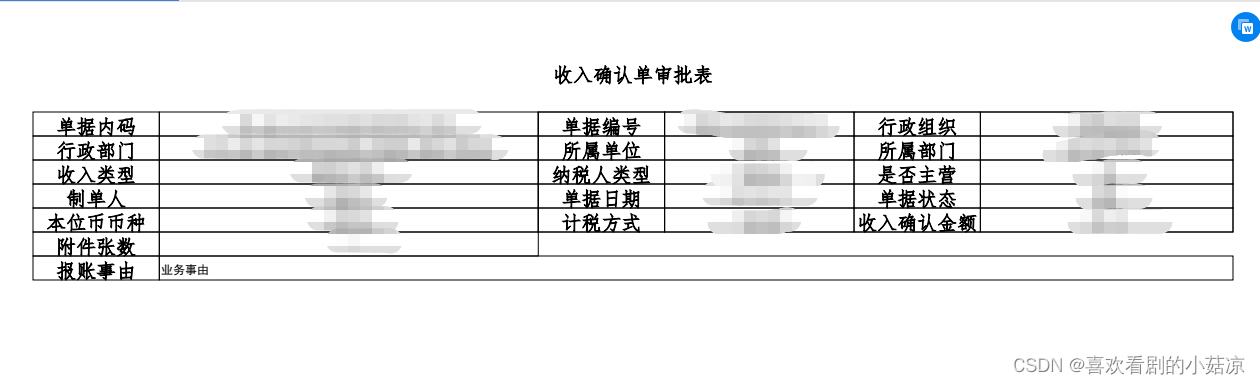
边栏推荐
- 中英文说明书丨TRC 交替醇(Catalogue NumberA575760)
- kubernetes security
- How to find package information and pin definitions for NXP S32K1xx series microcontrollers
- 弄潮 Web3 欧易OKX全球「抢人」
- qt send mail program
- 深度学习-神经网络原理2
- Cysteine/Galactose/Perylenediimide Functionalized Fe3O4 Fe3O4 Nanomaterials | Scientific Research Reagents
- 盒子模型中垂直分布的基本内容
- 获取开发版安全码SHA1时遇到的报错
- S7-200SMART PLC Modbus TCP通信
猜你喜欢
 [email protected]@BSABiS纳米颗粒)|树状大分子稳定的硫化铋纳米颗粒|科研试剂"/>
四氧化三铁/硫化铋纳米复合材料([email protected]@BSABiS纳米颗粒)|树状大分子稳定的硫化铋纳米颗粒|科研试剂

Molybdenum disulfide/hafnium dioxide composite nanomaterials (MoS2/HfO2) | tantalum-doped hafnium dioxide nanoparticles (Qi Yue bio)

废品回收小程序、APP UNIAPP开发带有用户端和回收员端
VScode安装了ESlint以后不管用、不生效的解决办法

SiO2/KH550修饰四氧化三铁纳米磁性颗粒|PDA包裹四氧化三铁磁性纳米颗粒(科研级)
![[mysql database] the use of mysql database](/img/5a/eee7cf35dc5caa0123d1cbbbf4c0ba.png)
[mysql database] the use of mysql database

数据中台项目前期总结

Gao Zelong, a famous digital collection expert and founder of the Digital Collection Conference, was interviewed by China Entrepreneur Magazine

sqlserver导入数据类型问题

Harbor Enterprise Mirror Warehouse Construction
随机推荐
redis 运行lua 脚本 出现Invalid argument(s)
Three Musketeers Advanced
Gao Zelong, a famous digital collection expert and founder of the Digital Collection Conference, was interviewed by China Entrepreneur Magazine
多行字符串排序在线工具
Data center project preliminary summary
Molybdenum disulfide/hafnium dioxide composite nanomaterials (MoS2/HfO2) | tantalum-doped hafnium dioxide nanoparticles (Qi Yue bio)
Functions and differences of command, shell, raw, script modules, application of file, copy, fetch, synchronize
The 24th day of the special assault version of the sword offer
牛客每日刷题之链表
A test engineer with an annual salary of 35W was laid off. Personal experience: advice that you have to listen to
具有CT造影功能的硫化铋纳米棒|硫化铋-锌原卟啉复合材料(PAMAM/Bi2S3复合纳米粒子)
Program Performance Analysis - Complexity Analysis
IQ Products巨细胞病毒CMV感染检测试剂盒的特征和应用
二硫化钼/二氧化铪的复合纳米材料(MoS2/HfO2)|钽掺杂二氧化铪纳米颗粒(齐岳bio)
手把手教你用C语言制作七夕流星雨---优雅永不过时(详细教程)
Open the threshold of the digital age, Metaverse NFT mall develops solutions
[R language] Normalize and organize files into folders of various file types
Remember a nest.js route that matches all the path problems that follow
How to pass a two-dimensional array to a function in C language?
Adds, deletes, searches, and changes the leading doubly circular linked list (implemented in C language)