OpenRooms Dataset Release
Zhengqin Li, Ting-Wei Yu, Shen Sang, Sarah Wang, Meng Song, Yuhan Liu, Yu-Ying Yeh, Rui Zhu, Nitesh Gundavarapu, Jia Shi, Sai Bi, Zexiang Xu, Hong-Xing Yu, Kalyan Sunkavalli, Miloš Hašan, Ravi Ramamoorthi, Manmohan Chandraker
Dataset Overview

This is the webpage for downloading the OpenRooms dataset. We will first introduce the rendered images and various ground-truths. Later, we will introduce how to render your own images based on the OpenRooms dataset creation pipeline. For each type of data, we offer two kinds of formats, zip files and individual folders, so that users can choose whether to download the whole dataset more efficiently or download individual folders for different scenes. To download the file, we recommend the tool Rclone, otherwise users may suffer from slow downloading speed and instability. If you have any questions, please email to [email protected].
We render six versions of images for all the scenes. Those rendered results are saved in 6 folders: main_xml, main_xml1, mainDiffMat_xml, mainDiffMat_xml1, mainDiffLight_xml and mainDiffLight_xml1. All 6 versions are built with the same CAD models. main_xml, mainDiffMat_xml, mainDiffLight_xml share one set of camera views while main_xml1, mainDiffMat_xml1 and mainDiffLight_xml1 share the other set of camera views. main_xml(1) and mainDiffMat_xml(1) have the same lighting but different materials while main_xml(1) and mainDiffLight_xml(1) have the same materials but different lighting. Both the lighting and material configuration of main_xml and main_xml1 are different. We believe this configuration can potentially help us develope novel applications for image editing. Two example scenes from main_xml, mainDiffMat_xml and mainDiffLight_xml are shown in the below.
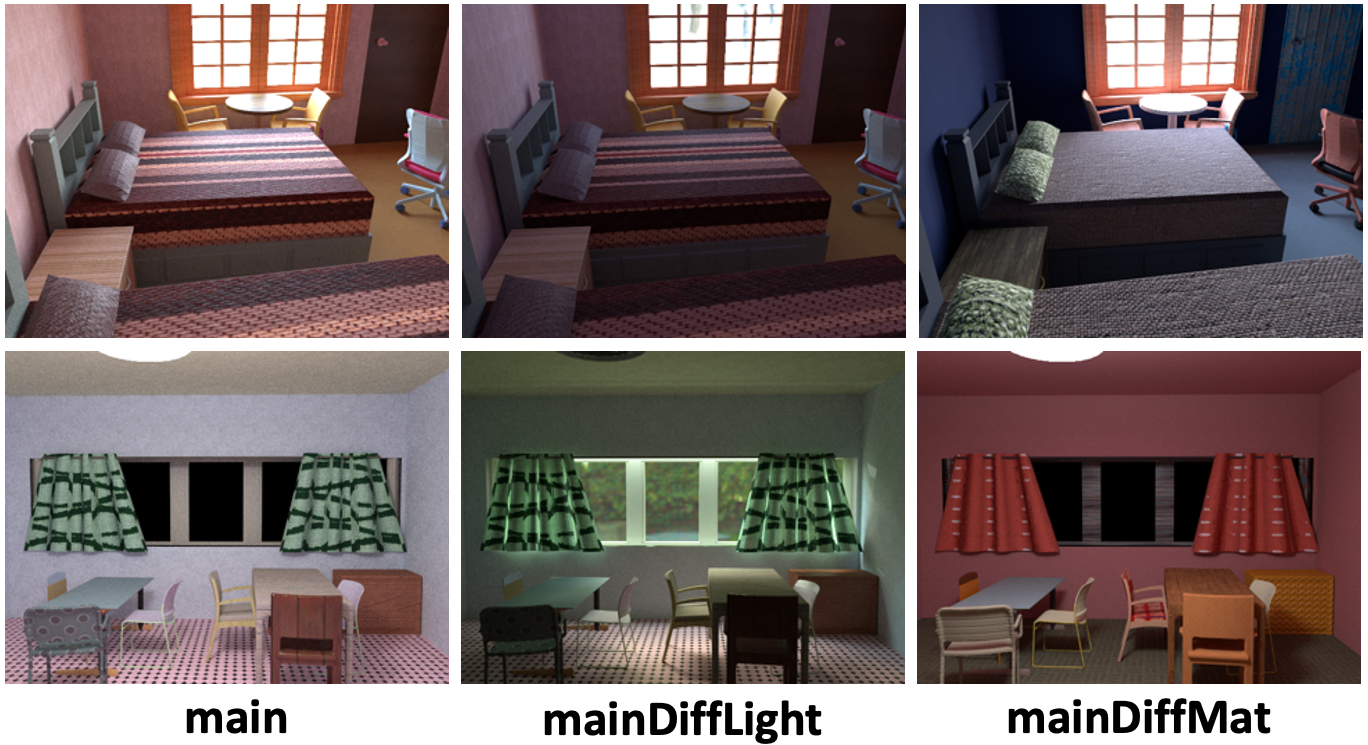
News: We currently only release the rendered images of the dataset. All ground-truths will be released in a few days. The dataset creation pipeline will also be released soon.
Rendered Images and Ground-truths
All rendered images and the corresponding ground-truths are saved in folder data/rendering/data/. In the following, we will detail each type of rendered data and how to read and interpret them. Two example scenes with images and all ground-truths are included in Demo and Demo.zip.
-
Images and Images.zip: The 480 × 640 HDR images
im_*.hdr, which can be read with the python command.im = cv2.imread('im_1.hdr', -1)[:, :, ::-1]
We render images for
main_xml(1),mainDiffMat_xml(1)andmainDiffLight_xml(1). -
Material and Material.zip: The 480 × 640 diffuse albedo maps
imbaseColor_*.pngand roughness mapimroughness_*.png. Note that the diffuse albedo map is saved in sRGB space. To load it into linear RGB space, we can use the following python commands. The roughness map is saved in linear space and can be read directly.im = cv2.imread('imbaseColor_1.hdr')[:, :, ::-1] im = (im.astype(np.float32 ) / 255.0) ** (2.2)
We only render the diffuse albedo maps and roughness maps for
main_xml(1)andmainDiffMat_xml(1)becausemainDiffLight_xml(1)share the same material maps with themain_xml(1). -
Geometry and Geometry.zip: The 480 × 640 normal maps
imnomral_*.pngand depth mapsimdepth_*.dat. The R, G, B channel of the normal map corresponds to right, up, backward direction of the image plane. To load the depth map, we can use the following python commands.with open('imdepth_1.dat', 'rb') as fIn: # Read the height and width of depth hBuffer = fIn.read(4) height = struct.unpack('i', hBuffer)[0] wBuffer = fIn.read(4) width = struct.unpack('i', wBuffer)[0] # Read depth dBuffer = fIn.read(4 * width * height ) depth = np.array( struct.unpack('f' * height * width, dBuffer ), dtype=np.float32 ) depth = depth.reshape(height, width)
We render normal maps for
main_xml(1)andmainDiffMat_xml(1), and depth maps formain_xml(1). -
Mask and Mask.zip: The 480 × 460 grey scale mask
immask_*.pngfor light sources. The pixel value 0 represents the region of environment maps. The pixel value 0.5 represents the region of lamps. Otherwise, the pixel value will be 1. We render the ground-truth masks formain_xml(1)andmainDiffLight_xml(1). -
SVLighting: The (120 × 16) × (160 × 32) per-pixel environment maps
imenv_*.hdr. The spatial resolution is 120 x 160 while the environment map resolution is 16 x 32. To read the per-pixel environment maps, we can use the following python commands.# Read the envmap of resolution 1920 x 5120 x 3 in RGB format env = cv2.imread('imenv_1', -1)[:, :, ::-1] # Reshape and permute the per-pixel environment maps env = env.reshape(120, 16, 160, 32, 3) env = env.transpose(0, 2, 1, 3, 4)
We render per-pixel environment maps for
main_xml(1),mainDiffMat_xml(1)andmainDiffLight_xml(1). Since the total size of per-pixel environment maps is 4.0 TB, we do not provide an extra .zip format for downloading. Please consider using the tool Rclone if you hope to download all the per-pixel environment maps. -
SVSG and SVSG.zip: The ground-truth spatially-varying spherical Gaussian (SG) parameters
imsgEnv_*.h5, computed from this optimization code. We generate the ground-truth SG parameters formain_xml(1),mainDiffMat_xml(1)andmainDiffLight_xml(1). For the detailed format, please refer to the optimization code. -
Shading and Shading.zip: The 120 × 160 diffuse shading
imshading_*.hdrcomputed by intergrating the per-pixel environment maps. We render shading formain_xml(1),mainDiffMat_xml(1)andmainDiffLight_xml(1). -
SVLightingDirect and SVLightingDirect.zip: The (30 × 16) × (40 × 32) per-pixel environment maps with direct illumination
imenvDirect_*.hdronly. The spatial resolution is 30 × 40 while the environment maps resolution is 16 × 32. The direct per-pixel environment maps can be load the same way as the per-pixel environment maps. We only render direct per-pixel environment maps formain_xml(1)andmainDiffLight_xml(1)because the direct illumination ofmainDiffMat_xml(1)is the same asmain_xml(1). -
ShadingDirect and ShadingDirect.zip: The 120 × 160 direct shading
imshadingDirect_*.rgbe. To load the direct shading, we can use the following python command.im = cv2.imread('imshadingDirect_1.rgbe', -1)[:, :, ::-1]
Again, we only render direct shading for
main_xml(1)andmainDiffLight_xml(1) -
SemanticLabel and SemanticLabel.zip: The 480 × 640 semantic segmentation label
imsemLabel_*.npy. We provide semantic labels for 45 classes of commonly seen objects and layout for indoor scenes. The 45 classes can be found insemanticLabels.txt. We only render the semantic labels formain_xml(1). -
LightSource and LightSource.zip: The light source information, including geometry, shadow and direct shading of each light source. In each scene directory,
light_xdirectory corresponds toim_x.hdr, where x = 0, 1, 2, 3 ... In eachlight_xdirectory, you will see files with numbers in their names. The numbers correspond to the light source ID, i.e. if the IDs are from 0 to 4, then there are 5 light sources in this scene.- Geometry: We provide geometry annotation for windows and lamps
box_*.datformain_xml(1)only. To read the annotation, we can use the following python commmands.There are 3 items saved in the dictionary, which we list blow.with open('box_0.dat', 'rb') as fIn: info = pickle.load(fIn )
- isWindow: True if the light source is a window, false if the light source is a lamp.
- box3D: The 3D bounding box of the light source, including center
center, orientationxAxis, yAxis, zAxisand sizexLen, yLen, zLen. - box2D: The 2D bounding box of the light source on the image plane
x1, y1, x2, y2.
- Mask: The 120 × 160 2D binary masks for light sources
mask*.png. We only provide the masks formain_xml(1). - Direct shading: The 120 × 160 direct shading for each light source
imDS*.rgbe. We provide the direction shading formain_xml(1)andmainDiffLight_xml(1). - Direct shading without occlusion: The 120 × 160 direct shading with outocclusion for each light source
imNoOcclu*.rgbe. We provide the direction shading formain_xml(1)andmainDiffLight_xml(1). - Shadow: The 120 × 160 shadow maps for each light source
imShadow*.png. We render the shadow map formain_xml(1)only.
- Geometry: We provide geometry annotation for windows and lamps
-
Friction and Friction.zip: The friction coefficients computed from our SVBRDF following the method proposed by Zhang et al. We compute the friction coefficients for
main_xml(1)andmainDiffLight_xml(1)
Dataset Creation
- GPU renderer: The Optix-based GPU path tracer for rendering. Please refer to the github repository for detailed instructions.
- Tileable texture synthesis: The tielable texture synthesis code to make sure that the SVBRDF maps are tileable. Please refer to the github repository for more details.
- Spherical gaussian optimization: The code to fit per-pixel environment map with spherical Gaussian lobes, using LBFGS optimization. Please refer to the github repository for detailed instructions.
The CAD models, environment maps, materials and code required to recreate the dataset will be released soon.
Applications
- Inverse Rendering: Trained on our dataset, we achieved state-of-the-arts on some inverse rendering metrics, especially the lighting estimation. Please refer to our github repository for the training and testing code.
- Robotics: Our robotics applications will come soon.
Related Datasets
The OpenRooms dataset is built on the datasets listed below. We thank their creators for the excellent contribution. Please refer to prior datasets for license issues and terms of use if you hope to use them to create your own dataset.
- ScanNet dataset: The real 3D scans of indoor scenes.
- Scan2cad dataset: The alignment of CAD models to the scanned point clouds.
- Laval outdoor lighting dataset: HDR outdoor environment maps
- HDRI Haven lighting dataset: HDR outdoor environment maps
- PartNet dataset: CAD models
- Adobe Stock: High-quality microfacet SVBRDF texture maps. Please license materials from the Adobe website.

 1 Nov 10, 2021
 24 Nov 30, 2022
 36 Dec 31, 2022
 46 Sep 20, 2022
 0 Jan 20, 2022
 45 Dec 13, 2022
 77 Dec 27, 2022
 31 Sep 04, 2022
 24 Dec 17, 2022
 3 Mar 09, 2022
 253 Dec 27, 2022
 2 Feb 11, 2022
 38 Dec 06, 2022
 3 Mar 30, 2022
 65 Dec 22, 2022
 78 Dec 19, 2022
 164 Dec 30, 2022
 27 Sep 19, 2022
 3 Nov 11, 2022
 28 Dec 10, 2022