当前位置:网站首页>【MinIO】Using tools
【MinIO】Using tools
2022-08-10 13:34:00 【Ho, senior】
一、安装minio
docker pull minio/minio
创建文件夹
mkdir /root/minio/data
mkdir /root/minio/config
赋予权限
chmod  -R 777 /root/minio/data
chmod  -R 777 /root/minio/config
docker run -it -p 9000:9000 -p 9090:9090 \
--name minio \
-d --restart=always \
-e "MINIO_ACCESS_KEY=minioadmin" \
-e "MINIO_SECRET_KEY=minioadmin" \
-e TZ=Asia/Shanghai --privileged=true \
-v /root/minio/data:/data \
-v /root/minio/config:/root/.minio \
minio/minio server \
/data --console-address ":9090" -address ":9000"
二、导入依赖
 <!-- MinIO -->
 <dependency>
	<groupId>io.minio</groupId>
	<artifactId>minio</artifactId>
	<version>${
    minio.version}</version>
</dependency>
<dependency>
	<groupId>com.squareup.okhttp3</groupId>
	<artifactId>okhttp</artifactId>
	<version>${
    okhttp.version}</version>
</dependency>
三、配置yml文件
# MinIO 配置
minio:
  endpoint: http://xxx.xx.xxx.xxx:9000       # MinIO服务地址
  fileHost: http://xxx.xx.xxx.xxx:9000       # 文件地址host
  bucketName: xxxx                           # 存储桶bucket名称
  accessKey: minioadmin                      # 用户名(默认的)
  secretKey: minioadmin                      # 密码(默认的)
  imgSize: 1024                              # 图片大小限制,单位:m
  fileSize: 1024
四、MinIO工具类
import io.minio.*;
import io.minio.http.Method;
import io.minio.messages.Bucket;
import io.minio.messages.DeleteObject;
import io.minio.messages.Item;
import lombok.extern.slf4j.Slf4j;
import org.springframework.web.multipart.MultipartFile;

import java.io.ByteArrayInputStream;
import java.io.InputStream;
import java.io.UnsupportedEncodingException;
import java.net.URLDecoder;
import java.util.ArrayList;
import java.util.LinkedList;
import java.util.List;
import java.util.Optional;

/** * MinIO工具类 */

@Slf4j
public class MinIOUtil {


    private static MinioClient minioClient;

    private static String endpoint;
    private static String bucketName;
    private static String accessKey;
    private static String secretKey;
    private static Integer imgSize;
    private static Integer fileSize;


    private static final String SEPARATOR = "/";

    public MinIOUtil() {

    }

    public MinIOUtil(String endpoint, String bucketName, String accessKey, String secretKey, Integer imgSize, Integer fileSize) {

        MinIOUtil.endpoint = endpoint;
        MinIOUtil.bucketName = bucketName;
        MinIOUtil.accessKey = accessKey;
        MinIOUtil.secretKey = secretKey;
        MinIOUtil.imgSize = imgSize;
        MinIOUtil.fileSize = fileSize;
        createMinioClient();
    }

    /** * 创建基于Java端的MinioClient */
    public void createMinioClient() {

        try {

            if (null == minioClient) {

                log.info("开始创建 MinioClient...");
                minioClient = MinioClient
                                .builder()
                                .endpoint(endpoint)
                                .credentials(accessKey, secretKey)
                                .build();
                createBucket(bucketName);
                log.info("创建完毕 MinioClient...");
            }
        } catch (Exception e) {

            log.error("MinIO服务器异常:{}", e);
        }
    }

    /** * 获取上传文件前缀路径 * @return */
    public static String getBasisUrl() {

        return endpoint + SEPARATOR + bucketName + SEPARATOR;
    }

    /****************************** Operate Bucket Start ******************************/

    /** * 启动SpringBoot容器的时候初始化Bucket * 如果没有Bucket则创建 * @throws Exception */
    private static void createBucket(String bucketName) throws Exception {

        if (!bucketExists(bucketName)) {

            minioClient.makeBucket(MakeBucketArgs.builder().bucket(bucketName).build());
        }
    }

    /** * 判断Bucket是否存在,true:存在,false:不存在 * @return * @throws Exception */
    public static boolean bucketExists(String bucketName) throws Exception {

        return minioClient.bucketExists(BucketExistsArgs.builder().bucket(bucketName).build());
    }


    /** * 获得Bucket的策略 * @param bucketName * @return * @throws Exception */
    public static String getBucketPolicy(String bucketName) throws Exception {

        String bucketPolicy = minioClient
                                .getBucketPolicy(
                                        GetBucketPolicyArgs
                                                .builder()
                                                .bucket(bucketName)
                                                .build()
                                );
        return bucketPolicy;
    }


    /** * 获得所有Bucket列表 * @return * @throws Exception */
    public static List<Bucket> getAllBuckets() throws Exception {

        return minioClient.listBuckets();
    }

    /** * 根据bucketName获取其相关信息 * @param bucketName * @return * @throws Exception */
    public static Optional<Bucket> getBucket(String bucketName) throws Exception {

        return getAllBuckets().stream().filter(b -> b.name().equals(bucketName)).findFirst();
    }

    /** * 根据bucketName删除Bucket,true:删除成功; false:删除失败,文件或已不存在 * @param bucketName * @throws Exception */
    public static void removeBucket(String bucketName) throws Exception {

        minioClient.removeBucket(RemoveBucketArgs.builder().bucket(bucketName).build());
    }

    /****************************** Operate Bucket End ******************************/


    /****************************** Operate Files Start ******************************/

    /** * 判断文件是否存在 * @param bucketName 存储桶 * @param objectName 文件名 * @return */
    public static boolean isObjectExist(String bucketName, String objectName) {

        boolean exist = true;
        try {

            minioClient.statObject(StatObjectArgs.builder().bucket(bucketName).object(objectName).build());
        } catch (Exception e) {

            exist = false;
        }
        return exist;
    }

    /** * 判断文件夹是否存在 * @param bucketName 存储桶 * @param objectName 文件夹名称 * @return */
    public static boolean isFolderExist(String bucketName, String objectName) {

        boolean exist = false;
        try {

            Iterable<Result<Item>> results = minioClient.listObjects(
                    ListObjectsArgs.builder().bucket(bucketName).prefix(objectName).recursive(false).build());
            for (Result<Item> result : results) {

                Item item = result.get();
                if (item.isDir() && objectName.equals(item.objectName())) {

                    exist = true;
                }
            }
        } catch (Exception e) {

            exist = false;
        }
        return exist;
    }

    /** * 根据文件前缀查询文件 * @param bucketName 存储桶 * @param prefix 前缀 * @param recursive 是否使用递归查询 * @return MinioItem 列表 * @throws Exception */
    public static List<Item> getAllObjectsByPrefix(String bucketName,
                                                   String prefix,
                                                   boolean recursive) throws Exception {

        List<Item> list = new ArrayList<>();
        Iterable<Result<Item>> objectsIterator = minioClient.listObjects(
                ListObjectsArgs.builder().bucket(bucketName).prefix(prefix).recursive(recursive).build());
        if (objectsIterator != null) {

            for (Result<Item> o : objectsIterator) {

                Item item = o.get();
                list.add(item);
            }
        }
        return list;
    }

    /** * 获取文件流 * @param bucketName 存储桶 * @param objectName 文件名 * @return 二进制流 */
    public static InputStream getObject(String bucketName, String objectName) throws Exception {

        return minioClient.getObject(GetObjectArgs.builder().bucket(bucketName).object(objectName).build());
    }

    /** * 断点下载 * @param bucketName 存储桶 * @param objectName 文件名称 * @param offset 起始字节的位置 * @param length 要读取的长度 * @return 二进制流 */
    public InputStream getObject(String bucketName, String objectName, long offset, long length)throws Exception {

        return minioClient.getObject(
                GetObjectArgs.builder()
                        .bucket(bucketName)
                        .object(objectName)
                        .offset(offset)
                        .length(length)
                        .build());
    }

    /** * 获取路径下文件列表 * @param bucketName 存储桶 * @param prefix 文件名称 * @param recursive 是否递归查找,false:模拟文件夹结构查找 * @return 二进制流 */
    public static Iterable<Result<Item>> listObjects(String bucketName, String prefix,
                                                     boolean recursive) {

        return minioClient.listObjects(
                ListObjectsArgs.builder()
                        .bucket(bucketName)
                        .prefix(prefix)
                        .recursive(recursive)
                        .build());
    }

    /** * 使用MultipartFile进行文件上传 * @param bucketName 存储桶 * @param file 文件名 * @param objectName 对象名 * @param contentType 类型 * @return * @throws Exception */
    public static ObjectWriteResponse uploadFile(String bucketName, MultipartFile file,
                                                String objectName, String contentType) throws Exception {

        InputStream inputStream = file.getInputStream();
        return minioClient.putObject(
                PutObjectArgs.builder()
                        .bucket(bucketName)
                        .object(objectName)
                        .contentType(contentType)
                        .stream(inputStream, inputStream.available(), -1)
                        .build());
    }

    /** * 上传本地文件 * @param bucketName 存储桶 * @param objectName 对象名称 * @param fileName 本地文件路径 */
    public static ObjectWriteResponse uploadFile(String bucketName, String objectName,
                                                String fileName) throws Exception {

        return minioClient.uploadObject(
                UploadObjectArgs.builder()
                        .bucket(bucketName)
                        .object(objectName)
                        .filename(fileName)
                        .build());
    }

    /** * 通过流上传文件 * * @param bucketName 存储桶 * @param objectName 文件对象 * @param inputStream 文件流 */
    public static ObjectWriteResponse uploadFile(String bucketName, String objectName, InputStream inputStream) throws Exception {

        return minioClient.putObject(
                PutObjectArgs.builder()
                        .bucket(bucketName)
                        .object(objectName)
                        .stream(inputStream, inputStream.available(), -1)
                        .build());
    }

    /** * 创建文件夹或目录 * @param bucketName 存储桶 * @param objectName 目录路径 */
    public static ObjectWriteResponse createDir(String bucketName, String objectName) throws Exception {

        return minioClient.putObject(
                PutObjectArgs.builder()
                        .bucket(bucketName)
                        .object(objectName)
                        .stream(new ByteArrayInputStream(new byte[]{
    }), 0, -1)
                        .build());
    }

    /** * 获取文件信息, 如果抛出异常则说明文件不存在 * * @param bucketName 存储桶 * @param objectName 文件名称 */
    public static String getFileStatusInfo(String bucketName, String objectName) throws Exception {

        return minioClient.statObject(
                StatObjectArgs.builder()
                        .bucket(bucketName)
                        .object(objectName)
                        .build()).toString();
    }

    /** * 拷贝文件 * * @param bucketName 存储桶 * @param objectName 文件名 * @param srcBucketName 目标存储桶 * @param srcObjectName 目标文件名 */
    public static ObjectWriteResponse copyFile(String bucketName, String objectName,
                                                 String srcBucketName, String srcObjectName) throws Exception {

        return minioClient.copyObject(
                CopyObjectArgs.builder()
                        .source(CopySource.builder().bucket(bucketName).object(objectName).build())
                        .bucket(srcBucketName)
                        .object(srcObjectName)
                        .build());
    }

    /** * 删除文件 * @param bucketName 存储桶 * @param objectName 文件名称 */
    public static void removeFile(String bucketName, String objectName) throws Exception {

        minioClient.removeObject(
                RemoveObjectArgs.builder()
                        .bucket(bucketName)
                        .object(objectName)
                        .build());
    }

    /** * 批量删除文件 * @param bucketName 存储桶 * @param keys 需要删除的文件列表 * @return */
    public static void removeFiles(String bucketName, List<String> keys) {

        List<DeleteObject> objects = new LinkedList<>();
        keys.forEach(s -> {

            objects.add(new DeleteObject(s));
            try {

                removeFile(bucketName, s);
            } catch (Exception e) {

                log.error("批量删除失败!error:{}",e);
            }
        });
    }

    /** * 获取文件外链 * @param bucketName 存储桶 * @param objectName 文件名 * @param expires 过期时间 <=7 秒 (外链有效时间(单位:秒)) * @return url * @throws Exception */
    public static String getPresignedObjectUrl(String bucketName, String objectName, Integer expires) throws Exception {

        GetPresignedObjectUrlArgs args = GetPresignedObjectUrlArgs.builder().expiry(expires).bucket(bucketName).object(objectName).build();
        return minioClient.getPresignedObjectUrl(args);
    }

    /** * 获得文件外链 * @param bucketName * @param objectName * @return url * @throws Exception */
    public static String getPresignedObjectUrl(String bucketName, String objectName) throws Exception {

        GetPresignedObjectUrlArgs args = GetPresignedObjectUrlArgs.builder()
                                                                    .bucket(bucketName)
                                                                    .object(objectName)
                                                                    .method(Method.GET).build();
        return minioClient.getPresignedObjectUrl(args);
    }

    /** * 将URLDecoder编码转成UTF8 * @param str * @return * @throws UnsupportedEncodingException */
    public static String getUtf8ByURLDecoder(String str) throws UnsupportedEncodingException {

        String url = str.replaceAll("%(?![0-9a-fA-F]{2})", "%25");
        return URLDecoder.decode(url, "UTF-8");
    }

    /****************************** Operate Files End ******************************/


}
五、配置MinIOConfig
import com.xxxx.common.util.MinIOUtil;
import lombok.Data;
import org.springframework.beans.factory.annotation.Value;
import org.springframework.context.annotation.Bean;
import org.springframework.context.annotation.Configuration;

@Configuration
@Data
public class MinIOConfig {


    @Value("${minio.endpoint}")
    private String endpoint;
    @Value("${minio.fileHost}")
    private String fileHost;
    @Value("${minio.bucketName}")
    private String bucketName;
    @Value("${minio.accessKey}")
    private String accessKey;
    @Value("${minio.secretKey}")
    private String secretKey;

    @Value("${minio.imgSize}")
    private Integer imgSize;
    @Value("${minio.fileSize}")
    private Integer fileSize;

    @Bean
    public MinIOUtil creatMinioClient() {

        return new MinIOUtil(endpoint, bucketName, accessKey, secretKey, imgSize, fileSize);
    }
}
六、测试类
    @PostMapping("/upload")
    @ApiOperation(value = "文件上传测试", notes = "文件上传测试")
    public Result upload(MultipartFile file) throws Exception {

        MinIOUtil.uploadFile(minIOConfig.getBucketName(),file.getOriginalFilename(),file.getInputStream());
        String url = minIOConfig.getFileHost() + "/" + minIOConfig.getBucketName() + "/" + file.getOriginalFilename();
        return Result.ok(url);
    }
边栏推荐
- Inventory of Loudi Agricultural Products Inspection Laboratory Construction Guidelines
- 友邦人寿可观测体系设计与落地
- [target detection] small script: extract training set images and labels and update the index
- 实现一个深克隆
- How to describe multiple paragraphs with different font settings in Open Office XML format
- Matrix Keyboard & Calculator Small Project Based on 51 (UcosII)
- NodeJs原理 - Stream(二)
- M²BEV: Multi-Camera Joint 3D Detection and Segmentation with Unified Bird’s-Eye View Representation
- Borg Maze (bfs+最小生成树)
- Short read or OOM loading DB. Unrecoverable error, aborting now
猜你喜欢
![ArcMAP has a problem of -15 and cannot be accessed [Provide your license server administrator with the following information:Err-15]](/img/da/b49d7ba845c351cefc4efc174de995.png)
ArcMAP has a problem of -15 and cannot be accessed [Provide your license server administrator with the following information:Err-15]
Stream通过findFirst()查找满足条件的一条数据

bgp dual plane experiment routing strategy to control traffic
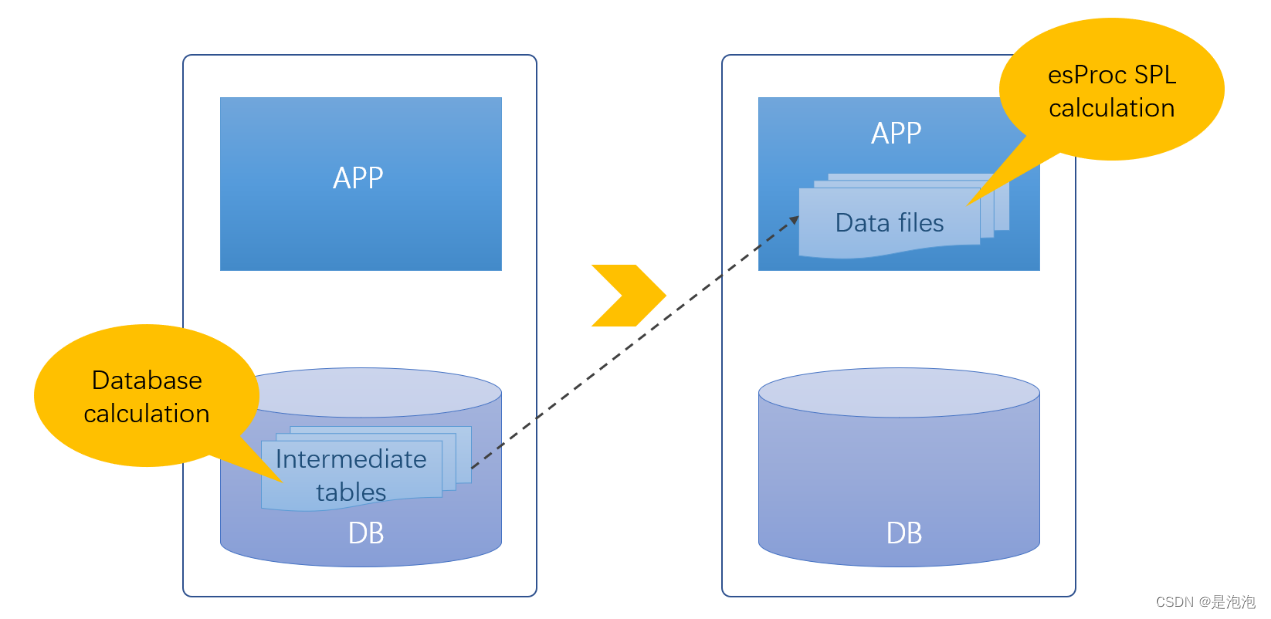
Open source SPL wipes out tens of thousands of database intermediate tables
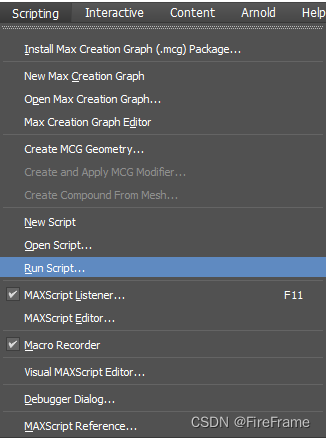
3DS MAX batch export file script MAXScript with interface
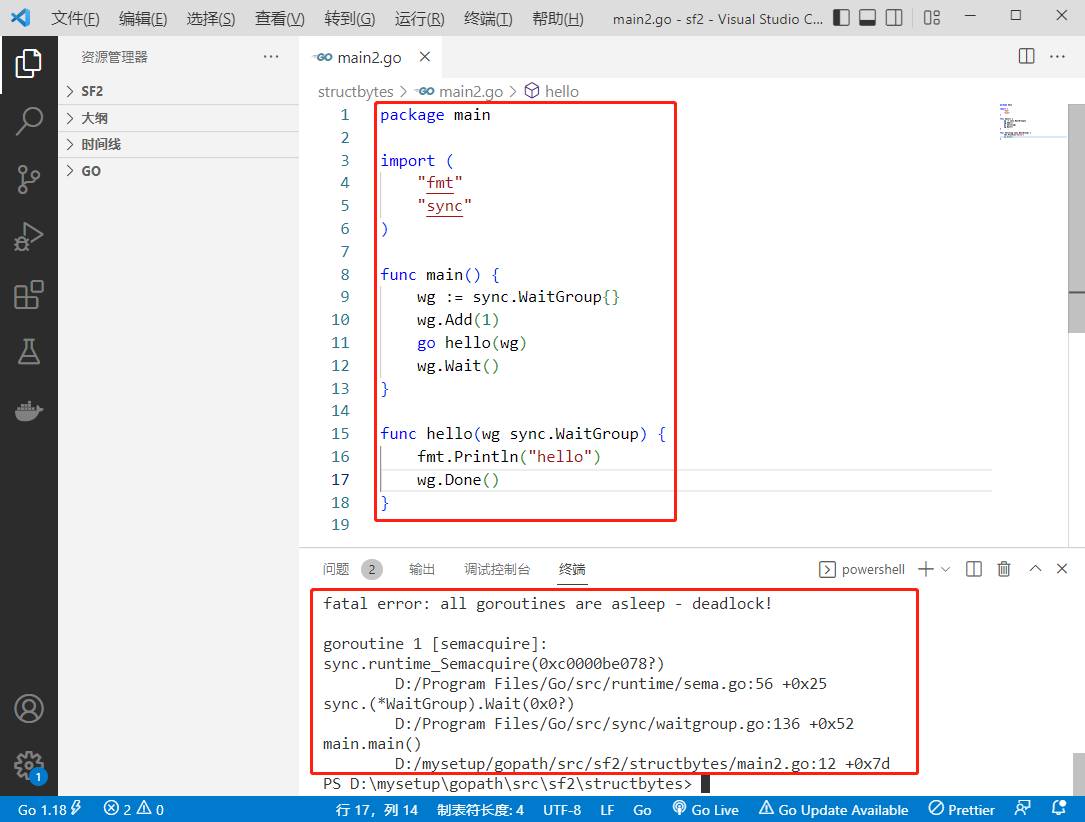
2022-08-09: What does the following go code output?A: No, it will panic; B: Yes, it can run correctly; C: Not sure, see the voting result.package main import (“fmt“ “syn

网络安全——XSS之被我们忽视的Cookie
LeetCode·297.二叉树的序列化与反序列化·DFS·BFS
【JS高级】ES5标准规范之创建子对象以及替换this_10
一个 CRM One Order Application log 的单元测试报表
随机推荐
Short read or OOM loading DB. Unrecoverable error, aborting now
作业8.9 构建TCP协议的服务器
高数_证明_曲率公式
22家!北京昌平区通报存在食品安全问题餐饮服务企业
数据产品经理那点事儿 二
锂电池技术
Jiugongge lottery animation
数据产品经理那点事儿 一
MySQL面试题整理
山水的高度
C# error The 'xmins' attribute is not supported in this context
接口自动化测试基础篇
Matlab画分段函数「建议收藏」
简单的写一个防抖跟节流
Reversing words in a string in LeetCode
R语言使用gt包和gtExtras包优雅地、漂亮地显示表格数据:gtExtras包的gt_highlight_rows函数高亮(highlight)表格中特定的数据行、配置高亮行的特定数据列数据加粗
OTA自动化测试解决方案---整体方案介绍
A can make large data clustering method of 2000 times faster, don't poke
八大排序总是忘?快来这里~
A method that can make large data clustering 2000 times faster